- Welcome my DevOps blog./
- 🔰Posts/
- 🗂️My Trainings/
- AWS Trainings and Certifications/
- 🏅AWS Certified Cloud Practitioner/
- AWS Global Infrastructure/
AWS Global Infrastructure

Table of Contents
A Global Application is an application deployed in multiple geographies. On AWS this could be Regions and / or Edge Locations.
- Decreased Latency
- Disaster Recovery
- (DOS / DDoS) Attack protection (distributed global infrastructure is harder to attack)
More: https://aws.amazon.com/about-aws/global-infrastructure/
AWS Global Infrastructure Overview - Regions, Availability Zones, Edge Locations and more
Route53 #
🏅 Solutions Architect Associate level extension: Route 53 - SAAC03.
Route53 is managed DNS.
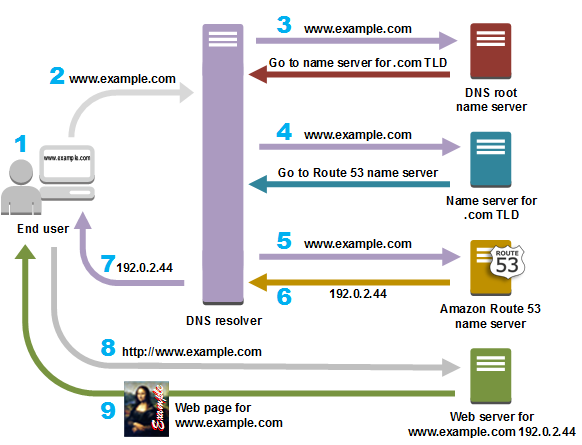
Route53 Routing Policies #
- Simple Routing Policy - No health checks, just DNS check
- Weighted Routing Policy - Specify what amount of traffic goes where (i.e. 70% = Server1, 20% = Server2, 10% = Server3. Simple form of Load Balancing)
- Latency Routing Policy - Based on latency - minimizing the latency between user and the server sending the traffic that is geographically (latency-based) closer to the user
- Failover Routing Policy - Disaster Recovery (DR) - based on Health Checks
- Geolocation Routing Policy - Routing based specifically on Geolocation
- IP-based Routing Policy - Route the traffic based on the IP address originates from
More on Routing Policies: https://docs.aws.amazon.com/Route53/latest/DeveloperGuide/routing-policy.html
AWS Route 53 Course
Registering a domain #
# Register a Domain
Route 53 > Registered Domains > Register Domain > CHOOSEADOMAIN.COM

# Hosted zones
Route 53 > Hosted zones > select "CHOOSEADOMAIN.COM" > Update the DNS records with the right EC2 instances, select an adequate Routing Policy
More about Registering and managing domains: https://docs.aws.amazon.com/Route53/latest/DeveloperGuide/registrar.html
More about Route 53: https://docs.aws.amazon.com/route53/
Amazon CloudFront #
🏅 Solutions Architect Associate level extension: CloudFront & Global Accelerator.
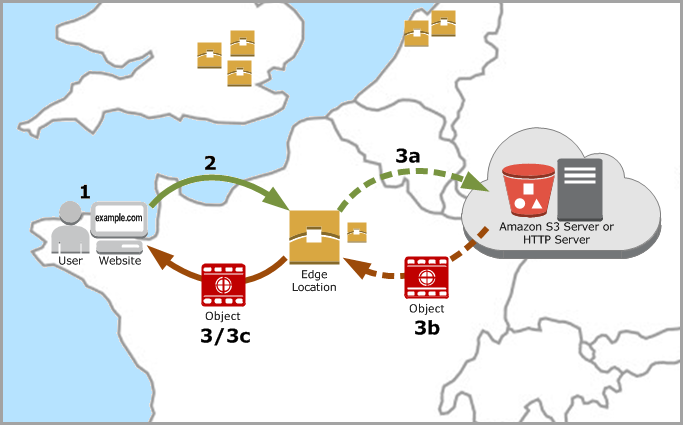
- Content Delivery Network (CDN)
- Improves read performance, content cached at the edge
- Improves users experience
- Many Points of Presence globally (Edge Locations, Edge Caches)
- DDoS protection (because it’s distributed globally)
- Integrated with Shield and AWS WAF (Web Application Firewall)
CloudFront - Origins #
- S3 Bucket
- For distributing files and caching them at the edge
- For uploading files to S3 through CloudFront
- Secured using Origin Access Control (OAC)
- VPC Origin
- For applications hosted in VPC private subnets
- Application Load Balancer / Network Load Balancer / EC2 Instances
- Custom Origin (HTTP)
- S3 website (must first enable the bucket as a static S3 website)
- Any public HTTP backend
CloudFront vs S3 Cross Region Replication #
CloudFront #
- Global Edge Network
- Files are cached for a TTL (day?)
- Use case: static content that must be available everywhere
S3 Cross Region Replication #
- Must be setup for each region you want your replication to happen
- Files are updated in near real-time
- Read-only
- Use case: dynamic content that needs to be available at low-latency in few regions only
S3 Transfer Acceleration #
Increase transfer speed by transferring files to an AWS edge location which will forward the data to the S3 bucket in the target region.
AWS Global Accelerator #
🏅 Solutions Architect Associate level extension: CloudFront & Global Accelerator.
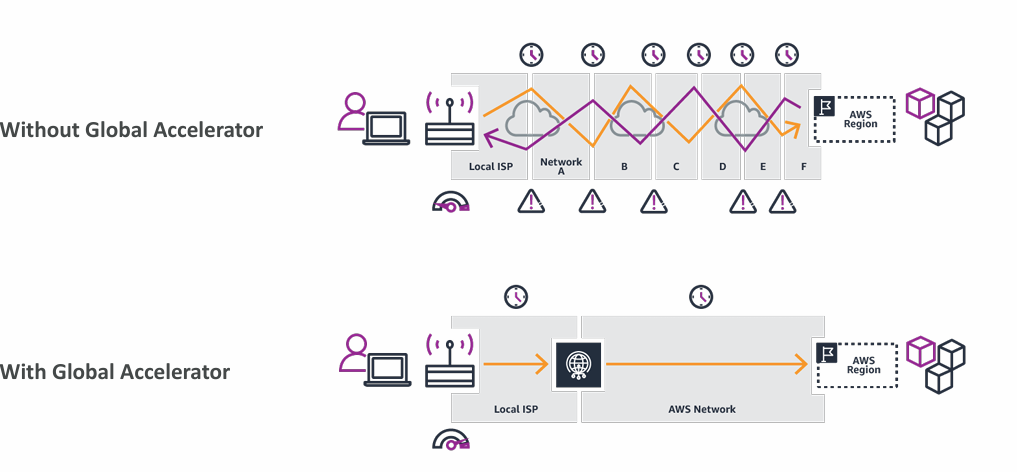
AWS Global Accelerator is used to improve global application availability and performance using the AWS global network.
Leverage the AWS internal network to optimize the route to your application (60% improvement).
More about AWS Global Accelerator:
- https://aws.amazon.com/global-accelerator/
- https://docs.aws.amazon.com/global-accelerator/latest/dg/what-is-global-accelerator.html
- https://speedtest.globalaccelerator.aws
AWS Global Accelerator vs CloudFront #
- They both use AWS global network and it’s edge locations
- Both services integrate with AWS Shield for DDoS protection
- CloudFront - Content Delivery Network
- Improves performance for cacheable content (images, videos, etc.)
- Content is served at the edge
- Global Accelerator
- No caching, proxying packets at the edge to applications running in one or more AWS regions
- Improves performance for a wide range of applications running in one or more AWS regions
- Improves performance for a wide range of applications over TCP or UDP
- Good for HTTP use cases that require static IP addresses
- Good for HTTP use cases that require deterministic, fast, regional failover
AWS Outposts #
AWS Outposts = Hybrid Cloud appliances. #
Outposts are “server racks” that offer the same AWS infrastructure, services, API’s & tools to build your own applications on-premises just as in the cloud.
AWS will setup and manage Outposts racks within your on-premises infrastructure. #
Benefits
- Low latency access to on-premises system
- Local data processing
- Data residency
- Easier migration from on-premises to the cloud
- Fully managed service
- Some example services that work on Outposts:
Wavelength #
Wavelength Zones are infrastructure deployments embedded within the telecommunication providers datacenters at the edge of the 5G networks.
- Ultra low latency applications through 5G networks
- Traffic doesn’t leave the Communication Service Provider’s (CSP) network
- High bandwidth and secure connection to the parent AWS Region
- No additional charges or service agreements
- Use cases:
- Smart Cities
- ML-assisted (Machine Learning) diagnostics
- Connected Vehicles
- Interactive Live Video Streams
- AR / VR
- Real-time gaming
AWS Local Zones #
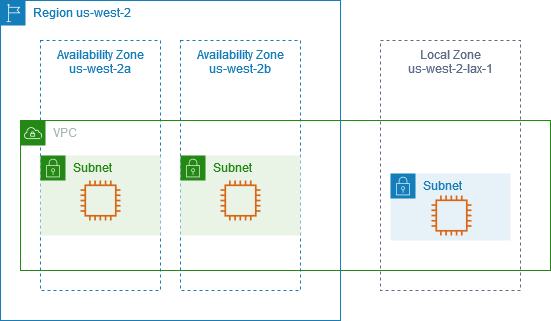
AWS Local Zones allow placing compute, storage, database and other selected AWS services closer to the users to run latency-sensitive applications.
It is an “Extension of AWS Region”.
Example: #
- AWS Region: N. Virginia (us-east-1)
- AWS Local Zones: Boston, Chicago, Dallas, Houston, Miami, …
Compatible with: #
More about AWS Local Zones: https://docs.aws.amazon.com/local-zones/latest/ug/what-is-aws-local-zones.html
Summary #
Route 53 - Global DNS
- Great to route users to the closest deployment with least latency
- Great for Disaster Recovery - DR - Strategies
CloudFront - Global CDN - Content Delivery Network
- Replicate part of your application to AWS Edge Locations - decreased latency
- Cache common requests - improved user experience and decreased latency
S3 Transfer Acceleration
- Accelerate global uploads & downloads into Amazon S3
AWS Global Accelerator
- Improve global application availability and performance using the AWS global network
AWS Outposts
- Deploy Outposts racks in an on-premises datacenter to extend some AWS services and for easier migration
AWS Wavelength
- Brings AWS services to the edge of the 5G networks
- Ultra-low latency applications
AWS Local Zones
- Bring AWS resources (compute, database, storage, …) closer to your users
- Good for latency-sensitive applications
» Sources « #
Global Infrastructure: https://aws.amazon.com/about-aws/global-infrastructure/
Route 53 #
Route 53: https://docs.aws.amazon.com/route53/ Route 53 Routing Policies: https://docs.aws.amazon.com/Route53/latest/DeveloperGuide/routing-policy.html Registering and managing domains: https://docs.aws.amazon.com/Route53/latest/DeveloperGuide/registrar.html
CloudFront #
CloudFront: https://docs.aws.amazon.com/cloudfront/
AWS Global Accelerator #
https://aws.amazon.com/global-accelerator/ https://docs.aws.amazon.com/global-accelerator/latest/dg/what-is-global-accelerator.html https://speedtest.globalaccelerator.aws
AWS Local Zones #
https://docs.aws.amazon.com/local-zones/latest/ug/what-is-aws-local-zones.html
» References « #
» Disclaimer « #
This series draws heavily from Stephane Maarek’s Ultimate AWS Certified Cloud Practitioner course on Udemy.
His content was instrumental in helping me pass the certification.
| About the instructor | |
|---|---|
| 🌐 Website | 📺 YouTube |
| 𝕏 x.com |
| AWS Certification Series » | |
|---|---|
| AWS Cloud Practitioner | AWS Solution Architect |