- Welcome my DevOps blog./
- 🔰Posts/
- 🗂️My Trainings/
- AWS Trainings and Certifications/
- 🏅AWS Certified Cloud Practitioner/
- Cloud Integrations & Messaging/
Cloud Integrations & Messaging
Table of Contents
This section is about multiple applications communicating with each other.
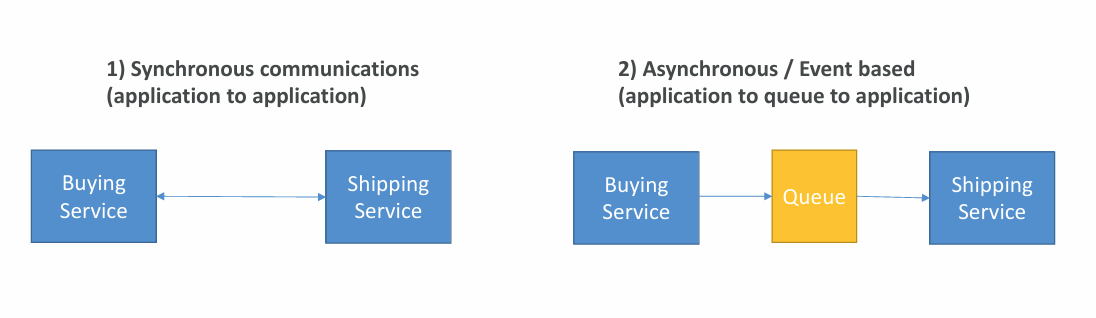
- Synchronous communication (application to application)
- Can be problematic if there are sudden spikes of traffic
- Asynchronous / Event-based communication (application to queue to application)
- It is called decoupling of applications
- SQS: queue model
- SNS: pub / sub model
- Kinesis: real-time data streaming model
- Those services can scale independently from our application
- It is called decoupling of applications
SQS #
SQS = Simple Queue Service. #
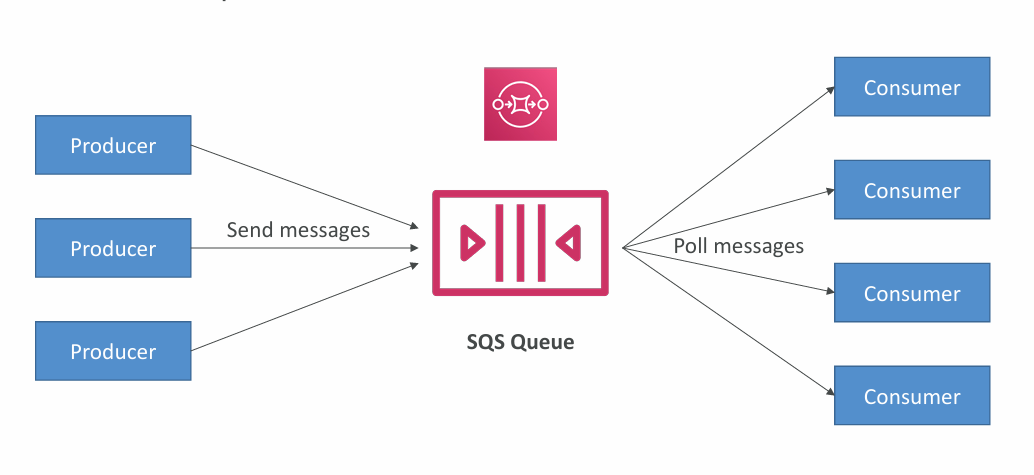
SQS - Standard Queue #
- Oldest AWS offering (over 10 years old)
- Fully managed, serverless service used to decouple applications
- Sales from 1 message per second to 10,000s per second
- Default messages retention: 4 days, maximum 14 days
- No limit to how many messages can be in the queue
- Messages are deleted after they’re read by consumers (applications)
- Low latency
- Consumers share the work to read messages and scale horizontally
SQS - FIFO Queue #
FIFO = First in First Out (ordering of messages in the queue) #
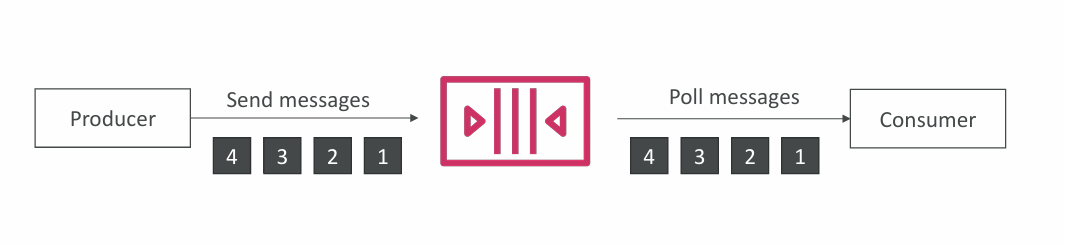
- Messages are processed in order by the consumer
- Ordering by Message Group ID (all messages in the same group are ordered) – mandatory parameter
SQS - Consuming Messages #
- Consumers (running on EC2 instances, servers, or AWS Lambda)…
- Poll SQS for messages (receive up to 10 messages at a time)
- Process the messages (example: insert the message into an RDS database)
- Delete the messages using the DeleteMessage API
Amazon SQS - Security #
- Encryption:
- In‑flight via HTTPS
- At‑rest with KMS keys
- Optional client‑side encryption for full control
- Access control:
- IAM policies govern who can call SQS APIs
- SQS access policies (like S3 bucket policies) enable cross‑account access
- Useful for allowing services such as SNS or S3 to send messages to a queue
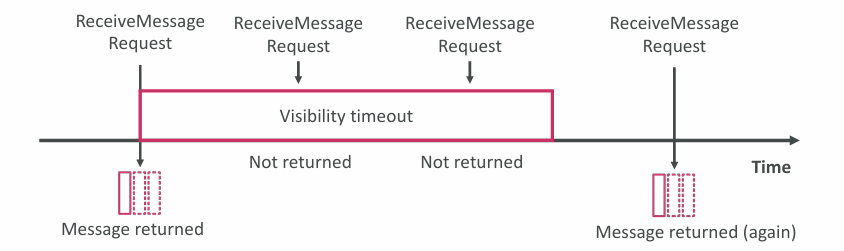
SQS - Message Visibility Timeout #
- Once a consumer reads a message, it becomes invisible to others
- Default visibility timeout is 30 seconds - the window to finish processing
- When the timeout expires, the message becomes visible again
- If processing isn’t finished in time, the message may be processed twice
- Consumers can extend the timeout using ChangeMessageVisibility
- Very long timeouts delay retries if a consumer crashes
- Very short timeouts increase the chance of duplicate processing
Amazon SQS - Long Polling #
- Consumers can wait for messages to arrive instead of returning immediately
- This is Long Polling, which reduces API calls and improves efficiency/latency
- Wait time ranges from 1-20 seconds (20 seconds recommended)
- Preferable to short polling
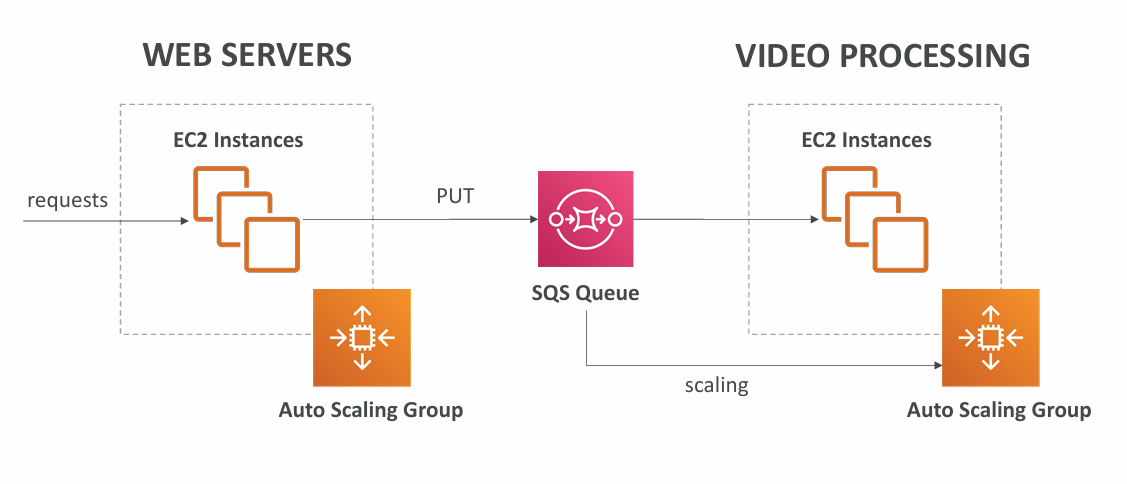
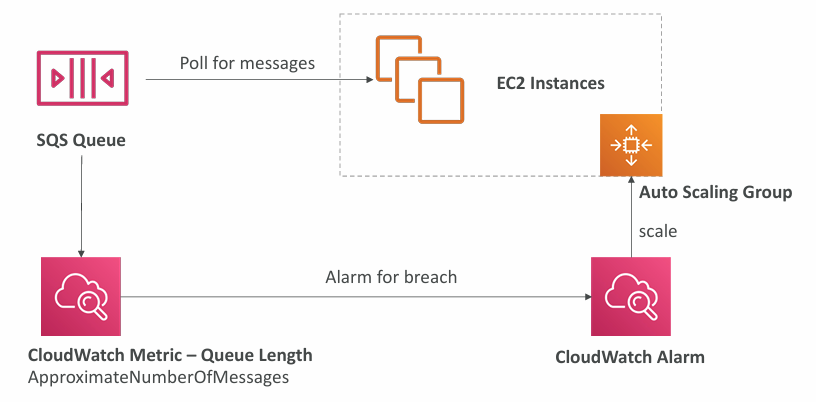
SQS with ASG #
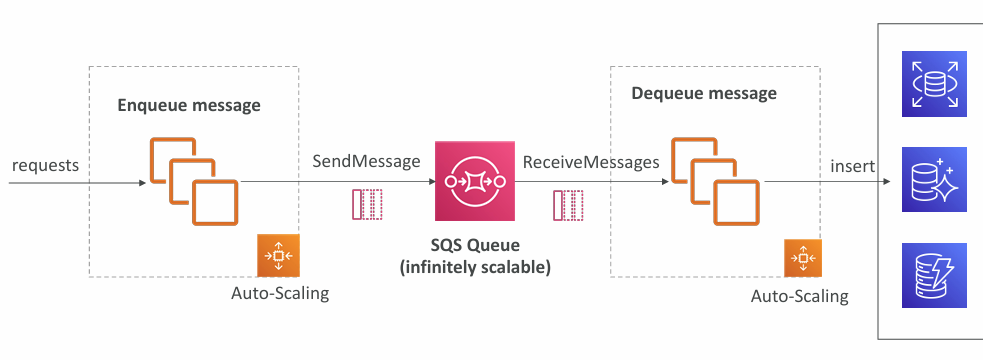
SQS as a buffer to database writes #
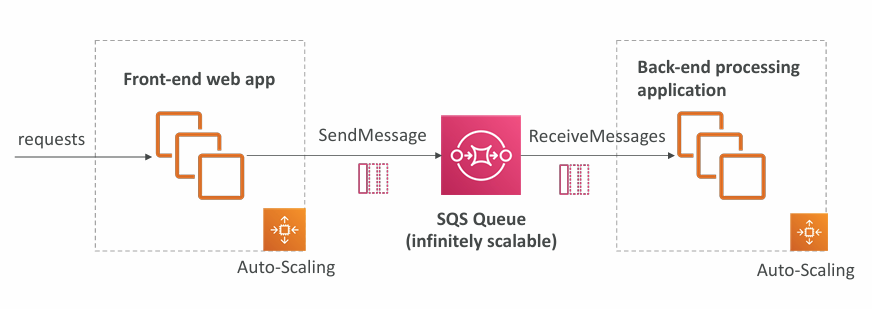
SQS to decouple between application tiers #
🙋🏻 Question: What SQS messages are exactly? For example - when processing video (relatively large file) between Front End -> SQS -> Back End - how SQS would be involved in this? Would it transfer the (large) file for example?
An SQS message is small metadata, typically:
- a file name
- a file path
- an S3 object key
- a job ID
- a JSON payload describing work to do
- a pointer to where the real data lives
🙋🏻 Question: How SQS fits into a video‑processing pipeline - as an example?
- SQS messages are small (MAX 256 KB). They never contain large files.
- SQS is used to send instructions or pointers to where the real data lives (usually S3).
- SQS never moves the video.
- S3 stores the video.
- SQS tells the backend which video to process and what to do with it.
Example video-processing pipeline with SQS:
‼️ Note: Worker extends visibility timeout during long processing was described earlier. Explainer:
- Video processing is long‑running
Transcoding a video can take minutes / tens of minutes / sometimes hours.
Default SQS visibility timeout is 30 seconds, which is nowhere near enough.
- Workers must extend visibility timeout
Workers typically call:
ChangeMessageVisibility
to extend the timeout periodically while processing.
This prevents:
- another worker from picking up the same message
- duplicate processing
- corrupted output
- race conditions
- It’s a core part of SQS‑based pipelines
More info: Visibility Timeout
Amazon Kinesis #
🏅 Solutions Architect Associate level extension: Kinesis - SAAC03.
Kinesis = real-time big data streaming. #
Managed service to collect, process and analyze real-time streaming data at any scale.
Amazon SNS #
SNS = Simple Notification Service. #
SNS is sending one message to multiple receivers.
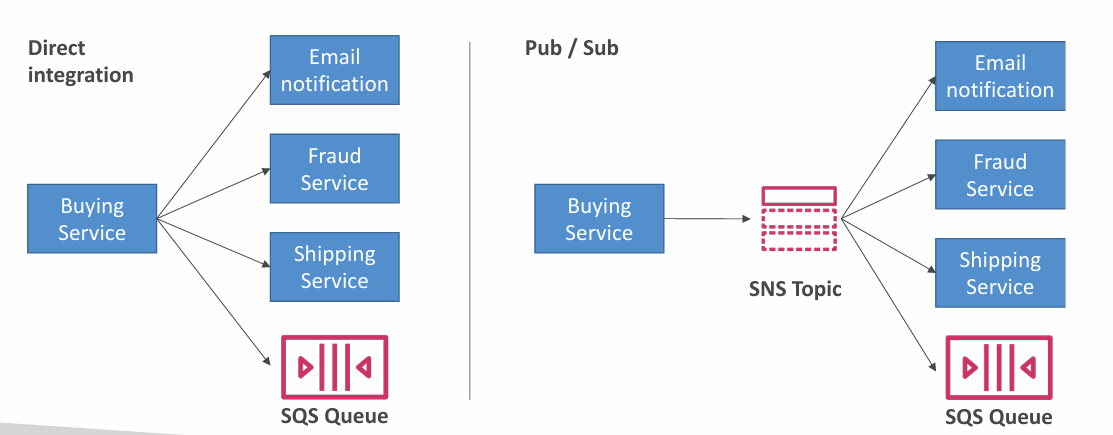
- The “event publishers” only sending message to one SNS topic
- As many “event publishers” as we want to listen to the SNS topic notifications
- Each subscriber to the topic will get all the messages
- Up to 12,500,000 subscriptions per topic, 100,000 topics limit

SQS vs SNS vs Kinesis #
| SQS | SNS | Kinesis |
|---|---|---|
| Consumer “pull data” | Push data to many subscribers | Standard: pull data (2 MB per shard) |
| Data is deleted after being consumed | Up to 12,500,000 subscribers | Enhanced-fan out: push data (2 MB per shard per consumer) |
| Can have as many workers (consumers) as we want | Data is not persisted (lost if not delivered) | Possibility to replay data |
| No need to provision throughput | Pub/Sub | Meant for real-time big data, analytics and ETL |
| Ordering guarantees only on FIFO queues | Up to 100,000 topics | Ordering at the shard level |
| Individual message delay capability | No need to provision throughput | Data expires after X days |
| Integrates with SQS for fan out architecture pattern | Provisioned mode or on demand capacity mode | |
| FIFO capability for SQS FIFO |
Amazon MQ #
SQS and SNS are “cloud-native” services. Traditional applications running from on-premises may use open protocols, such as:
- MQTT
- AMQP
- STOMP
- Openwire
- WSS
When migrating to the cloud, instead of re-engineering the application to use SQS and SNS, Amazon MQ can be used instead.
Amazon MQ is a managed message broker service for:
RabbitMQ
Active MQ
Amazon MQ doesn’t scale as much as SQS / SNS
Amazon MQ runs on servers, can run in Multi-AZ with failover
Amazon MQ has both - queue feature (~SQS) and topic features (~SNS)
Summary #
- SQS
- Queue service in AWS
- Multiple Producers, messages kept up to 14 days
- Multiple Consumers share the read and delete messages when done
- Used to decouple applications in AWS
- SNS
- Notification service in AWS
- Subscribers:
- Lambda
- SQS
- HTTP
- Mobile
- Others
- Multiple Subscribers, sending all messages to all of them
- No message retention
- Kinesis
- Real-time data streaming
- Amazon MQ
- Managed message broker for Active MQ and Rabbit MQ in the cloud (MQTT, AMQP protocols)
» Sources « #
» Disclaimer « #
This series draws heavily from Stephane Maarek’s Ultimate AWS Certified Cloud Practitioner course on Udemy.
His content was instrumental in helping me pass the certification.
| About the instructor | |
|---|---|
| 🌐 Website | 📺 YouTube |
| 𝕏 x.com |
| AWS Certification Series » | |
|---|---|
| AWS Cloud Practitioner | AWS Solution Architect |