- Welcome my DevOps blog./
- 🔰Posts/
- 🗂️My Trainings/
- AWS Trainings and Certifications/
- 🏅AWS Certified Cloud Practitioner/
- Storage/
Storage

Table of Contents
EBS Volume #
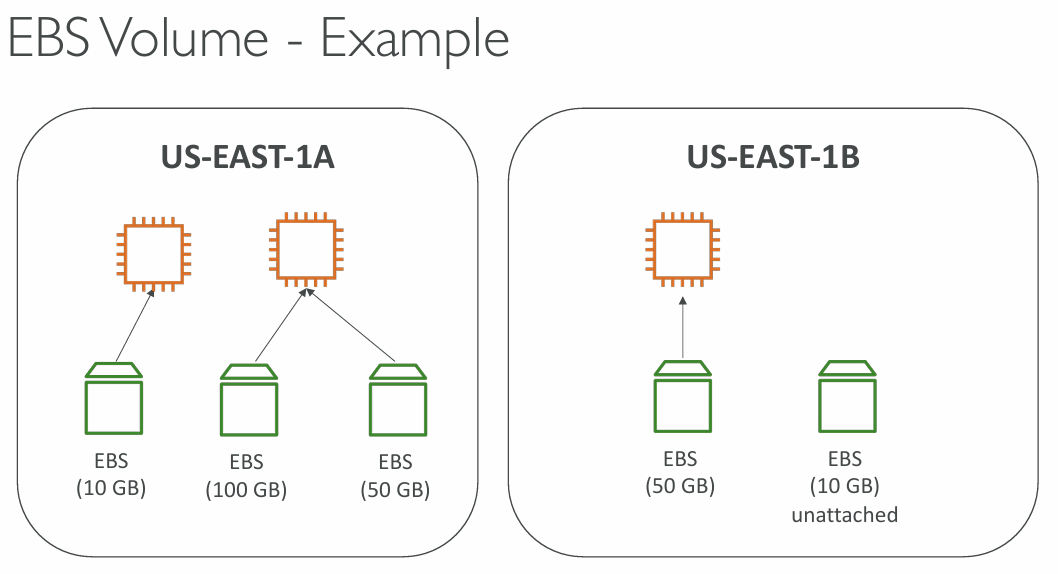
- EBS (Elastic Block Store) - Network drive that can be attached to instances while they run
- It allows instances to persist the data, even after their termination
- Can be mounted to 1 instance at a time
- Bound to an Availability Zone
- It’s a “Network Drive”
- it uses the network to communicate to the instance (there can be latency)
- it can be detached from an EC2 instance and attached to another one quickly
- It’s locked to an Availability Zone (AZ)
- an EBS Volume that is us-east-1a can’t be attached to us-east-1b
- to move a volume across AZ, snapshot has to be created first
- It has a provisioned capacity (size in GB and IOPS)
- you will get billed for a provisioned capacity
- You can increase the capacity of the drive
EBS Delete on Termination #
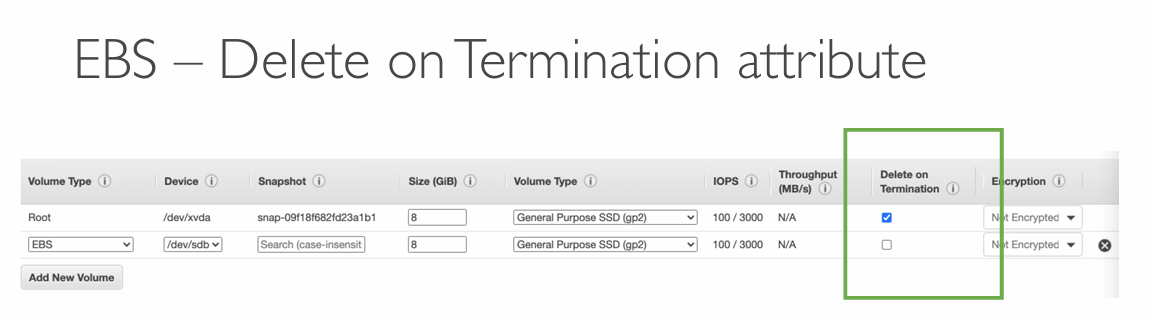
- Controls the EBS behavior when EC2 instance terminates
- by default the root EBS volume is deleted (attribute enabled)
- by default any other attached EBS volume is not deleted (attribute disabled)
- This can be controlled by both, AWS Console and AWS CLI
- Use case: preserve root volume when instance is terminated
EBS Snapshots #
- Make a backup (snapshot) of EBS volume at a point in time
- Not necessary to detach the volume to do the snapshot but recommended
- Snapshots can be copied across AZ or Regions
EBS Snapshots features #
- EBS Snapshot Archive
- Move a Snapshot to an “archive tier” that is 75% cheaper
- Takes between 24 to 72 hours of restoring the archive
EC2 > Snapshots > Recycle Bin > Create retention rule
When Snapshot Archive is enabled, it is possible to Archive it from a drop-down box in AWS Console. Archived Snapshots appear in the Recycle Bin.
- Recycle Bin for EBS Snapshots
- Setup rules to retain deleted snapshots so you can recover them after an accidental deletion
- Specify retention (from 1 day to 1 year)
🙋🏻 Question: Does EBS Recycle Bin protect EBS Volumes or only EBS Snapshots?
If volume‑level protection is required, the correct approach is:
- Take snapshots (manual, scheduled, or via AWS Backup)
- Apply Recycle Bin retention rules to those snapshots
Practical takeaway
If you delete an EBS volume, it’s gone unless you have a snapshot. If you delete a snapshot and Recycle Bin is enabled, you can recover it.
🙋🏻 Question: EBS Restore in another region - what needs to be considered when using KMS CMK?
To restore an encrypted EBS snapshot in another region, AWS must re‑encrypt it using a KMS key in the destination region. Multi‑Region keys (MRK) simplify this because replicas exist in each region. Single‑Region keys require a separate CMK in the target region and appropriate key‑sharing permissions.
🙋🏻 Question: How does KMS CMK key rotation affect EBS snapshots stored in the Recycle Bin, and what considerations are required to ensure those snapshots remain recoverable?
EBS Recycle Bin keeps snapshots, but KMS CMK key rotation does not re‑encrypt them. As long as the original CMK remains enabled and not deleted, snapshots are fully recoverable. If the CMK is disabled or deleted, Recycle Bin cannot save the snapshot.
- Automatic annual rotation of AWS‑managed or customer‑managed CMKs is fully compatible with Recycle Bin.
- Manual deletion of the CMK breaks your ability to restore snapshots.
- Fast Snapshot Restore (FSR)
- Force full initialization of snapshot to have no latency on the first use (EXPENSIVE!)
EC2 Instance Store #
EBS volumes are network drives with good but “limited” performance
If high-performance hardware disk is required, EC2 Instance Store can be used
Better I/O performance
EC2 Instance Store is ephemeral (data is lost after stopping EC2 instance)
Use case: buffer, cache, scratch data, temporary content
Risk of data loss if hardware fails.
EFS - Elastic File System #
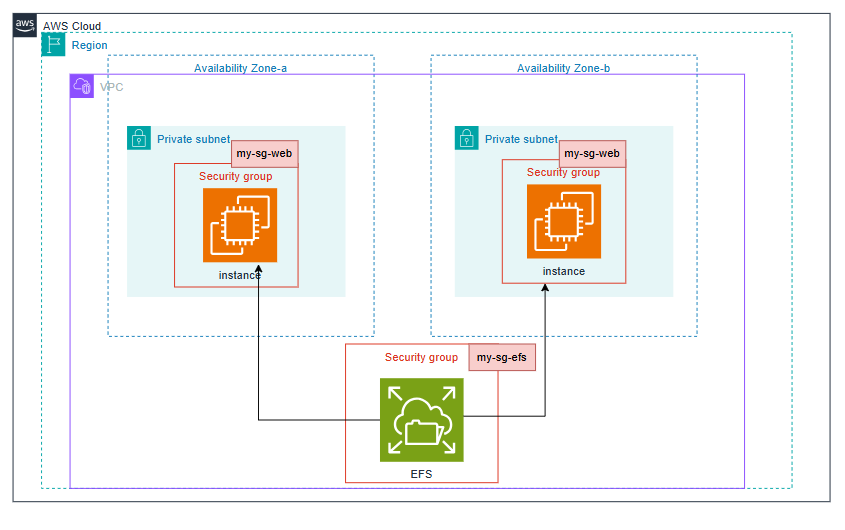
- Managed NFS (Network File System) that can be mounted on 100s of EC2 instances
- EFS works with Linux EC2 instances only and is multi-AZ.
- Highly-available, scalable, expensive (3x gp2 EBS), pay per use, no capacity planning
- Encryption at rest using KMS
- Scales automatically, pay-per-use, no capacity planning
Performance & Storage Classes #
EFS Scale #
- Supports thousands of concurrent NFS clients and 10+ GB/s of throughput
- Automatically grows to petabyte‑scale as your data increases
Performance Modes (chosen at file system creation) #
- General Purpose (default) - best for latency‑sensitive workloads (web servers, CMS, etc.)
- Max I/O - higher latency but higher throughput and massive parallelism (big data, media processing)
Throughput Modes #
- Bursting - baseline of 50 MiB/s per TB, with bursts up to 100 MiB/s
- Provisioned - set a fixed throughput regardless of storage size (e.g., 1 GiB/s even with 1 TB stored)
- Elastic (Recommended) - automatically adjusts throughput based on workload demand
- Up to 3 GiB/s reads and 1 GiB/s writes
- Ideal for unpredictable or spiky workloads
Storage Classes #
EFS Storage tiers and lifecycle management.
Standard #
- For frequently accessed files
EFS Infrequent Access (EFS-IA) #
- Storage class that is cost-optimized for files not accessed every day
- up to 92% lower cost compared to EFS Standard
- When enabled, EFS will automatically move your files to EFS-IA based on last time they were accessed
- Enable EFS-IA with a Lifecycle Policy
- Example: move files that are not accessed for 60 days to EFS-IA
- Transparent to the applications accessing EFS (apps don’t see whether file is in EFS or EFS-IA)
Archive #
- Rarely accessed data (few times each year), 50% cheaper
Availability and durability #
- Standard: Multi-AZ, great for prod
- One Zone: One AZ, great for dev, backup enabled by default, compatible with IA (EFS One Zone-IA)
EBS vs EFS #
| Feature | EBS | EFS |
|---|---|---|
| Access Model | Single-instance | Multi-instance |
| Use Cases | Databases, Development | Web serving, big data |
| Performance | Low-latency, high IOPS | High throughput |
| Scalability | Limited to provisioned volume | Auto-scales to petabytes |
| File Size Limit | No limit | 47.9 TiB |
| Accessibility | Not accessible over the internet | Shared across instances |
| Pricing | Cheaper for single-instance | Cost-effective for shared use |
More info:
- https://aws.amazon.com/efs/when-to-choose-efs/
- https://lucidity.cloud/blog/ebs-vs-efs
- https://www.cloudzero.com/blog/ebs-vs-efs/
Amazon FSx #
3rd party with high-performance file system on AWS.
FSx for Lustre - fully managed, high-performance, scalable file storage for High Performance Computing (HPC).
- Use cases: Machine Learning, Analytics, Video processing, Financial Modelling
- Scales up to 100s GB/s, millions of IOPS, sub-ms latencies
- Seamless integration with S3
- Can “read S3” as a file system (through FSx)
- Can write the output of the computations back to S3 (through FSx)
- Can be used from on-premises servers (VPN or Direct Connect)
FSx for Windows File Server - fully managed, highly reliable and scalable Windows native shared file system built on Windows File Server. Supports SMB and NTFS file systems. Integrated with AD for security. Can be accessed from AWS or from On-Premise.
- Microsoft Active Directory integration, ACLs, user quotas
- Can be mounted on Linux EC2 instances
- Supports Microsoft’s Distributed File System (DFS) Namespaces (group files across multiple FS)
FSx for NetApp ONTAP - Managed NetApp ONTAP on AWS. File System compatible with NFS, SMB, iSCSI protocol
- Move workloads running on ONTAP or NAS to AWS
- Works with:
- Linux
- Windows
- MacOS
- VMware Cloud on AWS
- Amazon Workspaces & AppStream 2.0
- Amazon EC2, ECS and EKS
- Storage shrinks or grows automatically
- Snapshots, replication, low-cost, compression and data de-duplication
- Point-in-time restores
FSx for OpenZFS
- Fully managed OpenZFS file system on AWS
- Supports NFS v3, v4, v4.1, and v4.2
- Ideal for migrating existing ZFS workloads to AWS
- Works with Linux, Windows, macOS, VMware Cloud on AWS, WorkSpaces, AppStream 2.0, EC2, ECS, and EKS
- Delivers up to 1,000,000 IOPS with <0.5 ms latency
- Provides snapshots, compression, and low‑cost storage
- Supports instant, point‑in‑time restores
Hybrid Cloud for Storage #
- AWS promotes hybrid cloud architectures
- Part of your environment runs in AWS, part remains on‑premises
- Common reasons: long migration timelines, security or compliance needs, or broader IT strategy
- Since S3 is a proprietary storage system (unlike NFS/EFS), exposing S3 data on‑premises requires a bridge
- Solution: AWS Storage Gateway
Storage Comparison #
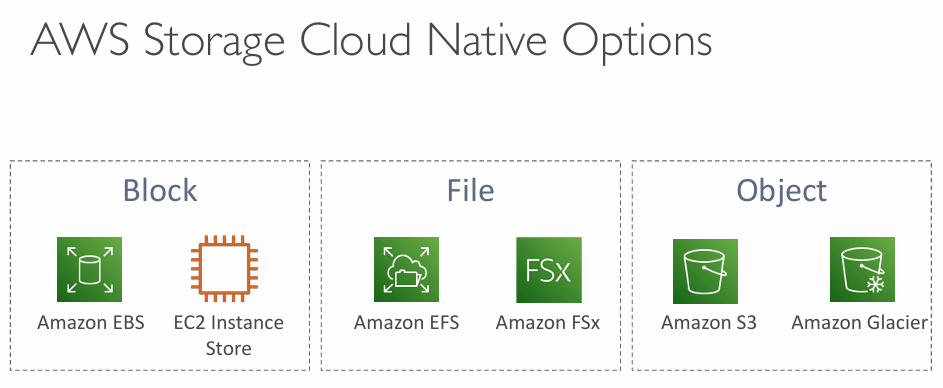
- S3: Object Storage
- S3 Glacier: Object Archival
- EBS volumes: Network storage for one EC2 instance at a time
- Instance Storage: Physical storage for your EC2 instance (high IOPS)
- EFS: Network File System for Linux instances, POSIX filesystem
- FSx for Windows: Network File System for Windows servers
- FSx for Lustre: High Performance Computing Linux file system
- FSx for NetApp ONTAP: High OS Compatibility
- FSx for OpenZFS: Managed ZFS file system
- Storage Gateway: S3 & FSx File Gateway, Volume Gateway (cache & stored), Tape Gateway
- Transfer Family: FTP, FTPS, SFTP interface on top of Amazon S3 or Amazon EFS
- DataSync: Schedule data sync from on-premises to AWS, or AWS to AWS
- Snowcone / Snowball / Snowmobile: to move large amount of data to the cloud, physically
- Database: for specific workloads, usually with indexing and querying
Summary #
EBS Volumes
- network drives attached to one EC2 instance at a time
- Mapped to an Availability Zones
- Can use EBS snapshots for backups and then transferring across AZ’s
EC2 Instance Store
- high performance hardware disk attached to our EC2 instance
- ephemeral (data lost if instance stopped or terminated)
EFS
- Network File System
- Can be attached to 100s of EC2 instances
- spans through a region
- expensive compared to EBS
EFS-IA
- Cost-optimized storage class for infrequently accessed files
- Lifecycle Policy for automatically moving files between tiers
FSx for Windows
- Network File System for Windows servers
- SMB and NTFS
- Can be accessed from on-prem and the cloud
FSx for Lustre
- High Performance (HPC) Linux file system
» Sources « #
- https://aws.amazon.com/efs/when-to-choose-efs/
- https://lucidity.cloud/blog/ebs-vs-efs
- https://www.cloudzero.com/blog/ebs-vs-efs/
» References « #
» Disclaimer « #
This series draws heavily from Stephane Maarek’s Ultimate AWS Certified Cloud Practitioner course on Udemy.
His content was instrumental in helping me pass the certification.
| About the instructor | |
|---|---|
| 🌐 Website | 📺 YouTube |
| 𝕏 x.com |
| AWS Certification Series » | |
|---|---|
| AWS Cloud Practitioner | AWS Solution Architect |
Only true at Practitioner level. More info: EBS Multi‑Attach. ↩︎