- Welcome my DevOps blog./
- 🔰Posts/
- 🗂️My Trainings/
- AWS Trainings and Certifications/
- 🏅AWS Certified Cloud Practitioner/
- Elastic Load Balancing/
Elastic Load Balancing
Table of Contents
Elastic Load Balancing automatically distributes your incoming traffic across multiple targets (EC2 instances, containers, IP addresses) in one or more Availability Zones.
It monitors the health of its registered targets and routes the traffic only to healthy targets.
ℹ️ Additional, Solutions-Architect level coverage: Elastic Load Balancing (SAA-C03)
AWS Elastic Load Balancing Introduction
Benefits of using Load Balancer #
Spread load across multiple downstream instances
Expose a single point of access (DNS) to the application
Seamlessly handle failures of downstream instances
Do regular health checks to the instances
SSL termination
High Availability across Availability Zones
ELB is a managed Load Balancer
- AWS is responsible for upgrades, maintenance and High Availability
- AWS provides only a few configuration items
3 kinds of Load Balancers offered by AWS #
| Application Load Balancer | Network Load Balancer | Gateway Load Balancer |
|---|---|---|
| HTTP / HTTPS / gRPC protocols (layer 7) | TCP / UDP protocols (layer 4) | Geneve Protocol on IP Packets (layer 3) |
| HTTP Routing features | High Performance (millions or requests per second) | Route Traffic to Firewalls that you manage on EC2 instances |
| Static DNS (URL) | Static IP through Elastic IP | Intrusion Detection |
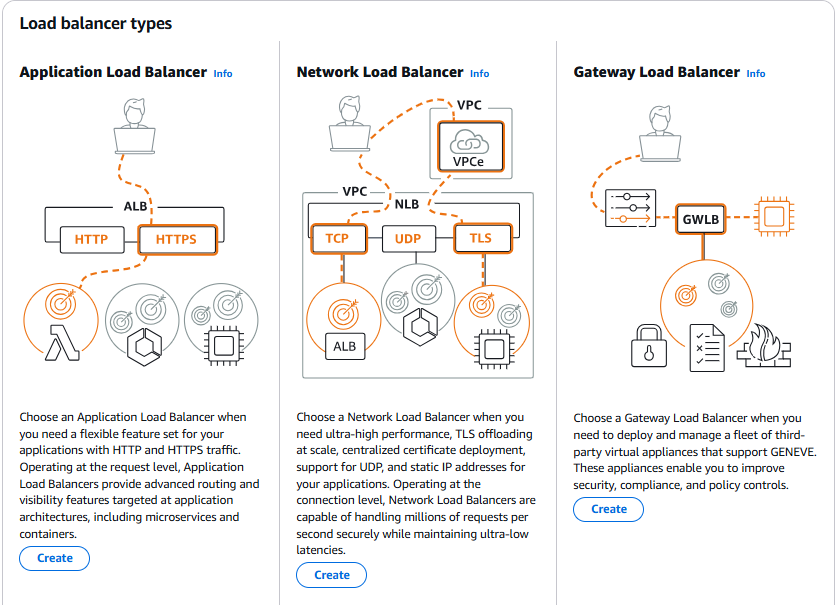
1. Application Load Balancer #
HTTP / HTTPS only (layer 7)
Load balancing to multiple HTTP applications across machines (target groups)
Load balancing to multiple applications on the same machine (ex: containers)
Support for HTTP/2 and WebSocket
Support redirects (from HTTP to HTTPS for example)
Routing tables to different target groups
- Routing based on path in URL (example.com/users & example.com/posts)
- Routing based on hostname in URL (one.example.com & other.example.com)
- Routing based on Query String, Headers (example.com/users?id=123&order=false)
ALB are a great fit for micro services & container-based application (example: Docker & Amazon ECS)
Has a port mapping feature to redirect to a dynamic port in ECS
Target Groups #
- EC2 instances (including those in an Auto Scaling Group) - HTTP targets
- ECS tasks (managed by ECS) - HTTP targets
- Lambda functions - HTTP requests are converted into JSON events
- IP addresses - must be private IPs
- An ALB can route traffic to multiple target groups
- Health checks are defined at the target group level
2. Network Load Balancer #
- ultra high performance, allows for TCP (layer 4)
- Network Load Balancers (Layer 4) can forward TCP and UDP traffic to your targets
- Built to handle millions of requests per second with ultra‑low latency
- Each NLB provides one static IP per AZ, and you can also assign Elastic IPs for fixed, whitelisted addresses
- Ideal for extreme performance use cases and workloads that rely on TCP or UDP traffic
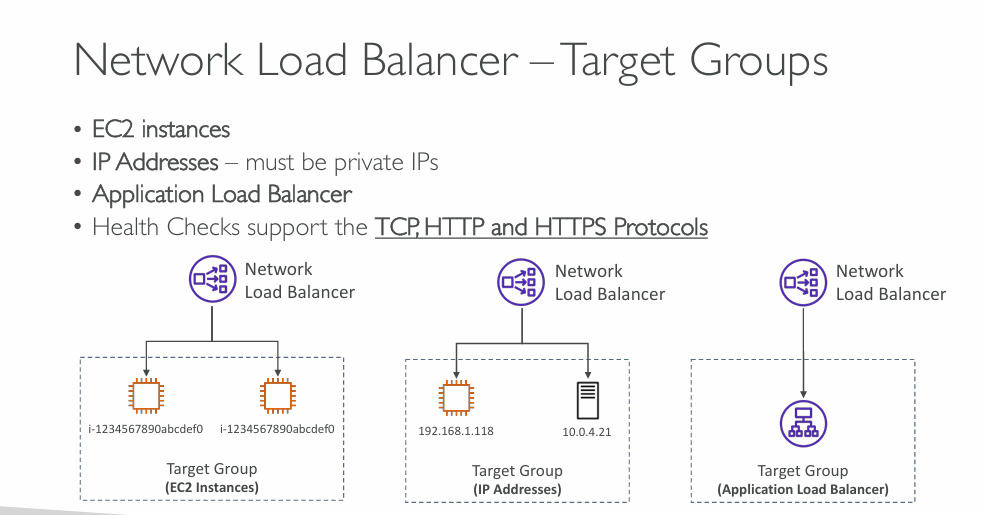
Target Groups #
- EC2 instances
- IP Addresses - must be private IPs
- Application Load Balancer
- Health Checks support the TCP, HTTP and HTTPS Protocols
3. Gateway Load Balancer #
- Operates at Layer 3 (Network Layer) – IP Packets
- Combines the following functions:
- Transparent Network Gateway – single entry/exit for all traffic
- Load Balancer - distributes traffic to your virtual appliances
- Supports GENEVE protocol. Built for extra security (layer 3)
Target Groups #
- EC2 instances
- IP Addresses - must be private IPs
ALB vs NLB #
ALB = Smart load balancer (Layer 7) #
It understands HTTP and HTTPS, just like a web browser does.
What it can do:
- Look inside the request (URLs, headers, cookies)
- Route traffic based on rules (e.g., /api goes to one service, /images to another)
- Terminate SSL/TLS (handle certificates)
- Support WebSockets
- Do health checks at the application level (e.g., “does
/healthreturn 200?”)
When to use it:
- Websites
- APIs
- Microservices
- Anything using HTTP/HTTPS
Easy analogy:
ALB is like a receptionist who reads the letter and decides where it should go based on the content.
NLB = Fast, simple load balancer (Layer 4) #
It works at the TCP/UDP level — it doesn’t understand HTTP, it just forwards packets.
What it can do:
- Handle millions of requests per second
- Extremely low latency
- Provide static IPs or Elastic IPs
- Forward raw TCP/UDP traffic (e.g., VoIP, gaming servers)
When to use it:
- Non‑HTTP traffic
- High‑performance or latency‑sensitive workloads
- When you need fixed IPs
- When you want to pass traffic straight through to the application without inspection
Easy analogy:
NLB is like a mail sorter that only looks at the address on the envelope, not the contents.
Quick comparison #
| Feature | ALB | NLB |
|---|---|---|
| OSI Layer | Layer 7 (Application) | Layer 4 (Transport) |
| Understands HTTP/HTTPS | ✔ Yes | ✖ No |
| Smart routing (path, host, headers) | ✔ Yes | ✖ No |
| Performance | High | Extremely high |
| Latency | Low | Ultra‑low |
| Static IPs | ✖ No | ✔ Yes |
| TCP/UDP support | HTTP/HTTPS only | ✔ Yes |
| SSL termination | ✔ Yes | ✖ No (passes through) |
- Use ALB when you’re dealing with web traffic and need smart routing.
- Use NLB when you need raw speed, static IPs, or non‑HTTP protocols
If it’s a website → ALB If it’s anything else (TCP/UDP, high‑performance, fixed IP) → NLB
» Sources « #
- https://aws.amazon.com/elasticloadbalancing/
- https://aws.amazon.com/compare/the-difference-between-the-difference-between-application-network-and-gateway-load-balancing/
- https://medium.com/@xiaotiancheng.orange/comparison-between-alb-nlb-and-glb-4444f3291173
- https://tutorialsdojo.com/application-load-balancer-vs-network-load-balancer-vs-gateway-load-balancer/
Stephane Maarek’s AWS playlists on YouTube: https://www.youtube.com/@StephaneMaarek/playlists Full YouTube Rahul’s AWS Course: https://www.youtube.com/playlist?list=PL7iMyoQPMtAN4xl6oWzafqJebfay7K8KP
» References « #
Solutions-Architect: Elastic Load Balancing (SAA-C03)
» Disclaimer « #
This series draws heavily from Stephane Maarek’s Ultimate AWS Certified Cloud Practitioner course on Udemy.
His content was instrumental in helping me pass the certification.
| About the instructor | |
|---|---|
| 🌐 Website | 📺 YouTube |
| 𝕏 x.com |
| AWS Certification Series » | |
|---|---|
| AWS Cloud Practitioner | AWS Solution Architect |