- Welcome my DevOps blog./
- 🔰Posts/
- 🗂️My Trainings/
- AWS Trainings and Certifications/
- 🏅AWS Certified Solutions Architect - Associate/
- Solutions Architect: S3/
Solutions Architect: S3
Table of Contents
| AWS Certifications Series » | |
|---|---|
| AWS Cloud Practitioner | AWS Solution Architect |
S3 - Introduction #
ℹ️ Associate‑level extension of the S3 section from the AWS Cloud Practitioner series. In this post, I expand on key S3 concepts and introduce deeper topics relevant to the Associate‑level understanding.
S3 - Advanced #
ℹ️ Read more about S3 Storage Classes in the AWS Cloud Practitioner series.
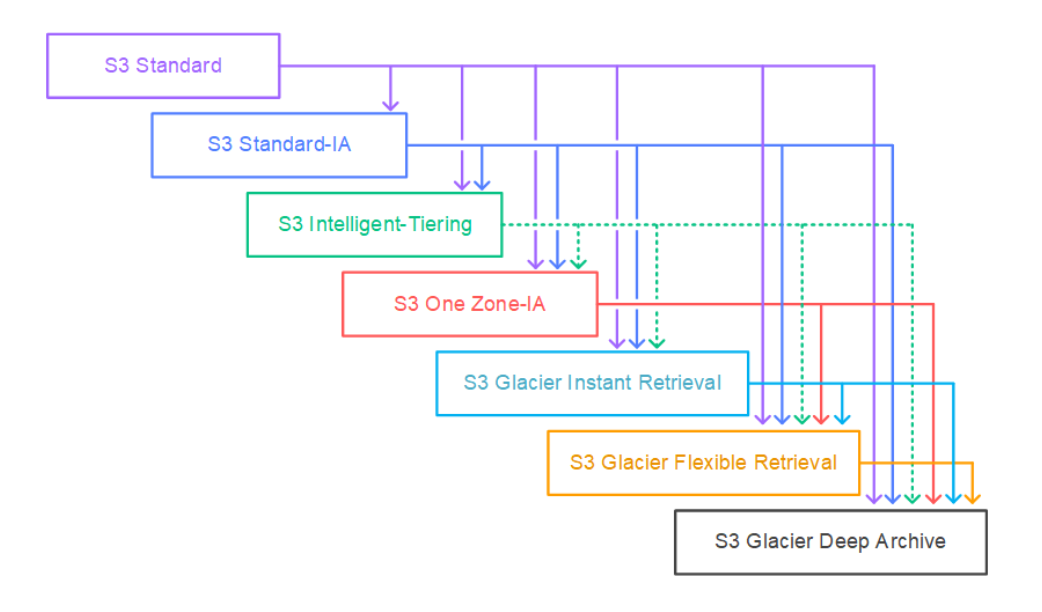
Moving between Storage Classes #
- You can transition objects between storage classes
- For infrequently accessed object, move them to Standard IA
- For archive objects that you don’t need fast access to, move them to Glacier or Glacier Deep Archive
- Moving objects can be automated using a Lifecycle Rules
Lifecycle Rules #
Transition Actions - configure objects to transition to another storage class
- Move objects to Standard IA class 60 days after creation
- Move to Glacier for archiving after 6 months
Expiration actions - configure objects to expire (delete) after some time
- Access log files can be set to delete after a 365 days
- Can be used to delete old versions of files (if versioning is enabled)
- Can be used to delete incomplete Multi-Part uploads
Rules can be created for a certain prefix (example: s3://mybucket/mp3/*) Rules can be created for certain objects Tags (example: Department: Finance)
Storage Class Analysis #
- Helps you determine when to move objects into the appropriate storage class
- Provides recommendations for Standard and Standard‑IA
- Does not support One‑Zone IA or Glacier
- Report updates daily
- Takes 24-48 hours before analysis begins
Requester Pays #
- Normally, the bucket owner pays for all S3 storage and data‑transfer costs
- With Requester Pays, the requester covers request and data‑download charges instead
- Useful for sharing large datasets across AWS accounts
- The requester must be authenticated in AWS (cannot be anonymous)
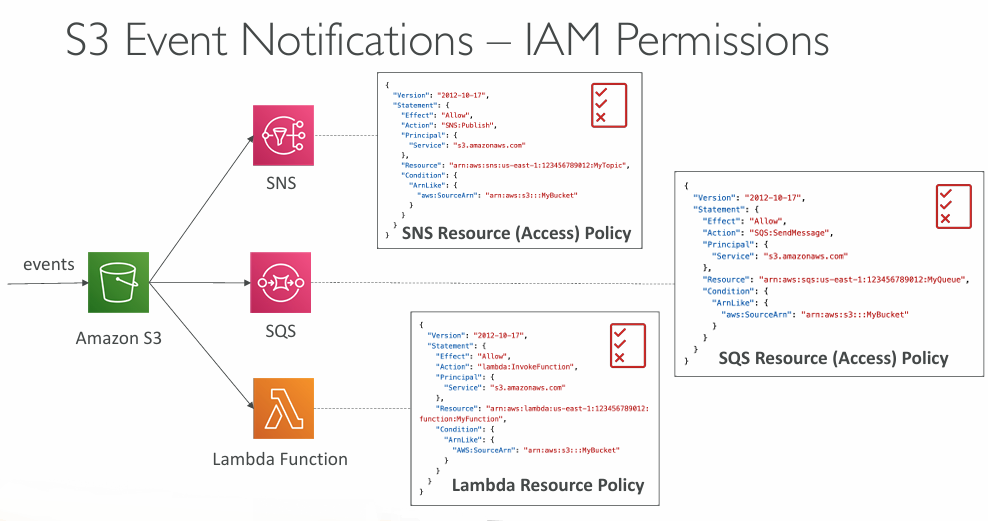
Event Notifications #
- Supports events like ObjectCreated, ObjectRemoved, ObjectRestore, Replication, etc.
- Allows object‑name filtering (e.g.,
*.jpg) - Common use cases: generate image thumbnails, trigger data processing pipelines, send notifications, update search indexes, run ETL jobs, or kick off serverless workflows
- You can define as many S3 event notifications as needed
Performance #
- Amazon S3 automatically scales to high request rates, latency 100-200 ms
- Your application can achieve at least 3,500 PUT/COPY/POST/DELETE or 5,500 GET/HEAD requests per second per prefix in a bucket.
| Example (object path => prefix): | |
|---|---|
| bucket/folder1/sub1/file | => /folder1/sub1/ |
| bucket/folder1/sub2/file | => /folder1/sub2/ |
| bucket/1/file | => /1/ |
| bucket/2/file | => /2/ |
- Objects (files) have a Key
- The key is the FULL path:
- s3://my-bucket/my_file.txt
- s3://my-bucket/my_folder/another_folder/my_file.txt
- The key is composed of prefix + object name
- s3://my-bucket/my_folder/another_folder/my_file.txt
- There is no concept of “directories” within S3 buckets (although UI will suggest there is), just keys with very long names that contain slashes ("/")
More about S3 Objects: Amazon S3 - Objects
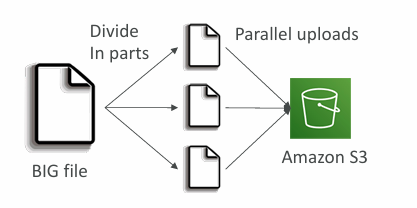
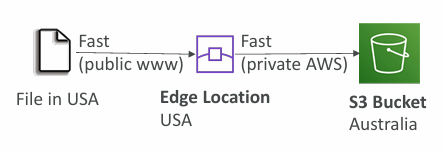
| Multi-Part upload: | S3 Transfer Acceleration |
|---|---|
| recommended for files > 100MB, must use for files > 5GB | Increase transfer speed by transferring file to an AWS edge location which will forward the data to the S3 bucket in the target region |
| Can help parallelize uploads (speed up transfers) | Compatible with multi-part upload |
 |  |
Storage Lens #
Provides visibility to understand, analyze, and optimize storage usage across your entire AWS Organization
Surfaces anomalies, highlights cost‑saving opportunities, and recommends data‑protection best practices using 30 days of usage and activity metrics
Lets you aggregate insights at the Organization, account, region, bucket, or prefix level
Default dashboard shows Multi-Region and Multi-Account data
- Preconfigured by Amazon S3
S3 - Security #
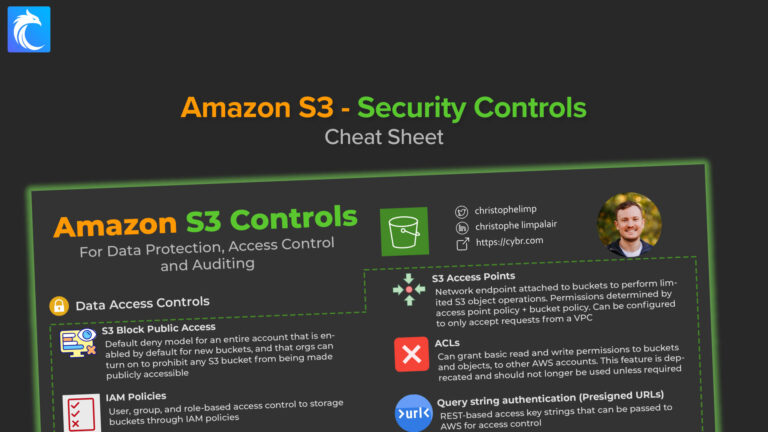
Object Encryption #
- Server-Side Encryption (SSE)
- Server-Side Encryption with Amazon S3-Managed Keys (SSE-S3) - Enabled by Default
- Encrypts S3 objects using keys handled, managed, and owned by AWS
- Server-Side Encryption with KMS Keys stored in AWS KMS (SSE-KMS)
- Leverage AWS Key Management Service (AWS KMS) to manage encryption keys
- Server-Side Encryption with Customer-Provided Keys (SSE-C)
- When you want to manage your own encryption keys
- Server-Side Encryption with Amazon S3-Managed Keys (SSE-S3) - Enabled by Default
- Client-Side Encryption
- SSE‑S3 → AWS owns and manages everything
- SSE‑KMS → AWS KMS manages keys, but you can own them and enforce strict controls
- SSE‑C → You own the keys entirely and provide them with every request
| Feature | SSE-S3 | SSE-KMS | SSE-C |
|---|---|---|---|
| Who owns the keys? | AWS (S3 owns & manages all keys) | AWS KMS owns keys, but you can own/manage Customer‑Managed Keys (CMKs) | You (customer provides and fully owns the keys) |
| Key storage | Managed internally by S3 | Stored in AWS KMS | Not stored by AWS |
| Key rotation | Automatic (AWS‑controlled) | Optional automatic rotation for CMKs | You must rotate keys yourself |
| Access control | Basic S3 IAM permissions | Fine‑grained IAM + KMS key policies | Controlled entirely by you |
| Audit logging | No per‑object key usage logs | Full CloudTrail audit of every key request | No AWS audit logs (AWS never sees the key) |
| Performance | Fastest (no KMS calls) | Slightly slower due to KMS API calls | Similar to SSE‑S3, but you must supply keys per request |
| Must set header | “x-amz-server-side-encryption”: “AES256” | “x-amz-server-side-encryption”: “aws:kms” | Encryption key must provided in HTTP headers, for every HTTP request made |
| Use cases | Default encryption, general workloads | Compliance, regulated workloads, strict access control | Bring‑your‑own‑key requirements, external key management |
SSE-S3 #
- Uses encryption keys that are fully handled, managed, and owned by AWS
- Objects are encrypted on the server side before being stored
- Encryption algorithm is AES‑256
- Requires the header:
x-amz-server-side-encryption: AES256 - Enabled by default for all new buckets and newly uploaded objects
SSE-KMS #
- Uses encryption keys that are created, stored, and managed by AWS KMS
- Provides stronger controls: you can manage permissions and audit every key use through CloudTrail
- Objects are encrypted on the server side before being stored
Using SSE‑KMS means every S3 upload triggers a GenerateDataKey call to KMS, and every download triggers a Decrypt call. These operations count toward your KMS request-per‑second quotas (which vary by region: 5,500 / 10,000 / 30,000 req/s).
If your workload is high‑volume, you can hit these limits and experience throttling. You can request a quota increase through the Service Quotas console.
SSE-C #
- Uses server‑side encryption with keys that are fully managed and controlled by the customer, outside of AWS
- Amazon S3 never stores or retains the encryption key you supply
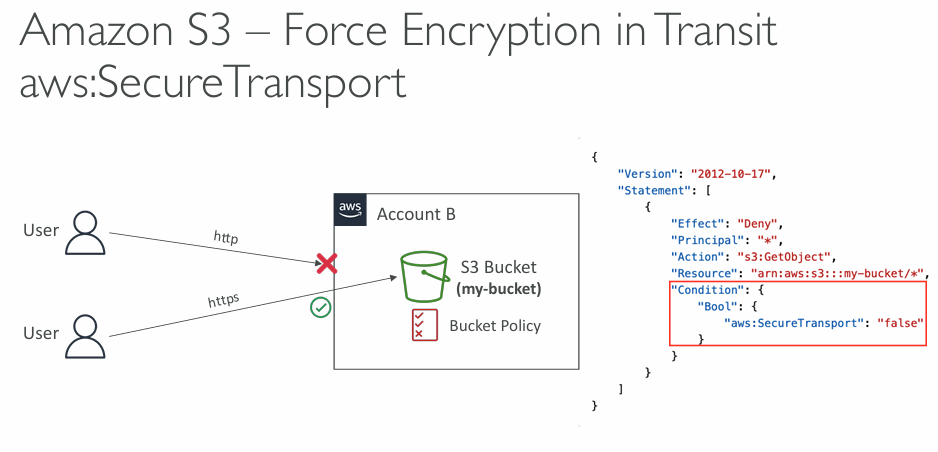
- All requests must be sent over HTTPS
SSE‑C = Server‑Side Encryption with Customer‑Provided Keys.
Where the keys live
- AWS never stores SSE‑C keys.
- You store them yourself, typically in:
- Your own on‑premises HSM
- A third‑party key management system
- A self‑hosted KMS (HashiCorp Vault, Thales, Fortanix, etc.)
- A secure secrets manager (1Password, Bitwarden, CyberArk, etc.)
- A custom encrypted database or internal secrets vault
How they are used
- For every PUT and GET request, you must send the key in the HTTPS request header.
- AWS uses the key only in memory to encrypt/decrypt the object.
- AWS immediately discards the key after the operation.
- If you lose the key, the object is unrecoverable.
Why SSE‑C exists
- Some organisations have compliance rules requiring:
- External key custody
- Keys never stored or managed by AWS
- Full customer control of key lifecycle
CORS #
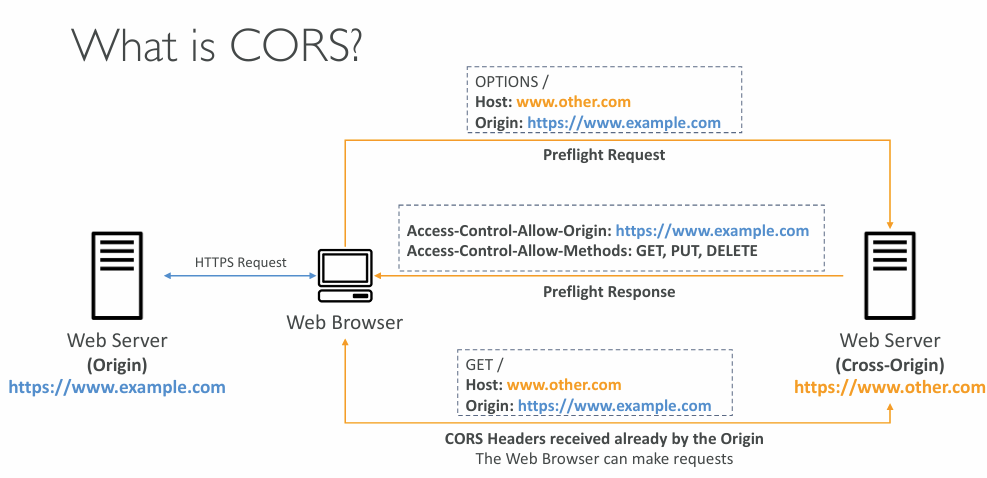
- Origin = scheme (protocol) + host (domain) + port
- example: https://www.example.com (implied port is 443 for HTTPS, 80 for HTTP)
- Web Browser based mechanism to allow requests to other origins while visiting the main origin
- Same origin: http://example.com/app1 & http://example.com/app2
- Different origins: http://www.example.com & http://other.example.com
- The requests won’t be fulfilled unless the other origin allows for the requests, using CORS Headers (example: Access-Control-Allow-Origin)
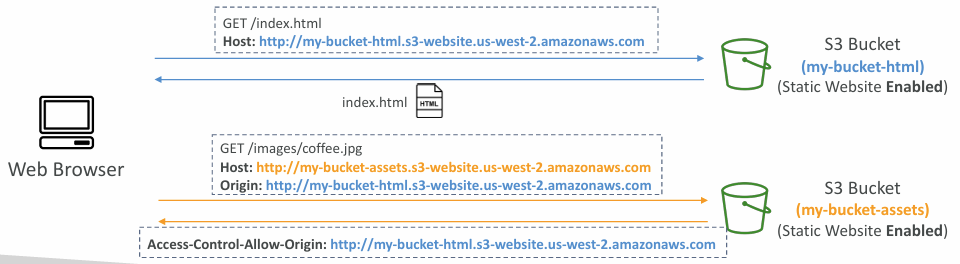
- If a client makes a cross-origin request on our S3 bucket, we need to enable the correct CORS headers
- It’s a popular exam question
- You can allow for a specific origin or for * (all origins)
MFA Delete #
- MFA Delete adds an extra security layer by requiring a one‑time MFA code before performing sensitive S3 actions
- MFA is required to permanently delete object versions and to suspend versioning
- MFA is not required to enable versioning or list deleted versions
- MFA Delete only works when Versioning is enabled
- Only the root account (bucket owner) can turn MFA Delete on or off
S3 Access Logs #
S3 access logs let you record every request made to your bucket - whether allowed or denied, and regardless of which AWS account made it. Logs are delivered to another S3 bucket in the same region, where they can be analysed with tools like Athena, EMR, or external analytics systems.
The log format is documented by AWS: Amazon S3 server access log format - Amazon Simple Storage Service
Pre-Signed URLs #
- Pre‑signed URLs can be generated via the S3 Console, AWS CLI, or SDKs
- Expiration limits:
- Console: 1–720 minutes (up to 12 hours)
- CLI:
--expires-in(default 3600s, max 604800s ≈ 168 hours)
- Anyone using the URL inherits the permissions of the creator for GET/PUT
- Common uses:
- Give authenticated users temporary access to premium content
- Dynamically generate download links for changing user lists
- Allow temporary, controlled uploads to a specific S3 location
Glacier Vault Lock #
- Implements a WORM (Write Once, Read Many) model for immutable data
- You create a Vault Lock policy and then lock it so it cannot be changed or deleted
- Ensures strong compliance and long‑term data retention guarantees
Object Lock #
- Enforces a WORM (Write Once, Read Many) model to prevent object version deletion
- Retention modes:
- Compliance: No one (not even root) can delete or shorten retention; fully immutable
- Governance: Most users are blocked, but privileged users can modify retention or delete
- Retention period: Protects an object for a fixed time; can only be extended
- Legal Hold:
- Protects an object indefinitely, independent of retention
- Can be added or removed with the
s3:PutObjectLegalHoldpermission
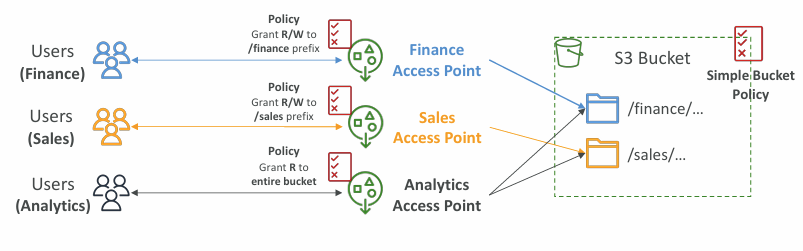
Access Points #
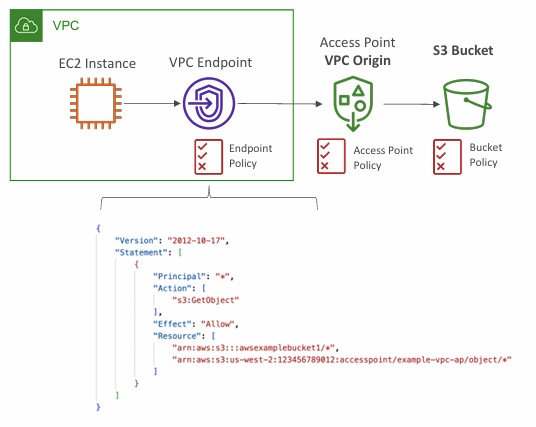
- Access Points simplify security management for S3 Buckets
- Each Access Point has:
- its own DNS name (Internet Origin or VPC Origin)
- an access point policy (similar to bucket policy) – manage security at scale
Object Lambda #
- Use S3 Object Lambda with Lambda functions to transform objects dynamically before they’re returned
- Works with a single S3 bucket plus an Access Point and an Object Lambda Access Point
- Common uses: redact PII, convert data formats (e.g., XML → JSON), or resize/watermark images on demand
» Sources « #
- Amazon S3
- Amazon Simple Storage Service Documentation
- Amazon S3 server access log format - Amazon Simple Storage Service
S3 Security:
» References « #
Cloud Practitioner:
» Disclaimer « #
This series draws heavily from Stephane Maarek’s Ultimate AWS Certified Solutions Architect Associate 2026 course on Udemy.
His content was instrumental in helping me pass the certification.
| About the instructor | |
|---|---|
| 🌐 Website | 📺 YouTube |
| 𝕏 x.com |