- Welcome my DevOps blog./
- 🔰Posts/
- 🗂️My Trainings/
- AWS Trainings and Certifications/
- 🏅AWS Certified Solutions Architect - Associate/
- Solutions Architect: RDS, Aurora, Elasticache/
Solutions Architect: RDS, Aurora, Elasticache
Table of Contents
ℹ️ Associate‑level extension of the Databases section from the AWS Cloud Practitioner series.
| AWS Certifications Series » | |
|---|---|
| AWS Cloud Practitioner | AWS Solution Architect |
RDS #
🏅 Cloud Practitioner-level: Amazon RDS
- RDS stands for Relational Database Service
- Fully managed service for SQL‑based relational databases
- Lets you run and maintain cloud‑hosted databases without managing the underlying infrastructure
- Supported engines:
- PostgreSQL
- MySQL
- MariaDB
- Oracle
- Microsoft SQL Server
- IBM DB2
- Aurora (AWS‑built, cloud‑optimised engine)
RDS - Storage Autoscaling #
- Automatically increases storage on your RDS instance when you start running low
- Removes the need for manual storage adjustments
- You define a Maximum Storage Threshold as the upper limit
- Storage is auto‑expanded when:
- Free space drops below 10%
- Low‑storage condition lasts 5 minutes
- At least 6 hours have passed since the last increase
- Ideal for workloads with unpredictable or spiky storage growth
- Supported across all RDS engines
RDS Read Replicas #
- Supports up to 15 Read Replicas
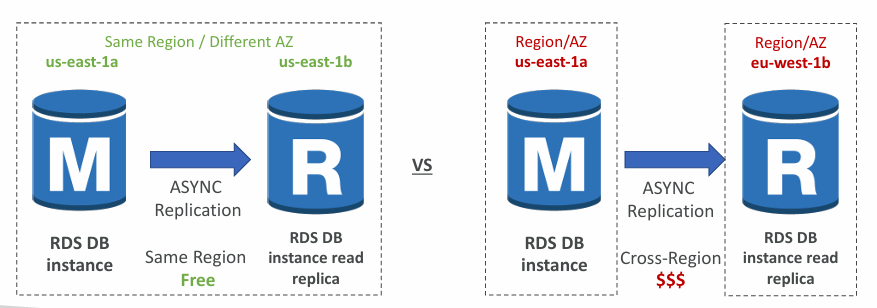
- Replicas can be created within the same AZ, across AZs, or across Regions
- Replication is ASYNC, so read replicas are eventually consistent
- A read replica can be promoted to a standalone primary database (i.e., becomes its own read/write DB instance)
- Applications must update their connection strings to make use of read replicas
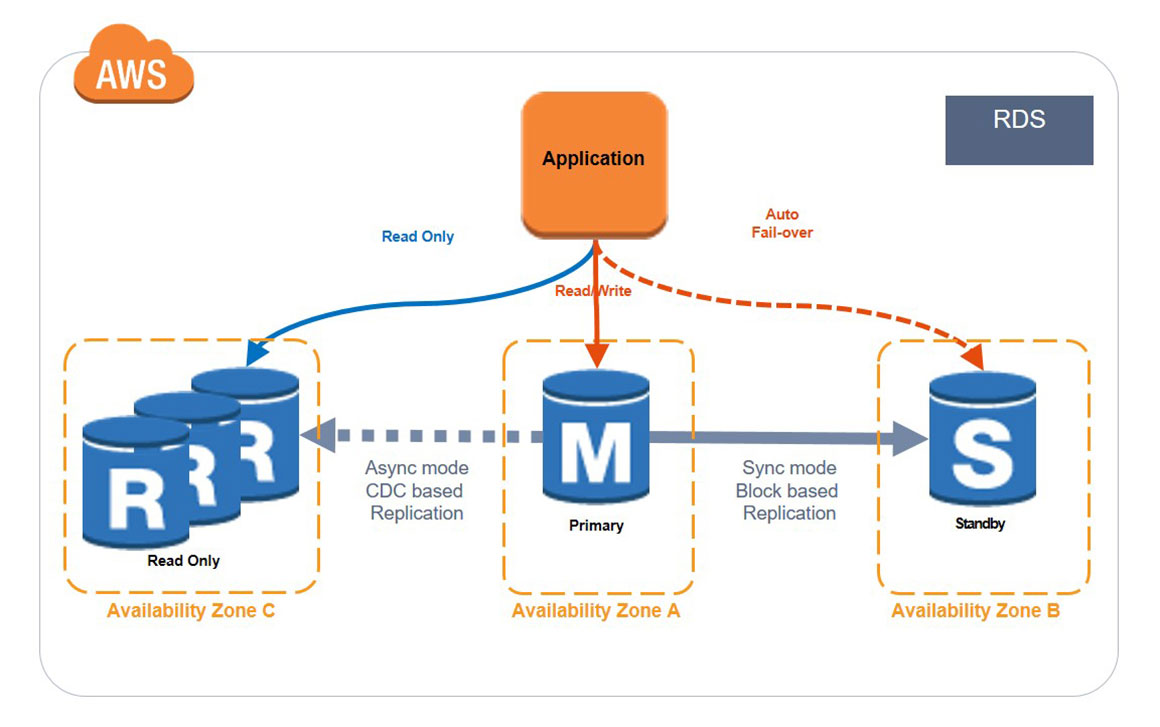
ℹ️ In AWS you normally pay for data transferred between AZs, but RDS Read Replicas within the same region avoid that cross‑AZ data transfer cost.
RDS Read Replica promotion #
🙋🏻 Question: Can RDS Read Replica become the primary and will RDS Proxy detect it automatically??
RDS Read Replica can be promoted to a standalone primary but it becomes and independent RDS instance with it’s own endpoint. It is not automatically wired into any failover mechanism - RDS Proxy must be reconfigured to point to the new primary.
- ✔ Can become a standalone primary
- ✖ Does not auto‑update RDS Proxy
- ✖ Does not auto‑update application endpoints
- ✔ Requires manual reconfiguration
RDS Multi AZ (Disaster Recovery) #
RDS Multi‑AZ provides synchronous replication to a standby in another AZ, uses a single DNS endpoint for automatic failover, boosts availability during AZ, network, instance, or storage failures, requires no application changes, and is designed for high availability rather than scaling; additionally, Read Replicas themselves can be configured as Multi‑AZ for disaster‑recovery purposes.
You can switch an RDS instance from Single‑AZ to Multi‑AZ with zero downtime by modifying the database configuration, no restart required.
More info: Amazon RDS multi-AZ
RDS Backups #
- Automated backups:
- Daily full backup of the database (during the backup window)
- Transaction logs are backed-up by RDS every 5 minutes
- Ability to restore to any point in time (from oldest backup to 5 minutes ago)
- 1 to 35 days of retention, set 0 to disable automated backups
- Manual DB Snapshots:
- Manually triggered by the user
- Retention of backup set by the user
ℹ️ Restoring a RDS / Aurora backup or a snapshot creates a new database.
- Restoring MySQL RDS database from S3
- Create a backup of your on-premises database
- Store it on Amazon S3 (object storage)
- Restore the backup file onto a new RDS instance running MySQL
More info: RDS Backups
Aurora #
🏅 Cloud Practitioner-level: Amazon Aurora
High Availability and Read Scaling #
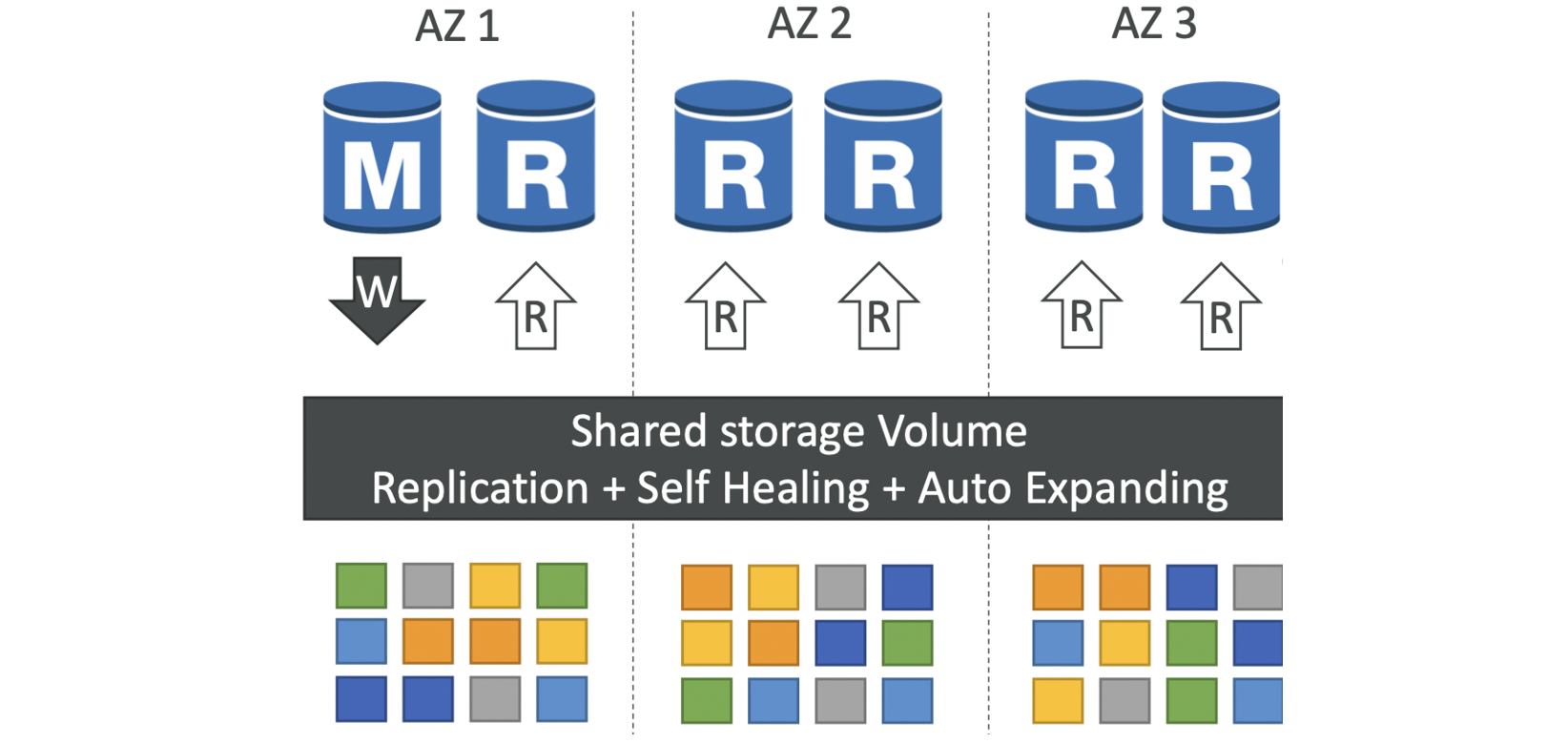
Aurora keeps six copies of your data across three AZs, needing 4 copies for writes and 3 for reads, uses self‑healing, peer‑to‑peer replication, and stripes storage across hundreds of volumes. A single Aurora writer handles writes, failover to a new writer happens in under 30 seconds, up to 15 read replicas can serve reads, and cross‑region replication is supported.
More info: High availability for Amazon Aurora
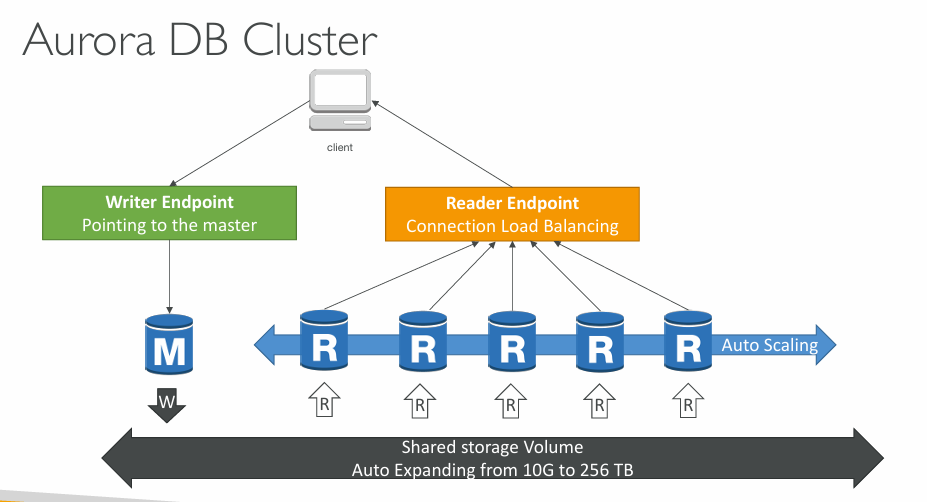
Aurora DB Cluster #
Features of Aurora #
- Automatic fail-over
- Backup and Recovery
- Isolation and security
- Industry compliance
- Push-button scaling
- Automated Patching with Zero Downtime
- Advanced Monitoring
- Routine Maintenance
- Backtrack: restore data at any point of time without using backups
More info: Amazon Aurora features
Aurora Replicas - Auto Scaling #
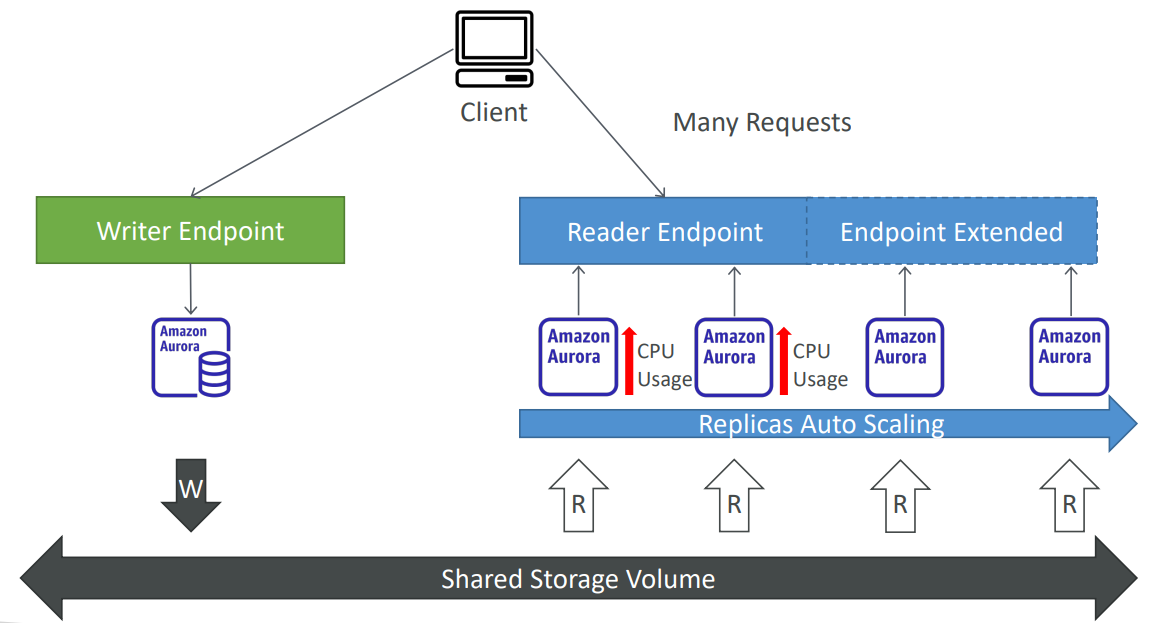
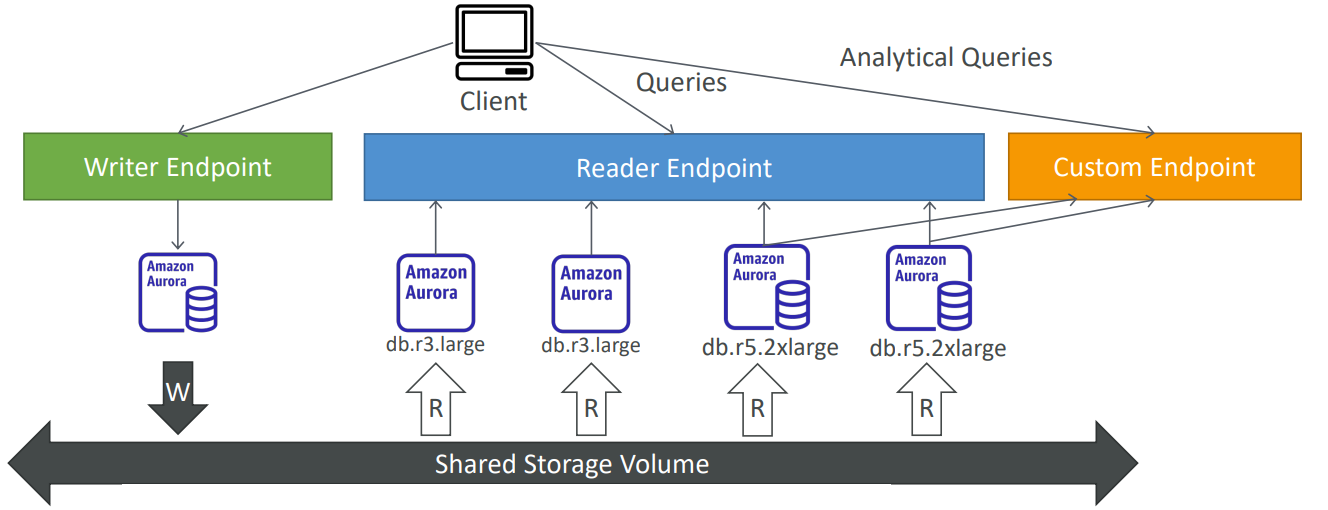
Aurora - Custom Endpoints #
- Define a subset of Aurora Instances as a Custom Endpoint
- Example: Run analytical queries on specific replicas
- The Reader Endpoint is generally not used after defining Custom Endpoints
Aurora Serverless #
- Automated database instantiation and auto scaling based on actual usage
- Good for infrequent, intermittent or unpredictable workloads
- No capacity planning needed
- Pay per second, can be more cost-effective
More info: Using Aurora serverless
Global Aurora #
An Aurora global database consists of one primary AWS Region where your data is written, and up to 10 read-only secondary AWS Regions.
- Promoting another region (for disaster recovery) has an RTO of < 1 minute
- Typical cross-region replication takes less than 1 second
More info: Using Amazon Aurora Global Database
Aurora Machine Learning #
Aurora Machine Learning lets you embed ML‑powered predictions directly into SQL queries, providing a simple and secure integration with AWS ML services like SageMaker (any model) and Comprehend (sentiment analysis), enabling use cases such as:
- fraud detection
- targeted ads
- sentiment analysis
- product recommendations
Aurora Backups #
- Automated backups
- 1 to 35 days (cannot be disabled)
- point-in-time recovery in that timeframe
- Manual DB Snapshots
- Manually triggered by the user
- Retention of backup for set by the user
ℹ️ Restoring a RDS / Aurora backup or a snapshot creates a new database.
- Restoring MySQL Aurora cluster from S3
- Create a backup of your on-premises database using Percona XtraBackup
- Store the backup file on Amazon S3
- Restore the backup file onto a new Aurora cluster running MySQL
More info: Overview of backing up and restoring an Aurora DB cluster
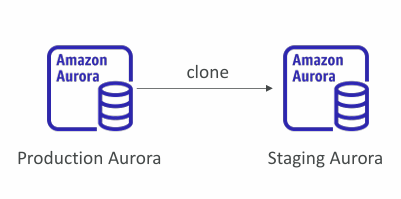
Aurora Database Cloning #
- Create a new Aurora DB Cluster from an existing one
- Faster than snapshot & restore
- Very fast & cost-effective
Useful to create a “staging” database from a “production” database without impacting the production database.
RDS & Aurora Security #
- At-rest encryption:
- Database master & replicas encryption using AWS KMS - must be defined at launch time
- If the master is not encrypted, the read replicas cannot be encrypted
- To encrypt an un-encrypted database, go through a DB snapshot & restore as encrypted
- In-flight encryption: TLS-ready by default, use the AWS TLS root certificates client-side
- IAM Authentication: IAM roles to connect to your database (instead of username/pw)
- Security Groups: Control Network access to your RDS / Aurora DB
- No SSH available except on RDS Custom
- Audit Logs can be enabled and sent to CloudWatch Logs for longer retention
Amazon RDS Proxy #
- Fully managed database proxy for RDS
- Pools and shares DB connections to reduce load on database resources
- Improves efficiency by lowering CPU/RAM pressure and avoiding excessive open connections
- Serverless, autoscaling, and Multi‑AZ for high availability
- Cuts RDS/Aurora failover time by up to 66%
- Supports RDS (MySQL, PostgreSQL, MariaDB, SQL Server) and Aurora (MySQL, PostgreSQL)
- Works with most applications without code changes
- Enforces IAM authentication and stores credentials in Secrets Manager
- Never publicly accessible - must be accessed from within a VPC
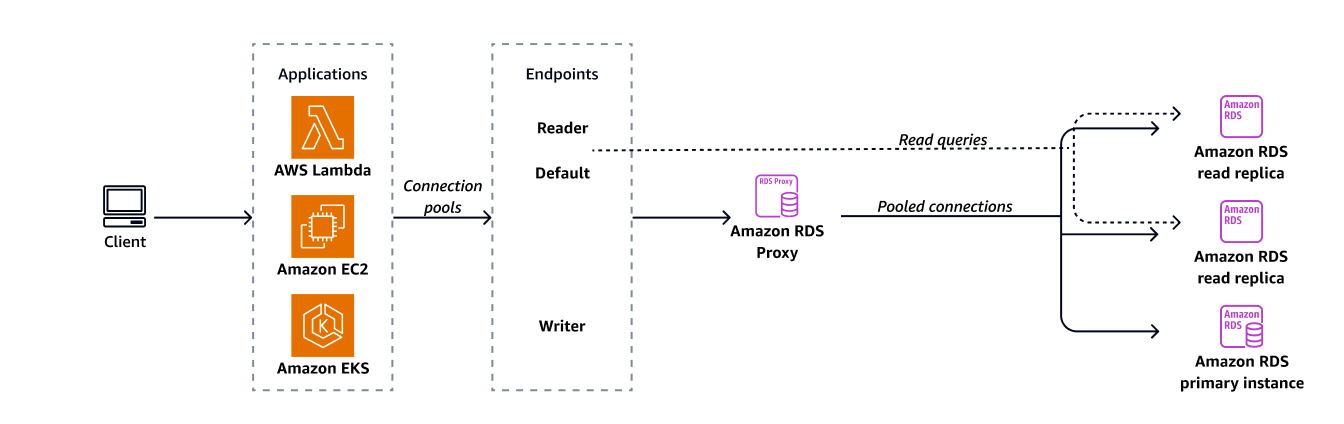
How RDS Proxy behaves with Aurora #
Aurora has:
- a cluster endpoint (always points to the writer)
- reader endpoint (load balances readers)
- automatic failover
- automatic replica promotion
RDS Proxy integrates tightly with this:
- When Aurora promotes a reader → cluster endpoint updates
- RDS Proxy automatically follows the new writer
- No manual changes needed
Result:
Aurora + RDS Proxy = fully automatic failover.
How RDS Proxy behaves with RDS #
RDS (non‑Aurora) has:
- Multi‑AZ failover only
- No automatic promotion of read replicas
- Each instance has its own endpoint
RDS Proxy integrates only with Multi‑AZ failover, not with read replicas.
- If the RDS primary fails → Multi‑AZ standby becomes primary → same writer endpoint → RDS Proxy follows automatically
- If you promote a read replica → it becomes a separate, standalone DB → new endpoint → RDS Proxy does not follow it
Result:
RDS + RDS Proxy = automatic failover only for Multi‑AZ, not for read replica promotion.
More info: Amazon RDS Proxy
ElastiCache #
🏅 Cloud Practitioner-level: ElastiCache
More info:
Serverless, fully managed caching service delivering microsecond latency with Valkey-, Memcached-, and Redis.
More info: Amazon ElastiCache
- The same way RDS is to get managed Relational Databases…
- ElastiCache is to get managed Redis or Memcached
- Caches are in-memory databases with really high performance, low latency
- Helps reduce load off of databases for read intensive workloads
- Helps make your application stateless
- AWS takes care of OS maintenance / patching, optimizations, setup, configuration, monitoring, failure recovery and backups
ℹ️ Note: Using ElastiCache involves heavy application code changes.
DB Cache #
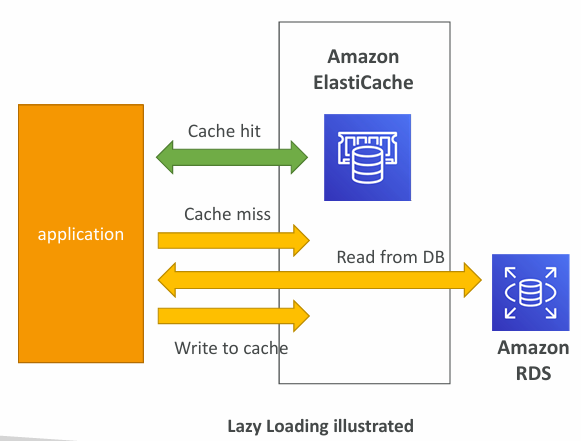
- Applications queries ElastiCache, if not available, get from RDS and store in ElastiCache
- Helps relieve load in RDS
- Cache must have an invalidation strategy to make sure only the most current data is used in there.
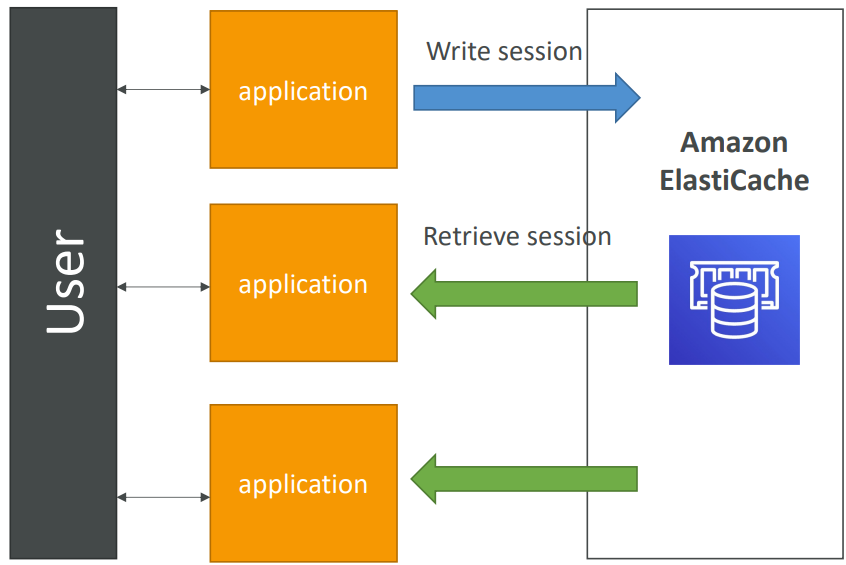
User Session Store #
- User logs into any of the application
- The application writes the session data into ElastiCache
- The user hits another instance of our application
- The instance retrieves the data and the user is already logged in
Redis vs Memcached #
| REDIS | MEMCACHED |
|---|---|
| Multi AZ with Auto-Failover | Multi-node for partitioning of data (sharding) |
| Read Replicas to scale reads and have high availability | No high availability (replication) |
| Data Durability using AOF persistence | Non persistent |
| Backup and restore features | Backup and restore (Serverless) |
| Supports Sets and Sorted Sets | Multi-threaded architecture |
Patterns #
- Lazy Loading: all the read data is cached, data can become stale in cache
- Write Through: Adds or update data in the cache when written to a DB (no stale data)
- Session Store: store temporary session data in a cache (using TTL features)
There are only two hard things in Computer Science: cache invalidation and naming things.
» Sources « #
» References « #
Cloud Practitioner: Databases
- Cloud Practitioner: RDS and Aurora
- Cloud Practitioner: Elasticache
Solutions Architect: Databases in AWS
» Disclaimer « #
This series draws heavily from Stephane Maarek’s Ultimate AWS Certified Solutions Architect Associate 2026 course on Udemy.
His content was instrumental in helping me pass the certification.
| About the instructor | |
|---|---|
| 🌐 Website | 📺 YouTube |
| 𝕏 x.com |