- Welcome my DevOps blog./
- 🔰Posts/
- 🗂️My Trainings/
- AWS Trainings and Certifications/
- 🏅AWS Certified Solutions Architect - Associate/
- Solutions Architect: Route 53/
Solutions Architect: Route 53

Table of Contents
ℹ️ Associate‑level extension of the Route53 section from the AWS Cloud Practitioner series. In this post, I expand on key Route53 concepts and introduce deeper topics relevant to the Associate‑level understanding.
| AWS Certifications Series » | |
|---|---|
| AWS Cloud Practitioner | AWS Solution Architect |
DNS Terminology #
- Domain Registrar: Amazon Route 53, GoDaddy, …
- DNS Records: A, AAAA, CNAME, NS, …
- Zone File: contains DNS records
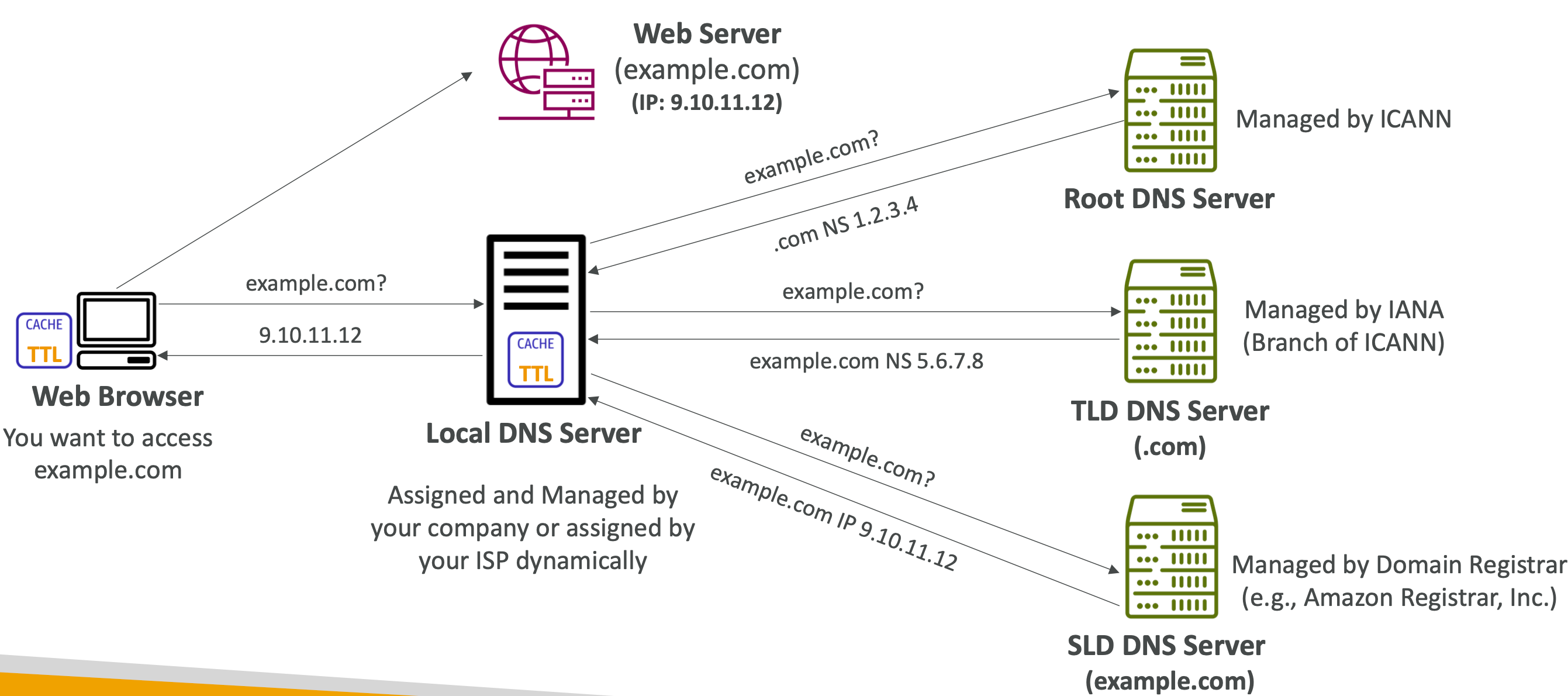
- Name Server: resolves DNS queries (Authoritative or Non-Authoritative)
- Top Level Domain (TLD): .com, .us, .in, .gov, .org, …
- Second Level Domain (SLD): amazon.com, google.com, … (sometimes referred to as a Zone Apex or Root Domain)
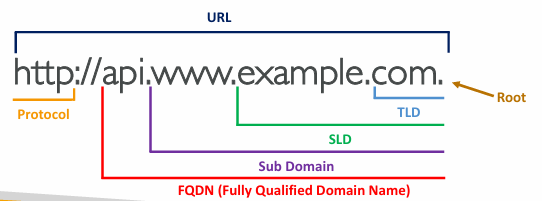
How DNS Works #
Amazon Route 53 #
🏅 Cloud Practitioner-level: Route 53
Route 53 is a fully managed, scalable, authoritative1 DNS service that also acts as a domain registrar and can perform health checks on your resources.
Route 53 - Records #
- Each record contains:
- Domain/subdomain Name - e.g., example.com
- Record Type - e.g., A or AAAA
- Value - e.g., 12.34.56.78
- Routing Policy - how Route 53 responds to queries
- TTL - amount of time the record cached at DNS Resolvers
- Route 53 supports the following DNS record types:
- (must know) A / AAAA / CNAME / NS
- (advanced) CAA / DS / MX / NAPTR / PTR / SOA / TXT / SPF / SRV
Route 53 - Record Types #
- A - maps a hostname to an IPv4 address
- AAAA - maps a hostname to an IPv6 address
- CNAME - maps a hostname to another hostname
- The CNAME target must ultimately resolve to an A or AAAA record
- You cannot create a CNAME at the zone apex (e.g.,
example.com), only at subdomains likewww.example.com
- NS - defines the name servers for the hosted zone
- NS records determine how DNS traffic for the domain is routed
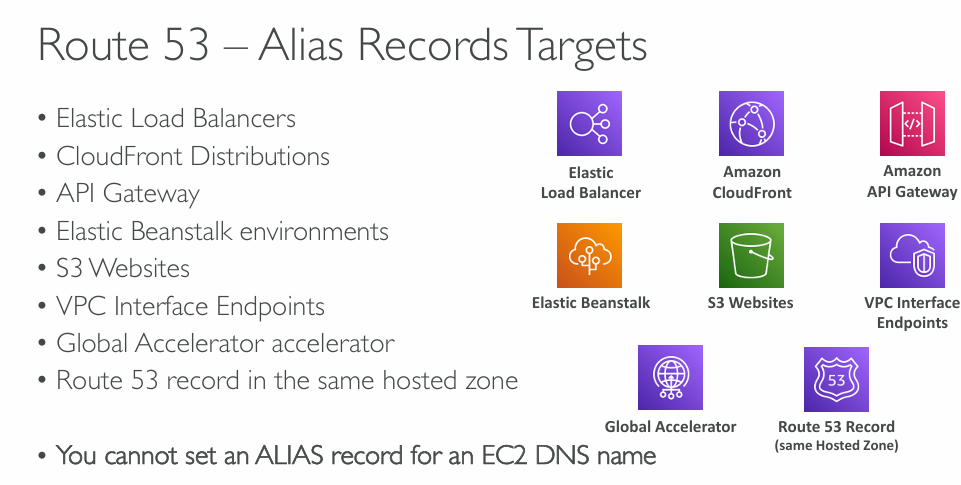
Alias Records #
- Maps a hostname to an AWS resource
- Route 53-specific extension to standard DNS
- Automatically tracks changes to the resource’s underlying IPs
- Can be used at the zone apex (e.g.,
example.com), unlike CNAME - Always implemented as an A/AAAA record for AWS targets
- TTL cannot be customised (Route 53 manages it automatically)
CNAME is a standard DNS record that maps one hostname to another hostname, and it cannot be used at the zone apex.
ALIAS is an Amazon Route 53-specific feature that behaves like a CNAME but can be used at the zone apex and can point to AWS resources (e.g., ALB, CloudFront, S3 website endpoints) without violating DNS rules.
- CNAME = standard DNS record
- ALIAS = Route 53 extension that solves CNAME limitations
Route 53 - Records TTL #
| High TTL - e.g., 24 hr | Low TTL - e.g., 60 sec. |
|---|---|
| Less traffic on Route 53 | More traffic on Route 53 ($$) |
| Possibly outdated records | Records are outdated for less time |
| Easy to change records |
Except for Alias records, TTL is mandatory for each DNS record.
Route 53 - Hosted Zones #
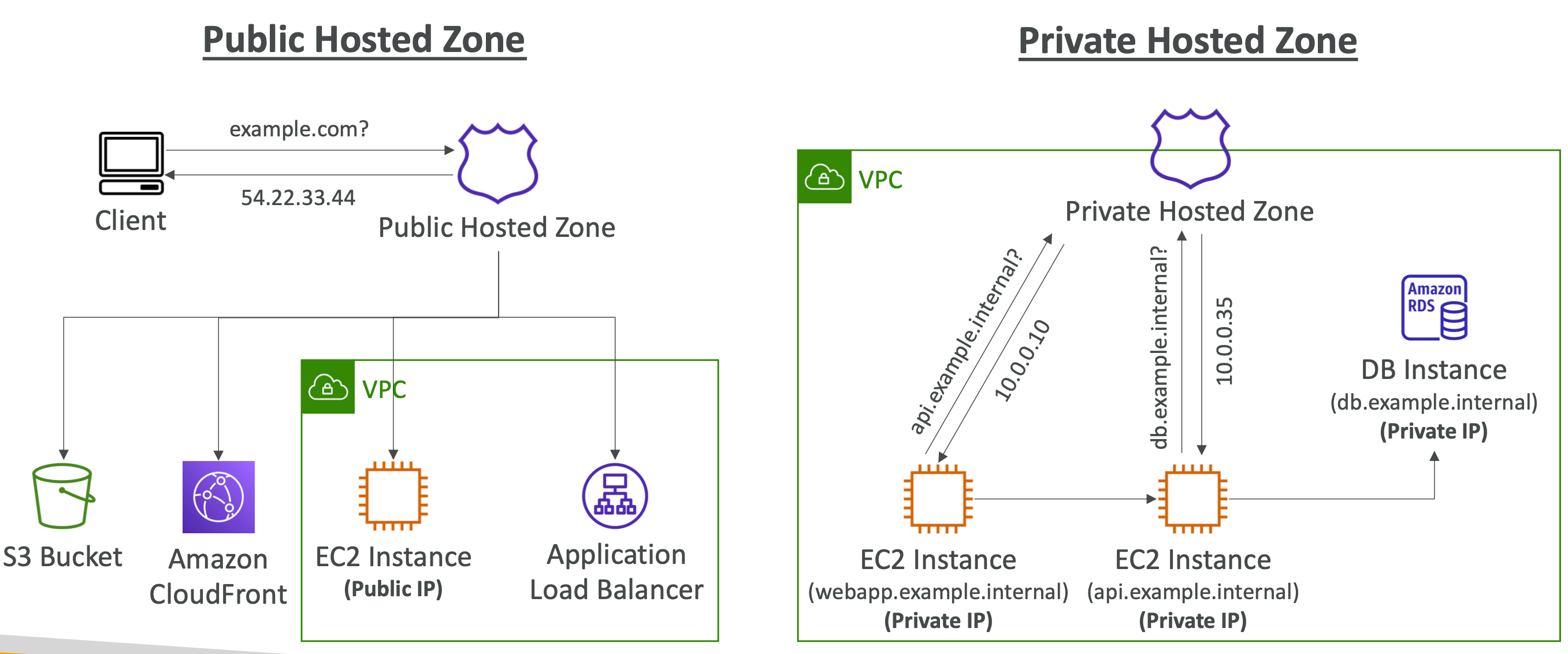
A hosted zone is a container for records, and records contain information about how you want to route traffic for a specific domain, such as example.com, and its subdomains (acme.example.com, zenith.example.com).
A hosted zone and the corresponding domain have the same name. There are two types of hosted zones:
Public hosted zones contain records that specify how you want to route traffic on the internet. For more information, see Working with public hosted zones.
Private hosted zones contain records that specify how you want to route traffic in an Amazon VPC. For more information, see Working with private hosted zones.
More info: Working with hosted zones
Route 53 - Routing Policies #
- Simple Routing Policy - No health checks, just DNS check
Multiple values are allowed - if this is the case, random will be chosen by the client
- Weighted Routing Policy - Specify what amount of traffic goes where (i.e. 70% = Server1, 20% = Server2, 10% = Server3 - simple form of Load Balancing)
- Latency Routing Policy - Based on latency - minimizing the latency between user and the server sending the traffic that is geographically (latency-based) closer to the user
- Failover Routing Policy - Disaster Recovery (DR) - based on Health Checks
- Geolocation Routing Policy - Routing based specifically on Geolocation
- Geoproximity Routing Policy - based on the geographic location of your users and your resources - it routes traffic to the closest resource that is available, can be “biased”
- IP-based Routing Policy - Route the traffic based on the IP address originates from
- Multi-Value Routing Policy - Route the traffic multiple resources
More info: Choosing a routing policy
Simple Routing #
- Typically, route traffic to a single resource
- Can specify multiple values in the same record
- If multiple values are returned, a random one is chosen by the client
- When Alias enabled, specify only one AWS resource
- Can’t be associated with Health Checks
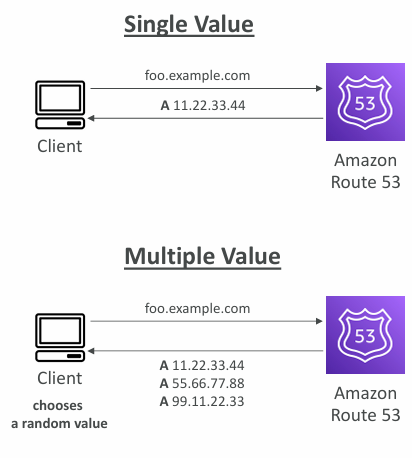
More info: Simple Routing
Weighted Routing #
- Control the % of the requests that go to each specific resource
- DNS records must have the same name and type
- Can be associated with Health Checks
- Use cases: load balancing between regions, testing new application versions…
- Assign a weight of 0 to a record to stop sending traffic to a resource
- If all records have weight of 0, then all records will be returned equally
More info: Weighted routing
Latency-based Routing #
- Redirect to the resource that has the least latency close to us
- Super helpful when latency for users is a priority
- Latency is based on traffic between users and AWS Regions
- Germany users may be directed to the US (if that’s the lowest latency)
- Can be associated with Health Checks (has a failover capability)
More info: Latency-based routing
Failover Routing #
Failover routing lets you route traffic to a resource when the resource is healthy or to a different resource when the first resource is unhealthy.
The primary and secondary records can route traffic to anything from an Amazon S3 bucket that is configured as a website to a complex tree of records.
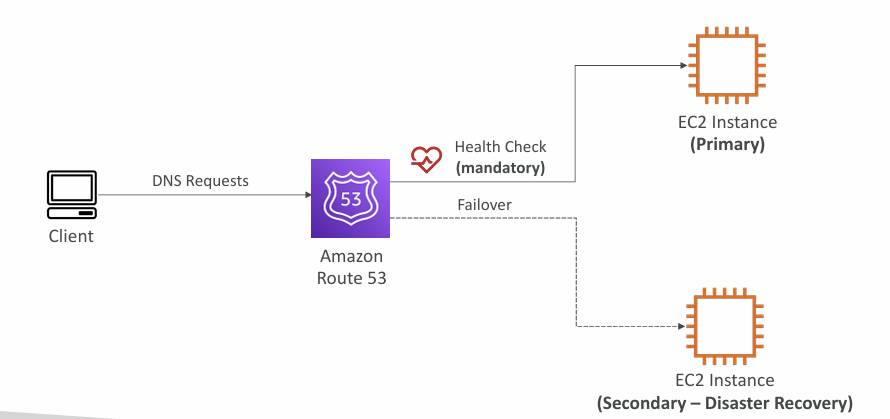
More info:
Geolocation Routing #
- Different from Latency-based!
- This routing is based on user location
- Specify location by Continent, Country or by US State (if there’s overlapping, most precise location selected)
- Should create a “Default” record (in case there’s no match on location)
- Use cases: website localization, restrict content distribution, load balancing, …
- Can be associated with Health Checks
More info: Geolocation Routing
Geoproximity Routing #
- Route traffic to your resources based on the geographic location of users and resources
- Ability to shift more traffic to resources based on the defined bias
- To change the size of the geographic region, specify bias values:
- To expand (1 to 99) - more traffic to the resource
- To shrink (-1 to -99) - less traffic to the resource
You must use Route 53 Traffic Flow to use this feature.
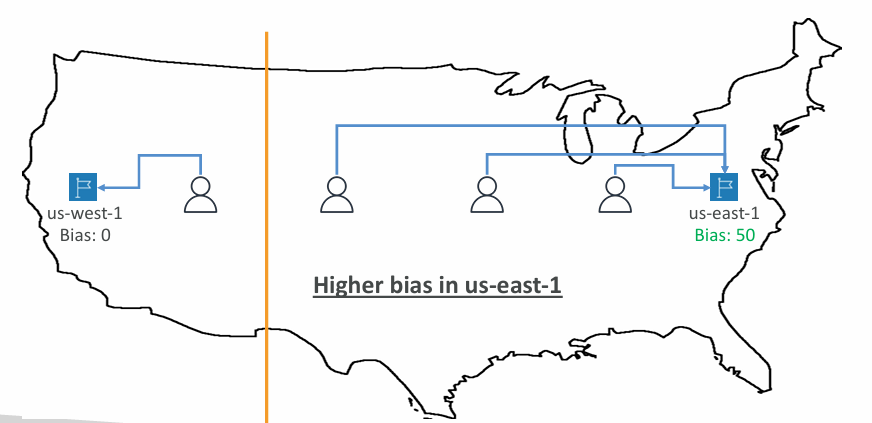
More info: Geoproximity Routing
IP-based Routing #
- Routing is based on clients’ IP addresses
- You provide a list of CIDRs for your clients and the corresponding endpoints/locations (user-IP-to-endpoint mappings)
- Use cases: Optimize performance, reduce network costs…
- Example: route end users from a particular ISP to a specific endpoint
More info: IP-based Routing
Multi-Value Routing #
- Use when routing traffic to multiple resources
- Route 53 return multiple values/resources
- Can be associated with Health Checks (return only values for healthy resources)
- Up to 8 healthy records are returned for each Multi-Value query
- Multi-Value is not a substitute for having an ELB
Route 53 - Health Checks #
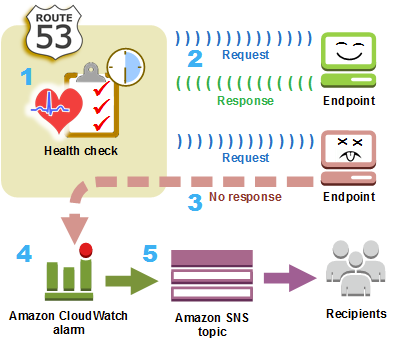
- HTTP Health Checks are only for public resources
- Health Check => Automated DNS Failover:
- Health checks that monitor an endpoint (application, server, other AWS resource)
- Health checks that monitor other health checks (Calculated Health Checks)
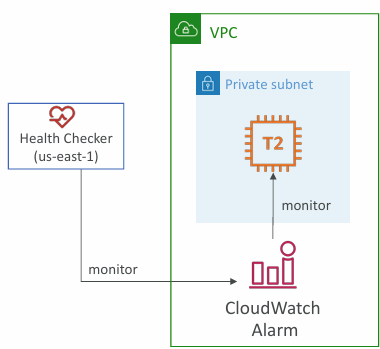
- Health checks that monitor CloudWatch Alarms (full control!!) - e.g., throttles of DynamoDB, alarms on RDS, custom metrics, … (helpful for private resources)
- Health Checks are integrated with CloudWatch metrics
Monitor an Endpoint #
- About 15 global health checkers will check the endpoint health
- Healthy/Unhealthy Threshold - 3 (default)
- Interval - 30 sec (can set to 10 sec - higher cost)
- Supported protocol: HTTP, HTTPS and TCP
- If > 18% of health checkers report the endpoint is healthy, Route 53 considers it Healthy. Otherwise, it’s Unhealthy
- Health Checks pass only when the endpoint responds with the 2xx and 3xx status codes
- Health Checks can be setup to pass / fail based on the text in the first 5120 bytes of the response
- Configure you router/firewall to allow incoming requests from Route 53 Health Checkers
Calculated Health Checks #
- Combine the results of multiple Health Checks into a single Health Check
- You can use OR, AND, or NOT
- Can monitor up to 256 Child Health Checks
- Specify how many of the health checks need to pass to make the parent pass
- Usage: perform maintenance to your website without causing all health checks to fail
Private Hosted Zones #
- Route 53 health checkers are outside the VPC
- They can’t access private endpoints (private VPC or on-premises resource)
- You can create a CloudWatch Metric and associate a CloudWatch Alarm, then create a Health Check that checks the alarm itself
Hybrid DNS #
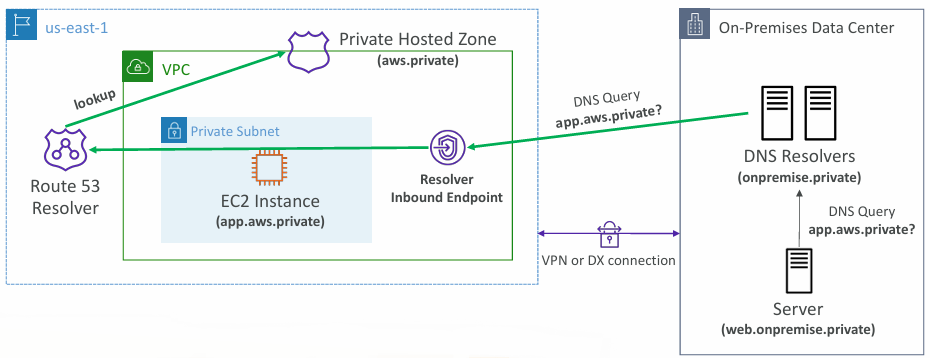
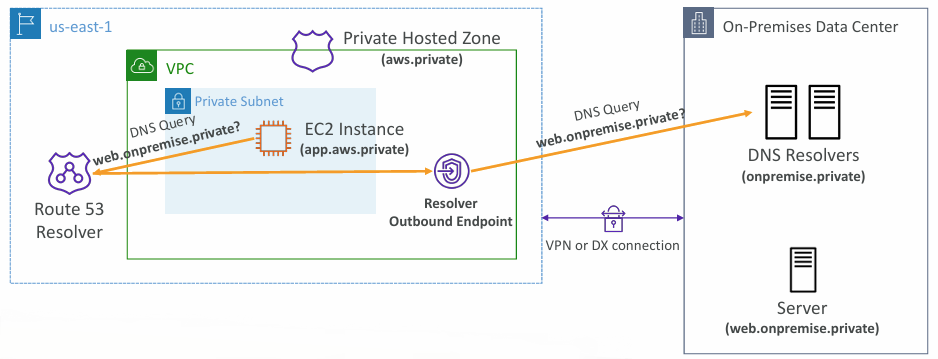
- Route 53 Resolver automatically answers DNS queries for EC2 internal hostnames, Private Hosted Zone records, and public DNS records
- Supports hybrid DNS, allowing resolution between your VPC (via Route 53 Resolver) and external networks
- External networks can include other VPCs (including peered VPCs) or on‑premises environments connected through Direct Connect or VPN
Resolver Endpoints #
Inbound Endpoint - allows your DNS Resolvers to resolve domain names for AWS resources (e.g., EC2 instances) and records in Private Hosted Zones.
Outbound Endpoint - Route 53 Resolver forwards DNS queries to your DNS Resolvers.
More info:
» Sources « #
AWS Route 53:
- Amazon Route 53 - DNS service
- What is Amazon Route 53?
- Working with hosted zones
- Choosing a routing policy
- Health Checks
» References « #
- Cloud Practitioner: Route53
» Disclaimer « #
This series draws heavily from Stephane Maarek’s Ultimate AWS Certified Solutions Architect Associate 2026 course on Udemy.
His content was instrumental in helping me pass the certification.
| About the instructor | |
|---|---|
| 🌐 Website | 📺 YouTube |
| 𝕏 x.com |
Authoritative means the DNS server is the official source of truth for a domain - it holds and serves the real DNS records, and you (as the domain owner) are allowed to create, change, or delete those records directly. ↩︎