- Welcome my DevOps blog./
- 🔰Posts/
- 🗂️My Trainings/
- AWS Trainings and Certifications/
- 🏅AWS Certified Solutions Architect - Associate/
- Solutions Architect: EC2/
Solutions Architect: EC2
Table of Contents
ℹ️ Associate‑level extension of the EC2 section from the AWS Cloud Practitioner series. In this post, I expand on key EC2 concepts and introduce deeper topics relevant to the Associate‑level understanding.
| AWS Certification Series » | |
|---|---|
| AWS Cloud Practitioner | AWS Solution Architect |
Public vs Private vs Elastic IP #
- Public IP
- Machine can be identified on the internet
- Unique across whole web
- Can be geo-located
- Private IP
- Machine can be identified on the Private Network only
- Unique across the Private Network
- Connection to the internet via NAT / Internet Gateway (proxy)
- Elastic IP
- When machine is stopped and started again, it can change it’s public IP
- If fixed Public IP is needed, Elastic IP is required
- Elastic IP is a Public IPv4 IP address owned by you until it’s deleted
- Can be attached to one instance at a time
- Only 5 Elastic IP’s per account (soft limit, can be extended with AWS support)
Avoid using Elastic IPs where possible, since they usually indicate weak architecture choices; instead rely on random public IPs with DNS or, place workloads behind a load balancer so no public IP is needed.
By default, your EC2 machine comes with a private IP for the internal AWS Network and a public IP, for the WWW.
If EC2 instance is stopped and then started, the public IP can change.
Placement Groups #
To meet the needs of your workload, you can launch a group of interdependent EC2 instances into a placement group to influence their placement.
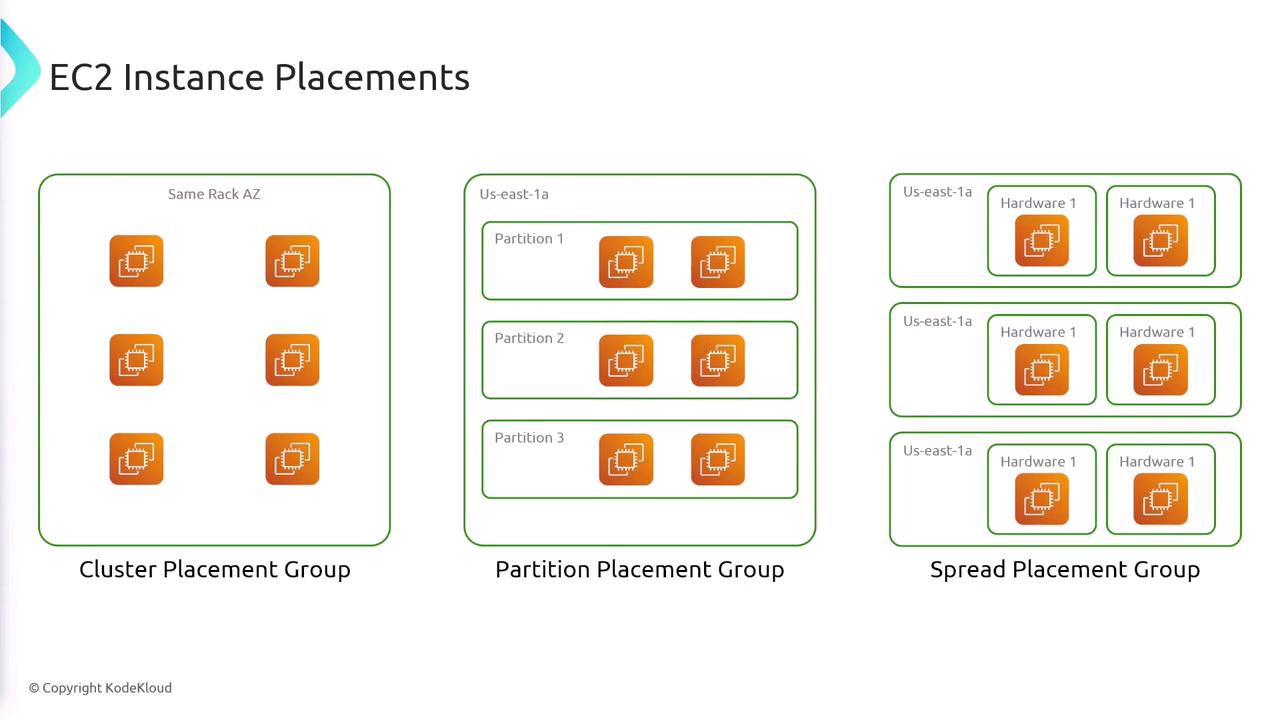
Depending on the type of workload, you can create a placement group using one of the following placement strategies:
Cluster #
Packs instances close together inside an Availability Zone. This strategy enables workloads to achieve the low-latency network performance necessary for tightly-coupled node-to-node communication that is typical of high-performance computing (HPC) applications.
| Pros | - Extremely high network throughput and very low latency between instances (up to 10–100 Gbps with Enhanced Networking) - Ideal for tightly coupled, high‑performance workloads that need fast node‑to‑node communication |
| Cons | - All instances are in a single AZ, so an AZ outage takes down the entire group - Capacity can be limited - launches may fail if AWS can’t place all instances close enough together |
| Use Cases | - Big Data or distributed compute jobs that must complete quickly - HPC workloads, analytics engines, or applications requiring ultra‑low latency and high network bandwidth |
Partition #
Spreads your instances across logical partitions such that groups of instances in one partition do not share the underlying hardware with groups of instances in different partitions. This strategy is typically used by large distributed and replicated workloads, such as Hadoop, Cassandra, and Kafka.
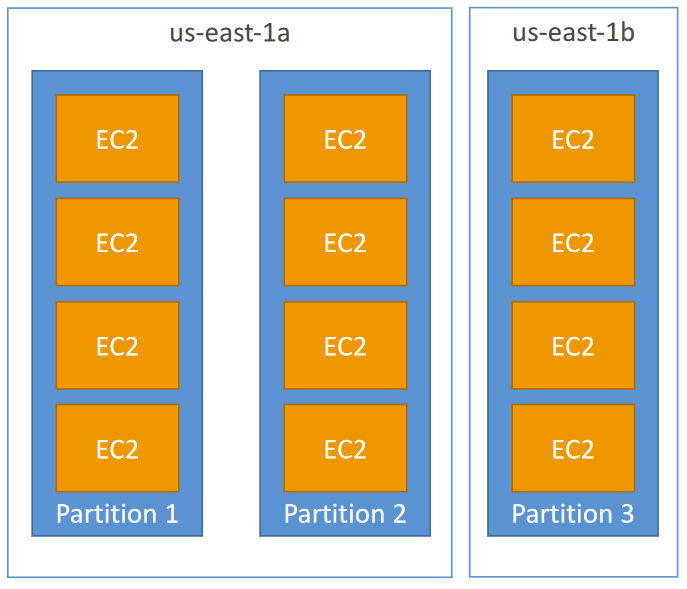
| Pros | - Can span multiple Availability Zones, improving resilience - Reduces the risk of simultaneous failure across instances - Instances are isolated on separate racks and physical hardware |
| Cons | - Limited to seven partitions per AZ within a placement group |
| Use Cases | - Applications that need maximum high availability - Critical workloads where each instance must be isolated from failures in other nodes |
Spread #
Strictly places a small group of instances across distinct underlying hardware to reduce correlated failures.
| Pros | - Highest failure isolation - each instance sits on distinct hardware - Ideal for small numbers of critical instances needing maximum resilience |
| Cons | - Limited to seven instances per AZ |
| Use Cases | - Critical services where no two instances should fail together |
Pricing #
There is no charge for creating a placement group.
📡 Sources:
Elastic Network Interfaces (ENI) #
- Logical component in a VPC that represents a virtual network card
- The ENI can have the following attributes:
- Primary private IPv4, one or more secondary IPv4
- One Elastic IP (IPv4) per private IPv4
- One Public IPv4
- One or more security groups
- A MAC address
- You can create ENI independently and attach them on the fly (move them) on EC2 instances for failover
- Bound to a specific availability zone (AZ)
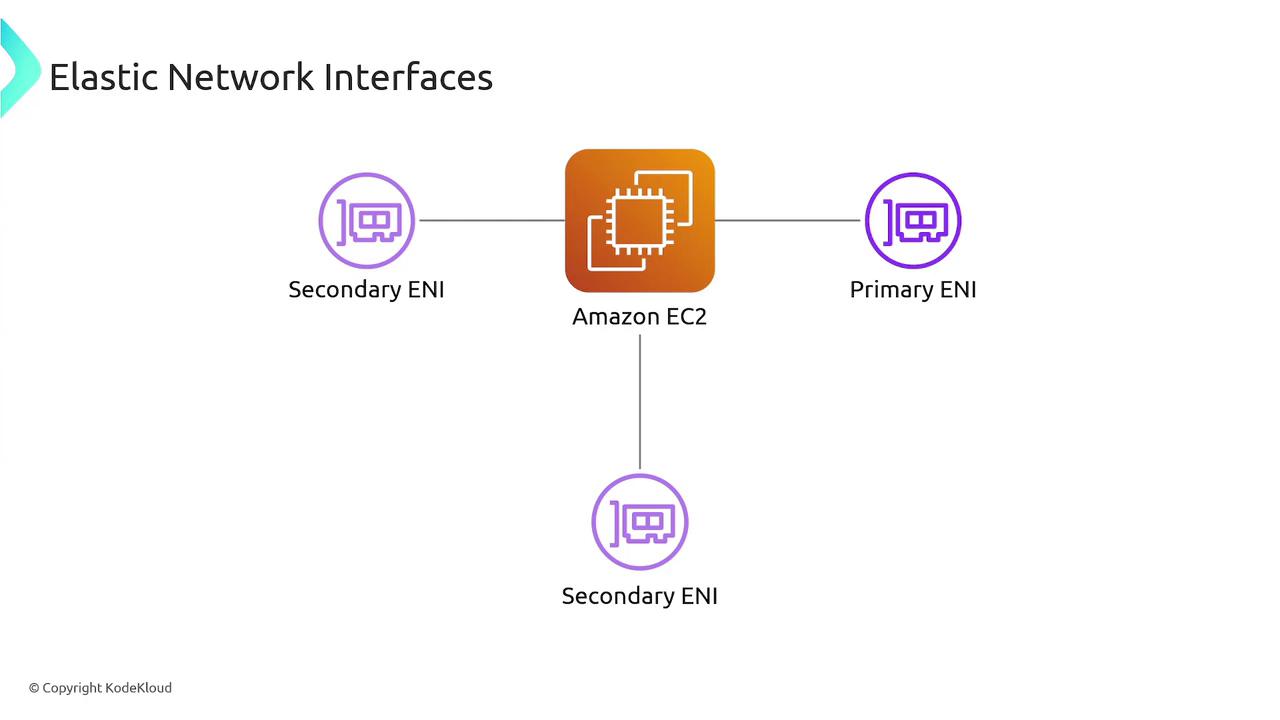
ENIs are a more advanced networking feature in AWS, and they take a bit of time and hands‑on practice to fully understand.
They’re powerful once you get comfortable with them, especially for multi‑homed architectures, failover patterns, and security‑focused designs.
For a deeper dive, AWS has a solid introductory post here:
📡 More:
- https://docs.aws.amazon.com/AWSEC2/latest/UserGuide/using-eni.html
- KodeKloud: Elastic Network Interfaces
EC2 Hibernate #
EC2 Hibernate
- The in-memory (RAM) state is preserved
- The instance boot is much faster! (the OS is not stopped / restarted)
- RAM state is written to a file in the root EBS volume
- The root EBS volume must be encrypted
Use cases
- Long-running processing
- Saving the RAM state
- Services that take time to initialize
Instance RAM Size - must be less than 150 GB
Instance Size - not supported for bare metal instances
AMI - Amazon Linux 2, Linux AMI, Ubuntu, RHEL, CentOS & Windows…
Root Volume - must be EBS, encrypted, not instance store
Available for On-Demand, Reserved and Spot Instances
‼️An instance can NOT be hibernated more than 60 days.
EC2 Fleet and Spot Fleet #
- Multiple instance types
A fleet can launch multiple instance types, ensuring it isn’t dependent on the availability of any single instance type. This increases the overall availability of instances in your fleet.
- Distributing instances across Availability Zones
A fleet can launch into multiple Availability Zones, enabling you to reduce costs and improve availability. If your fleet includes Spot Instances, the fleet automatically selects Availability Zones based on your preferences regarding price and interruptions.
- Multiple purchasing options
A fleet can launch multiple purchase options (Spot and On-Demand Instances), allowing you to optimize costs through Spot Instance usage. You can also take advantage of Reserved Instance and Savings Plans discounts by using them in conjunction with On-Demand Instances in the fleet.
- Automated replacement of Spot Instances
If your fleet includes Spot Instances, it can automatically request replacement Spot capacity if your Spot Instances are interrupted. Through Capacity Rebalancing, a fleet can also monitor and proactively replace your Spot Instances that are at an elevated risk of interruption.
- Reserve On-Demand capacity
A fleet can use an On-Demand Capacity Reservation to reserve On-Demand capacity. A fleet can also include Capacity Blocks for ML, allowing you to reserve GPU instances on a future date to support short duration machine learning (ML) workloads.
More info: EC2 Fleet and Spot Fleet
» Sources « #
Placement Groups:
Elastic Network Interface (ENI):
- https://docs.aws.amazon.com/AWSEC2/latest/UserGuide/using-eni.html
- KodeKloud: Elastic Network Interfaces
- 🔥Elastic Network Interfaces in the Virtual Private Cloud
EC2 Fleets:
» References « #
Cloud Practitioner: EC2
» Disclaimer « #
This series draws heavily from Stephane Maarek’s Ultimate AWS Certified Solutions Architect Associate 2026 course on Udemy.
His content was instrumental in helping me pass the certification.
| About the instructor | |
|---|---|
| 🌐 Website | 📺 YouTube |
| 𝕏 x.com |