- Welcome my DevOps blog./
- 🔰Posts/
- 🗂️My Trainings/
- AWS Trainings and Certifications/
- 🏅AWS Certified Solutions Architect - Associate/
- Solutions Architect: Containers on AWS/
Solutions Architect: Containers on AWS
Table of Contents
ℹ️ Associate‑level extension of the Other Compute Services section from the AWS Cloud Practitioner series.
| AWS Certifications Series » | |
|---|---|
| AWS Cloud Practitioner | AWS Solution Architect |
Introduction #
Introduction to Containers was covered in Other Compute Services (ECS, EKS, Lambda) section from the AWS Cloud Practitioner series.
| Tag: Docker | ||
|---|---|---|
| Docker | ECS | Fargate |
| EKS | ECR | Lambda |
More info:
Docker Containers Management on AWS #
- Amazon ECS: AWS’s native container orchestration platform
- Amazon EKS: Managed Kubernetes service based on open‑source Kubernetes
- AWS Fargate: Serverless compute engine for running containers with ECS or EKS
- Amazon ECR: Managed registry for storing container images
ECS #
ECS - EC2 Launch Type #
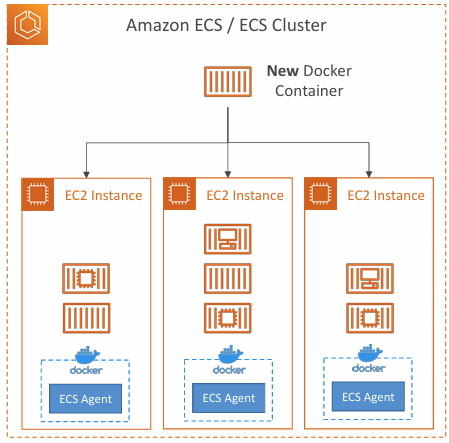
- ECS (Elastic Container Service) runs your Docker containers as ECS tasks on an ECS cluster
- With the EC2 launch type, you provision and manage the underlying EC2 instances yourself
- Each EC2 instance must run the ECS agent so it can register with the cluster
- ECS handles starting and stopping containers on those instances
ECS - Fargate Launch Type #
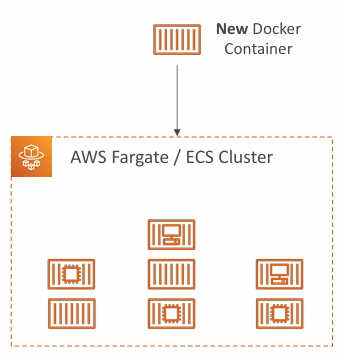
- Run Docker containers on AWS without managing any EC2 instances
- Fully serverless — no infrastructure to provision or maintain
- You define task definitions, and AWS runs the tasks with the CPU/RAM you specify
- Scaling is simple: just increase the number of tasks, with no EC2 capacity to worry about
ECS - IAM Roles for ECS #
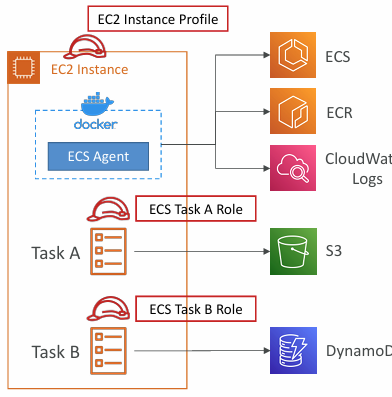
EC2 Instance Profile (EC2 launch type only):
- Used by the ECS agent
- Allows the agent to call ECS APIs
- Sends container logs to CloudWatch Logs
- Pulls container images from ECR
- Accesses secrets from Secrets Manager or SSM Parameter Store
ECS Task Role:
- Assigns a specific IAM role to each task
- Lets different ECS services use different permissions
- Defined directly in the task definition
ECS - Load Balancer Integrations #
- Application Load Balancer supported and works for most use cases
- Network Load Balancer recommended only for high throughput / high performance use cases, or to pair it with AWS Private Link
- Classic Load Balancer supported but not recommended (no advanced features – no Fargate)
ECS - Data Volumes (EFS) #
Mount EFS file systems onto ECS tasks
Works for both EC2 and Fargate launch types
Tasks running in any AZ will share the same data in the EFS file system
Fargate + EFS = Serverless
Use cases: persistent multi-AZ shared storage for your containers
‼️ Note:
- Amazon S3 cannot be mounted as a file system
ECS - Auto Scaling #
Fargate Launch Type - Auto Scaling #
Automatically adjusts the number of running ECS tasks
Uses Application Auto Scaling
Can scale on:
- CPU utilization
- Memory utilization
- ALB request count per target
Supports:
- Target Tracking (scale to a metric target)
- Step Scaling (based on CloudWatch alarms)
- Scheduled Scaling (time‑based, predictable changes)
Much simpler to configure because there are no EC2 instances to manage
EC2 Launch Type - Auto Scaling #
- Scaling ECS tasks may require adding more EC2 instances underneath
- Uses an Auto Scaling Group (ASG) to grow or shrink EC2 capacity
- ASG can scale on metrics like CPU utilization
- ECS Capacity Providers integrate the ASG with ECS
- Automatically provisions EC2 instances when tasks need more CPU/RAM
- Ensures the cluster has enough capacity for scheduled or scaled‑out tasks
ECR #
- ECR (Elastic Container Registry): stores and manages Docker images on AWS
- Supports private and public repositories (including the Amazon ECR Public Gallery)
- Fully integrated with ECS and backed by Amazon S3
- Access controlled through IAM (permission issues usually point to policy problems)
- Offers image vulnerability scanning, versioning, tagging, and lifecycle management
More info:
- Amazon Elastic Container Registry
- Amazon Elastic Container Registry Documentation
- Amazon ECR Public Gallery
EKS #
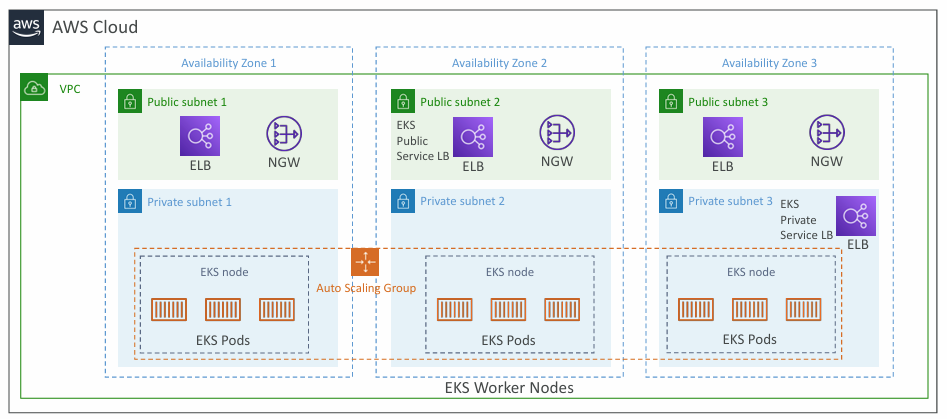
- Amazon EKS (Elastic Kubernetes Service): managed Kubernetes clusters on AWS
- Kubernetes is an open‑source system for deploying, scaling, and managing containerized (typically Docker) applications
- EKS is an alternative to ECS - same goal, different API and ecosystem
- Supports both EC2 worker nodes and Fargate for serverless pod execution
- Ideal when a company already uses Kubernetes on‑prem or in another cloud and wants to run Kubernetes on AWS
- Kubernetes is cloud‑agnostic, so it works across AWS, Azure, GCP, and on‑prem
- For multi‑region setups, deploy one EKS cluster per region
- Use CloudWatch Container Insights for logs and metrics
More info:
EKS - Diagram #
EKS - Node Types #
Managed Node Groups
- Creates and manages Nodes (EC2 instances) for you
- Nodes are part of an ASG managed by EKS
- Supports On-Demand or Spot Instances
Self-Managed Nodes
- Nodes created by you and registered to the EKS cluster and managed by an ASG
- You can use prebuilt AMI - Amazon EKS Optimized AMI
- Supports On-Demand or Spot Instances
AWS Fargate
- No maintenance required; no nodes managed
EKS - Data Volumes #
Define a StorageClass in your EKS cluster
Uses a CSI‑compliant storage driver
Supports:
- Amazon EBS
- Amazon EFS (including Fargate support)
- Amazon FSx for Lustre
- Amazon FSx for NetApp ONTAP
AWS App Runner (DISCONTINUED!) #
- Fully managed service for deploying web applications and APIs at scale
- No infrastructure expertise required
- Deploy directly from source code or a container image
- Automatically builds, deploys, and runs your application
- Provides automatic scaling, high availability, load balancing, and encryption
- Supports VPC access
- Can connect to databases, caches, and messaging services
- Ideal for web apps, APIs, microservices, and fast production rollouts
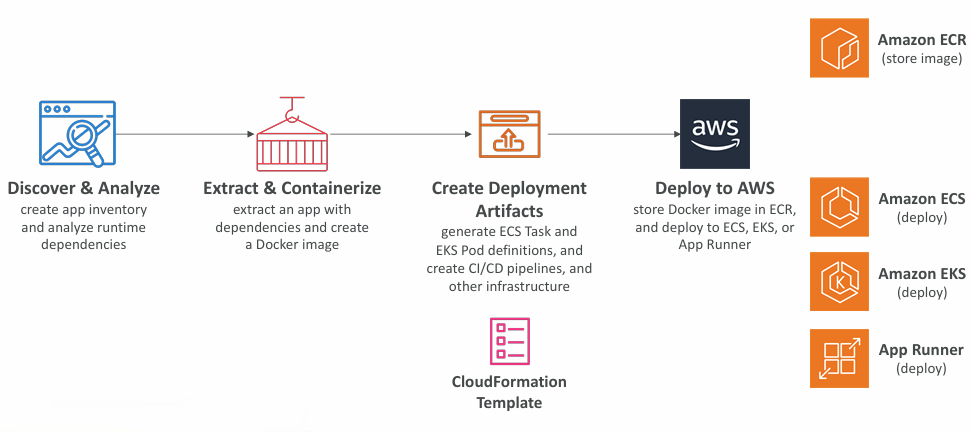
AWS App2Container (A2C) #
- CLI tool for migrating and modernizing Java and .NET web apps into Docker containers
- Supports lift‑and‑shift from on‑prem, VMs, or any cloud into AWS
- Speeds up modernization with no code changes required, suitable for legacy apps
- Generates CloudFormation templates for compute, networking, and related resources
- Builds and pushes generated container images to Amazon ECR
- Deploys to ECS, EKS, or App Runner
- Includes support for pre‑built CI/CD pipelines
» Sources « #
ECS:
ECR:
- Amazon Elastic Container Registry
- Amazon Elastic Container Registry Documentation
- Amazon ECR Public Gallery
EKS:
» References « #
Cloud Practitioner:
» Disclaimer « #
This series draws heavily from Stephane Maarek’s Ultimate AWS Certified Solutions Architect Associate 2026 course on Udemy.
His content was instrumental in helping me pass the certification.
| About the instructor | |
|---|---|
| 🌐 Website | 📺 YouTube |
| 𝕏 x.com |