- Welcome my DevOps blog./
- 🔰Posts/
- 🗂️My Trainings/
- AWS Trainings and Certifications/
- 🏅AWS Certified Solutions Architect - Associate/
- Solutions Architect: Serverless/
Solutions Architect: Serverless
Table of Contents
| AWS Certifications Series » | |
|---|---|
| AWS Cloud Practitioner | AWS Solution Architect |
Serverless means developers deploy code without managing any servers, infrastructure, or scaling themselves.
Serverless was pioneered by AWS Lambda but now also includes anything that’s managed: “databases, messaging, storage, etc.”
Serverless services in AWS #
- AWS Lambda
- DynamoDB
- Amazon Cognito
- AWS API Gateway
- Amazon S3
- AWS SNS & SQS
- AWS Kinesis Data Firehose
- Aurora Serverless
- Step Functions
- Fargate
- AWS SNS & SQS was covered in AWS Cloud Practitioner series.
- Amazon S3
AWS Lambda #
Virtual functions (no servers to manage)
Limited by time (short executions - up to 15 mins)
Run on-demand
Automated scaling
Simple pricing model: pay only for requests and compute time, with a generous free tier
Deep integration across AWS services
Supports multiple programming languages
Built‑in monitoring through CloudWatch
Easy to scale function resources (up to 10 GB RAM)
Increasing RAM also boosts CPU and network performance
Lambda language support #
- Supports Node.js, Python, Java, C#/.NET Core, PowerShell, and Ruby
- Allows custom runtimes via the Runtime API (e.g., Rust, Go)
- Can run Lambda container images, as long as they implement the Lambda Runtime API
- For arbitrary Docker images, ECS or Fargate is generally the better choice
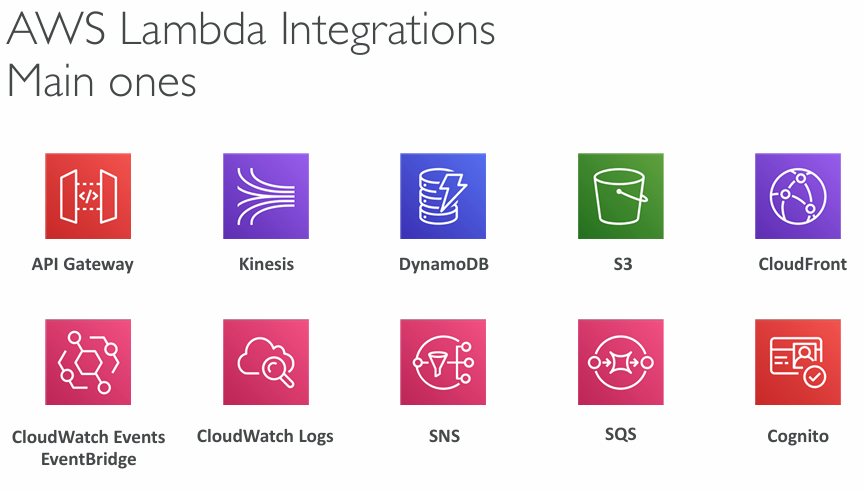
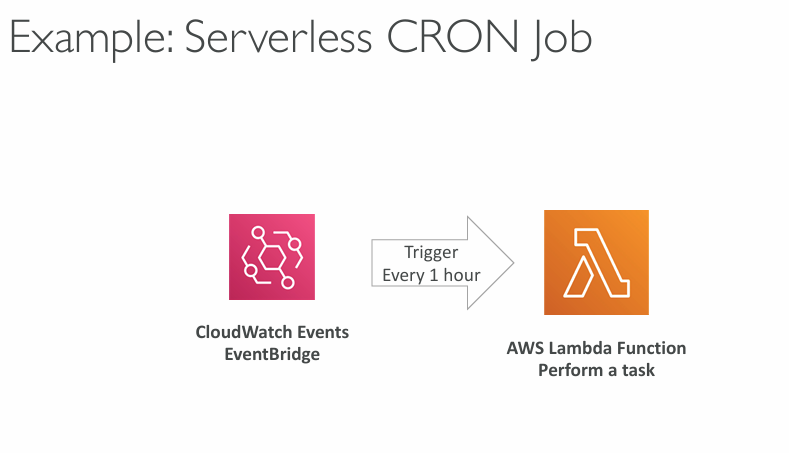
Lambda integrations #
Lambda pricing example #
You can find Lambda pricing information here: AWS Lambda pricing
- First 1M requests are free, then $0.20 per additional million
- You also get 400,000 GB‑seconds of compute time free each month
- Equals 400,000 seconds at 1 GB RAM
- Equals 3,200,000 seconds at 128 MB RAM
- After the free tier, compute costs $1.00 per 600,000 GB‑seconds
- Overall, Lambda is extremely cost‑efficient, which drives its popularity
Lambda Limits #
- Execution:
- Memory allocation: 128 MB - 10GB (1 MB increments)
- Maximum execution time: 900 seconds (15 minutes)
- Environment variables (4 KB)
- Disk capacity in the “function container” (in /tmp): 512 MB to 10GB
- Concurrency executions: 1000 (can be increased)
- Deployment:
- Lambda function deployment size (compressed .zip): 50 MB
- Size of uncompressed deployment (code + dependencies): 250 MB
- Can use the /tmp directory to load other files at startup
- Size of environment variables: 4 KB
Lambda Concurrency and Throttling #
- Concurrency limit: up to 1000 concurrent executions
- Can set a “reserved concurrency” at the function level (=limit)
- When invocations exceed your concurrency limit, Lambda throttles them
- Synchronous calls return a 429 ThrottleError
- Asynchronous calls are retried automatically, and if they still fail, they’re sent to the DLQ
- If you need a higher limit, open a support ticket
Synchronous invocation
The caller waits for the Lambda function to finish and gets the result immediately. Examples: API Gateway (REST), ALB, direct SDK calls.
If throttled → the caller instantly receives a 429 ThrottleError.
Asynchronous invocation
The caller does not wait for the function to finish. Lambda queues the event and processes it in the background. Examples: S3 events, SNS, EventBridge.
If throttled → Lambda automatically retries, and if it still fails after retries, the event is sent to a DLQ.
DLQ (Dead‑Letter Queue)
A DLQ is a fallback destination (SQS queue or SNS topic) where Lambda sends events that could not be processed successfully, even after retries. It lets you inspect failed events instead of losing them.
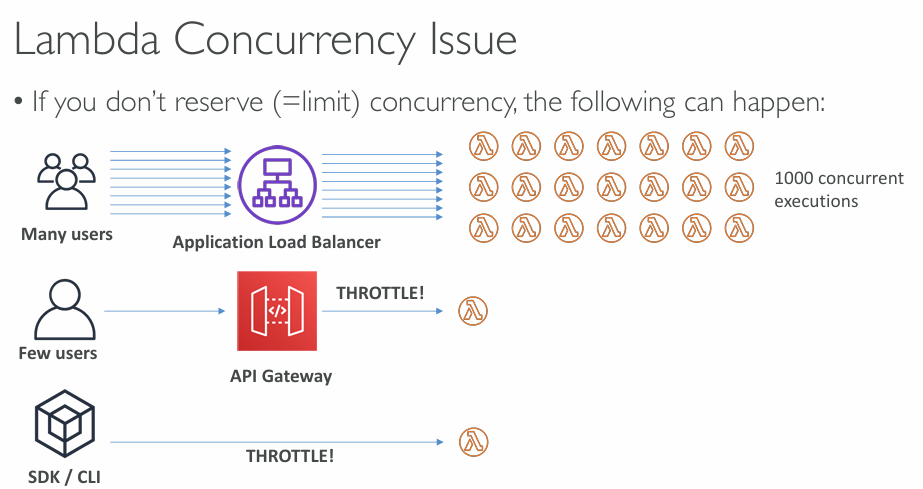
- If your function runs out of available concurrency, extra requests are throttled
- For 429 throttling errors or 500‑series system errors, Lambda requeues the event and retries for up to 6 hours
Cold Starts & Provisioned Concurrency #
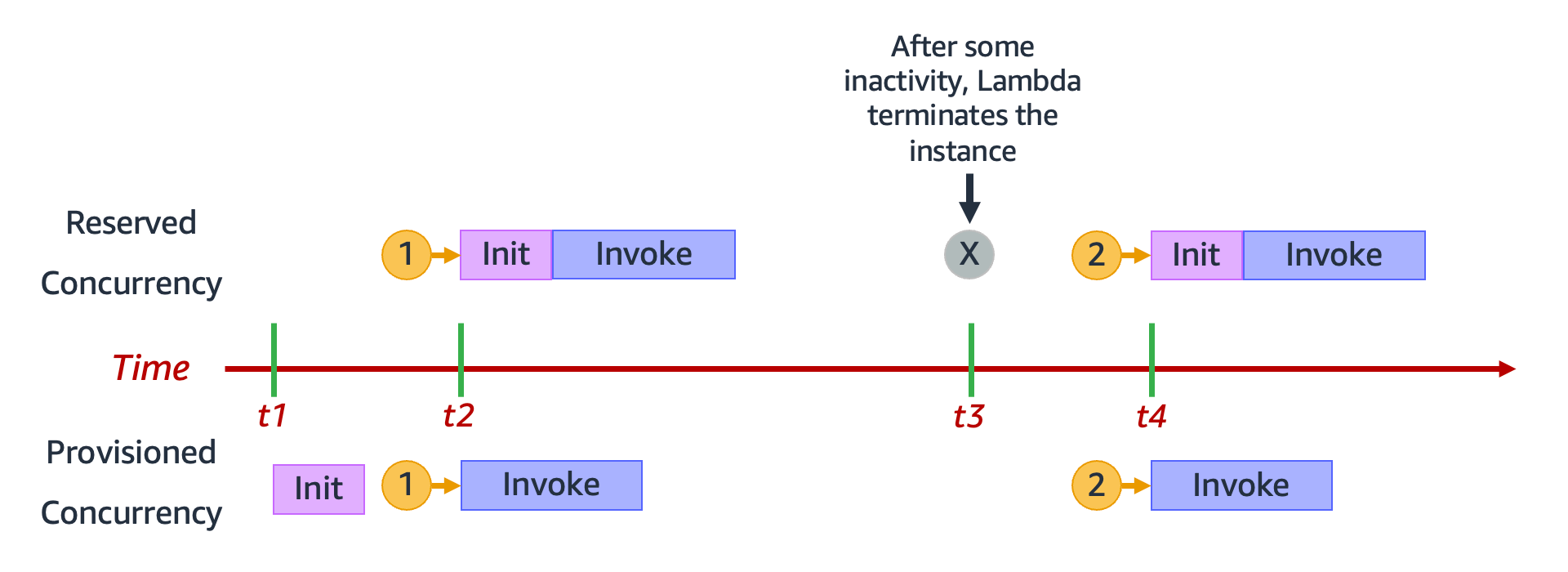
Cold Start: When a new Lambda instance is created, it must load your code and run initialization first; if this setup is heavy, the first request has noticeably higher latency.
Provisioned Concurrency: Pre‑warms a set number of Lambda instances so they’re always ready, eliminating cold starts and ensuring consistently low latency; can be managed automatically with Application Auto Scaling.
More info:
Lambda SnapStart #
- Boosts Lambda performance (especially for Java, Python, and .NET) by running functions from a pre‑initialized state instead of starting from scratch
- When a new version is published, Lambda initializes the function once, takes a snapshot of its memory and disk state, and caches it
- Subsequent invocations launch from this cached snapshot, delivering consistently low‑latency execution
Customization At The Edge #
- Modern apps often run some logic at the edge, close to users to reduce latency
- An Edge Function is code you attach to a CloudFront distribution to customize behavior
- CloudFront offers CloudFront Functions and Lambda@Edge, both globally deployed and fully serverless
- Ideal for customizing CDN content with no servers to manage
CloudFront Functions #
- Lightweight JavaScript functions designed for ultra‑high‑scale, low‑latency CDN customisation
- Start in under a millisecond and handle millions of requests per second
- Operate on Viewer Request (when CloudFront receives the request) and Viewer Response (before CloudFront returns the response)
- Fully native to CloudFront, with code managed entirely inside the service
Lambda@Edge #
- Lambda@Edge lets you run Node.js or Python functions at CloudFront locations, scaling to thousands of requests per second
- You can modify CloudFront traffic at all four lifecycle points:
- Viewer Request – when CloudFront first receives the request
- Origin Request – before CloudFront sends the request to the origin
- Origin Response – after the origin returns a response
- Viewer Response – before CloudFront sends the response back to the user
- You write and publish the function in us‑east‑1, and CloudFront automatically replicates it globally
CloudFront Functions vs. Lambda@Edge #
| CloudFront Functions | Lambda@Edge | |
|---|---|---|
| Runtime Support | JavaScript | Node.js, Python |
| Scale | Millions of requests per second | Up to 10,000 of requests per second per Region |
| Event Sources | - Viewer Request - Viewer Response | - Viewer Request - Viewer Response - Origin Request - Origin Response |
| Max. Execution Time | < 1 ms | Up to 30 seconds |
| Max. Memory | 2 MB | 128 MB up to 10 GB |
| Total Package Size | 10 KB | 1 MB – 50 MB |
| Network Access, File System Access | No | Yes |
| Access to the Request Body | No | Yes |
| Pricing | Free tier available, 1/6th price of @Edge | No free tier, charged per request & duration |
More info: Differences between CloudFront Functions and Lambda@Edge
CloudFront Functions & Lambda@Edge Use Cases #
- Website Security and Privacy
- Dynamic Web Application at the Edge
- Search Engine Optimization (SEO)
- Intelligently Route Across Origins and Data Centers
- Bot Mitigation at the Edge
- Real-time Image Transformation
- A/B Testing
- User Authentication and Authorization
- User Prioritization
- User Tracking and Analytics
Lambda Deployments #
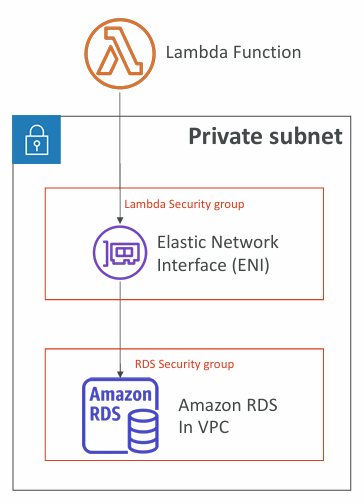
- By default, Lambda runs outside your VPC in an AWS‑managed VPC
- Because of this, it cannot directly reach private resources in your VPC such as RDS, ElastiCache, or internal load balancers
Lambda in VPC #
- You must define the VPC ID, the Subnets and the Security Groups
- Lambda will create an ENI (Elastic Network Interface) in your subnets
Lambda with RDS Proxy #
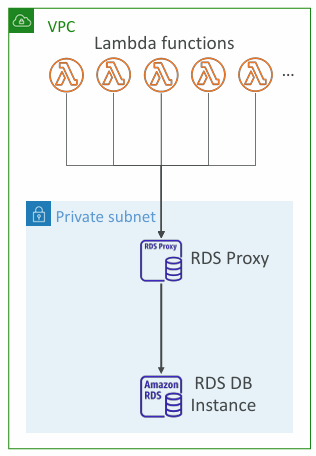
- When Lambda connects directly to a database, high traffic can create too many open connections
- RDS Proxy solves this by pooling and reusing connections, improving scalability
- It also boosts availability by preserving connections during failovers and cutting failover time by up to 66%
- Security improves through IAM authentication and credential storage in Secrets Manager
- Because RDS Proxy is never publicly accessible, the Lambda function must run inside your VPC
Invoking Lambda from RDS & Aurora #
- Your database can directly invoke Lambda functions to process events from inside the DB
- Supported on RDS PostgreSQL and Aurora MySQL
- The DB instance must have outbound network access to reach Lambda (Public, NAT Gateway, or VPC Endpoints)
- The DB also needs permission to invoke the function via a Lambda resource‑based policy and an IAM policy
DynamoDB #
ℹ️ DynamoDB coverage at AWS Cloud Practitioner level: DynamoDB.
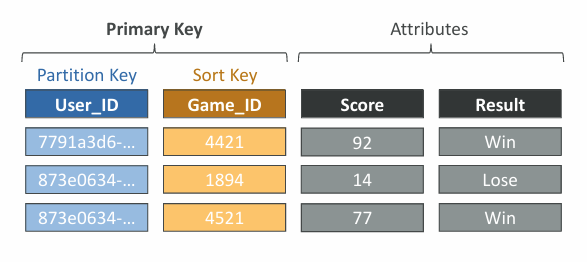
- DynamoDB stores data in tables, each defined by a primary key chosen at creation
- Tables can contain unlimited items, and each item is made of attributes that can evolve over time
- Maximum item size is 400 KB
- Supports scalar types (String, Number, Binary, Boolean, Null), document types (List, Map), and set types (String/Number/Binary sets)
- This flexible data model allows DynamoDB schemas to change and grow quickly
Read/Write Capacity Modes #
Determines how you allocate and pay for table read/write throughput
Provisioned mode (default):
- You set the number of reads/writes per second
- Requires capacity planning
- Billed by RCUs (Read Capacity Unit) and WCUs (Write Capacity Unit)
- Can enable auto‑scaling to adjust capacity automatically
On‑Demand mode:
- Scales read/write capacity automatically with traffic
- No planning required
- Pay only for actual usage (higher cost per request)
- Ideal for unpredictable workloads or sudden spikes
DynamoDB Accelerator (DAX) #
- Fully managed, highly available in‑memory cache for DynamoDB
- Reduces read load by serving cached results
- Provides microsecond‑level latency for cached reads
- Works with existing DynamoDB APIs, so no application changes required
- Default cache TTL is 5 minutes
Stream Processing #
- A DynamoDB Stream is an ordered log of item‑level changes (inserts, updates, deletes)
- Common uses include:
- Triggering real‑time actions (e.g., sending a welcome email)
- Real‑time analytics
- Populating or updating derived tables
- Cross‑region replication
- Invoking Lambda whenever your table changes
| DynamoDB Streams | Kinesis Data Streams (newer) |
|---|---|
| 24 hours retention | 1 year retention |
| Limited no. of consumers | High no. of consumers |
| Process using AWS Lambda Triggers, or DynamoDB Stream Kinesis adapter | Process using AWS Lambda, Kinesis Data Analytics, Kineis Data Firehose, AWS Glue Streaming ETL… |
DynamoDB Global Tables #
- Make a DynamoDB table accessible with low latency in multiple-regions
- Active-Active replication
- Applications can READ and WRITE to the table in any region
- Must enable DynamoDB Streams as a pre-requisite
DynamoDB - Time To Live (TTL) #
- Automatically delete items after an expiry timestamp
- Use cases: reduce stored data by keeping only current items, adhere to regulatory obligations, web session handling…
DynamoDB - Backups for disaster recovery #
- PITR (point-in-time recovery) provides continuous backups for up to 35 days, allowing restore to any point in that window
- Restoring from PITR always creates a new table
- On‑demand backups are full backups kept until you delete them, with no impact on performance
- Backups can be managed through AWS Backup, including cross‑region copies
- Restores from on‑demand backups also create a new table
DynamoDB - Integration with Amazon S3 #
Export to S3:
- Requires PITR and supports any point in the last 35 days
- No impact on table read capacity
- Useful for analytics, audits, or ETL workflows
- Data exported in DynamoDB JSON or ION format
Import from S3:
- Supports CSV, DynamoDB JSON, and ION
- Doesn’t consume write capacity and always creates a new table
- Any import errors are logged in CloudWatch Logs
AWS API Gateway #
- Combine API Gateway with Lambda for a fully managed, no‑infrastructure setup
- Supports WebSocket APIs
- Manages API versioning and multiple environments (dev/test/prod)
- Handles authentication, authorization, API keys, and throttling
- Import Swagger/OpenAPI definitions to build APIs quickly
- Can transform and validate requests/responses
- Generates SDKs and API specs
- Supports response caching
API Gateway - integrations #
- Lambda integration:
- Directly invoke a Lambda function
- Easiest way to expose a serverless REST API
- HTTP integration:
- Forward requests to any HTTP backend (on‑prem, ALB, internal APIs)
- Adds features like throttling, caching, auth, and API keys
- AWS service integration:
- Call AWS APIs through API Gateway (e.g., start Step Functions, send SQS messages)
- Useful for adding authentication, public access, and rate control
API Gateway - Endpoint Types #
Edge‑Optimized (default):
- Best for global clients
- Requests go through CloudFront edge locations for lower latency
- The API itself still resides in a single region
Regional:
- Intended for same‑region clients
- Can pair with your own CloudFront distribution for custom caching and routing
Private:
- Accessible only from your VPC via an interface VPC endpoint (ENI)
- Access controlled using a resource policy
Amazon Kinesis Data Streams #
More info:
What Kinesis Data Streams does #
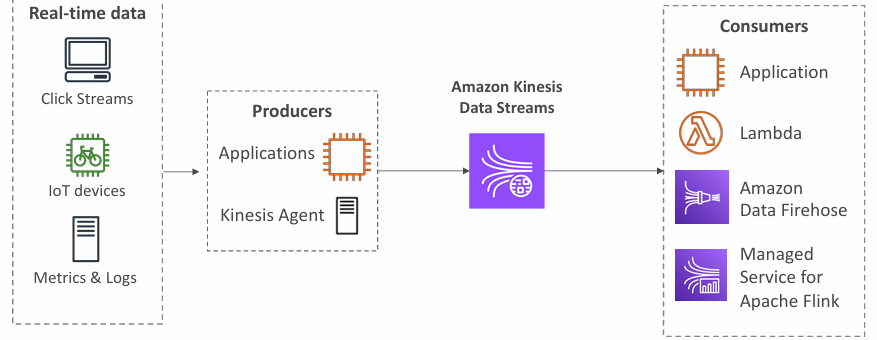
- Ingests massive volumes of streaming data (clickstreams, IoT telemetry, logs, financial events) at gigabytes per second from thousands of producers.
- Buffers and stores records durably across multiple AZs, with retention from 24 hours up to 365 days.
- Allows multiple consumers to read the same data independently without deleting it (replayable stream).
- Data can’t be deleted from Kinesis (until it expires).
- Guarantees ordered records within each shard (FIFO at shard level).
- At-rest KMS encryption, in-flight HTTPS encryption
Typical use cases:
- Real‑time analytics and dashboards
- Application monitoring and anomaly detection
- IoT data ingestion
- Clickstream analysis
- Event‑driven architectures
Amazon Data Firehose #
Amazon Kinesis Data Firehose is a fully managed, serverless service for loading streaming data directly into AWS destinations - without needing to build or manage your own ingestion pipelines.
Core idea
Firehose is the easiest way to take real‑time data and deliver it to storage, analytics, or observability tools. Unlike Kinesis Data Streams, Firehose does not require you to manage shards, scaling, or consumers. It handles everything automatically.
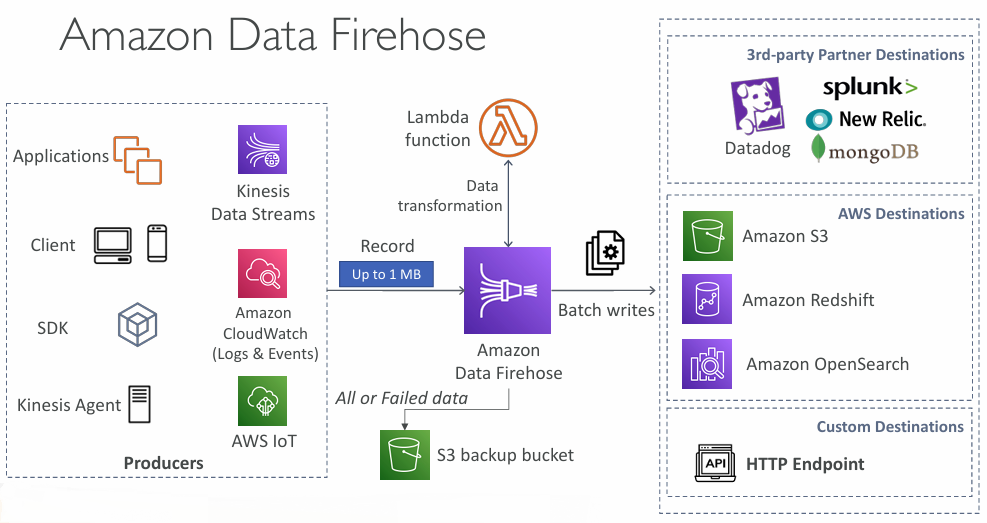
Typical use cases:
- Log ingestion (CloudWatch Logs, application logs, VPC Flow Logs)
- Clickstream analytics
- IoT telemetry delivery
- Security and audit data pipelines
- ETL pipelines landing raw data into S3 data lakes
Kinesis Data Streams vs Amazon Data Firehose #
| Kinesis Data Streams | Amazon Data Firehose |
|---|---|
| Streaming data collection | Load streaming data into S3 / Redshift / OpenSearch / 3rd party / custom HTTP |
| Producer & Consumer code | Fully managed |
| Real-time | Near real-time |
| Provisioned / On-Demand mode | Automatic scaling |
| Data storage up to 365 days | No data storage |
| Replay Capability | Doesn’t support replay capability |
AWS Step Functions #
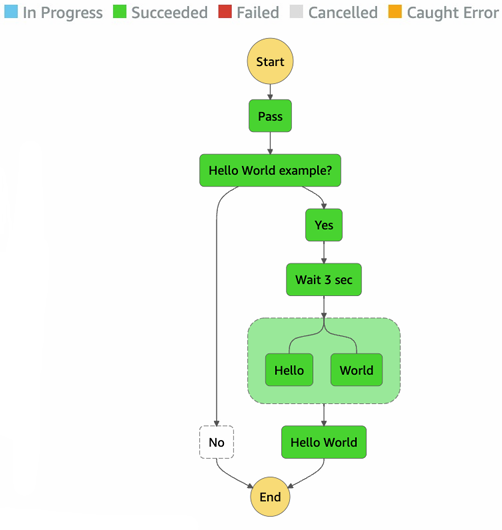
- Build serverless, visual workflows to orchestrate Lambda functions
- Supports sequences, parallel steps, branching, timeouts, and robust error handling
- Integrates with many AWS and external systems: EC2, ECS, on‑prem servers, API Gateway, SQS, and more
- Can include human approval steps in a workflow
- Ideal for order processing, data pipelines, web applications, and general workflow automation
Amazon Cognito #
ℹ️ Amazon Cognito coverage at AWS Cloud Practitioner level: Amazon Cognito.
- Provides identities for users of your web or mobile apps
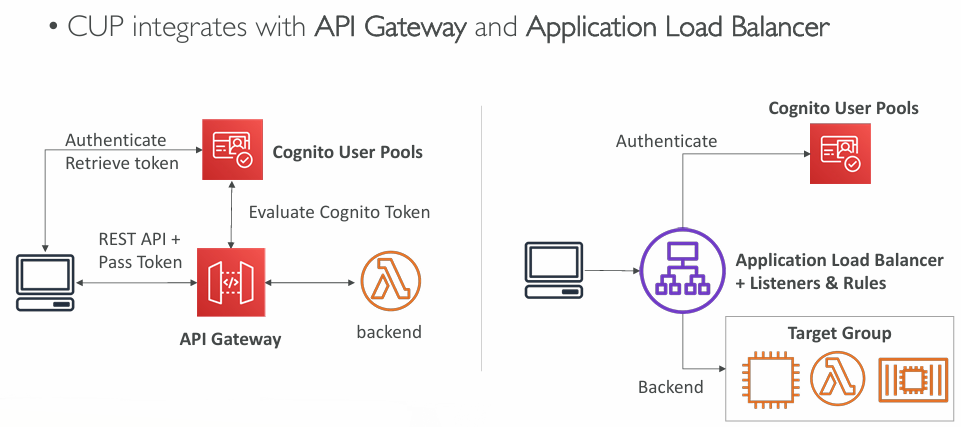
- User Pools: user sign‑up/sign‑in, integrates with API Gateway and ALB
- Identity Pools: issue AWS credentials so users can access AWS services directly; can use a User Pool as the identity provider
- Use Cognito instead of IAM for large numbers of app/mobile users or SAML‑based authentication
Cognito User Pools (CUP) #
- Create a serverless database of user for your web & mobile apps
- Simple login: Username (or email) / password combination
- Password reset
- Email & Phone Number Verification
- Multi-factor authentication (MFA)
- Federated Identities: users from Facebook, Google, SAML…
- Provides identities so users can receive temporary AWS credentials
- Supports Cognito User Pools and third‑party identity providers
- Users can access AWS services directly or via API Gateway
- IAM policies for these credentials are defined in Cognito and can be customised per user
Serverless - example architectures #
Mobile application: MyTodoList #
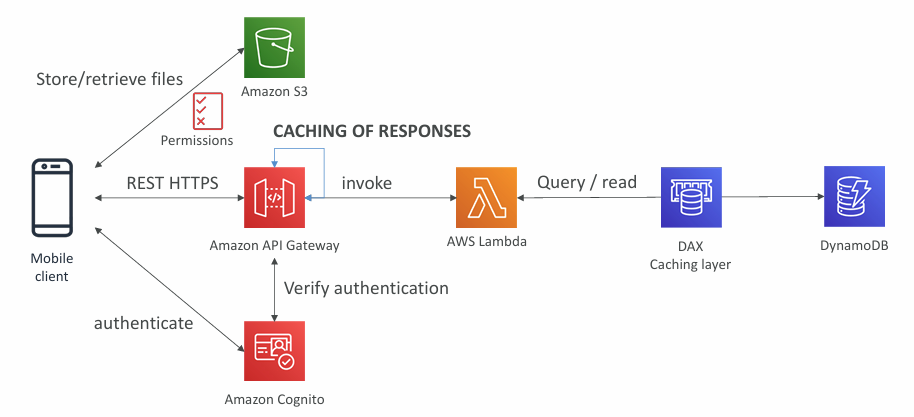
- Serverless REST stack: API Gateway + Lambda + DynamoDB over HTTPS
- Cognito issues temporary AWS credentials so app users can directly access restricted S3 (and similarly DynamoDB, Lambda, etc.)
- DAX accelerates DynamoDB reads with in‑memory caching
- API Gateway adds request‑level caching
- Cognito provides both authentication and authorization
Serverless hosted website: MyBlog.com #
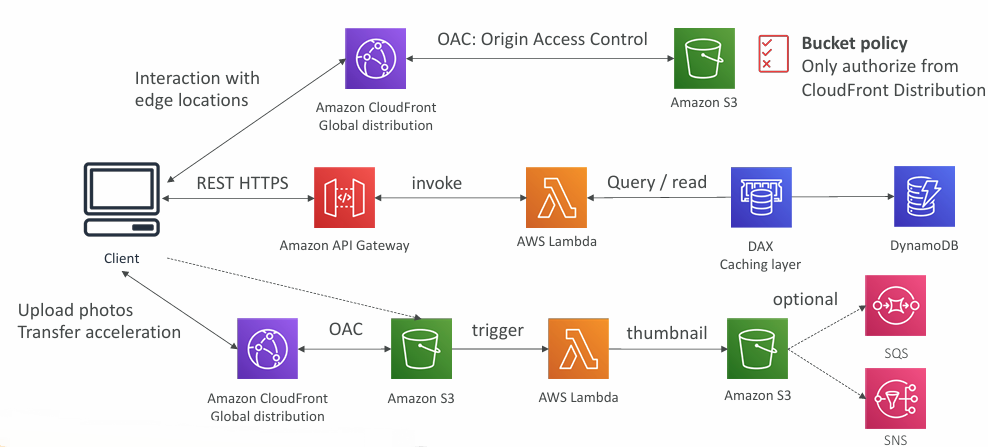
- CloudFront delivered static content from S3
- The REST API was serverless and public, so no Cognito was required
- A Global DynamoDB table provided worldwide low‑latency data access (Aurora Global DB was an alternative)
- DynamoDB Streams triggered a Lambda function
- That Lambda used an IAM role allowing it to send emails via SES
Micro Services Considerations #
Microservices introduce several challenges: each new service adds repeated setup and operational overhead, it becomes harder to optimise server utilisation across many small workloads, running multiple versions of multiple services at once increases complexity, and clients often need extra logic to integrate with a growing number of separate endpoints.
Serverless patterns help reduce these issues: API Gateway and Lambda scale automatically and charge only for actual usage, environments and APIs can be cloned or reproduced easily, and API Gateway can generate client SDKs through its Swagger/OpenAPI integration, simplifying client-side development.
» Sources « #
Lambda:
Kinesis:
» References « #
TAG: Serverless
» Disclaimer « #
This series draws heavily from Stephane Maarek’s Ultimate AWS Certified Solutions Architect Associate 2026 course on Udemy.
His content was instrumental in helping me pass the certification.
| About the instructor | |
|---|---|
| 🌐 Website | 📺 YouTube |
| 𝕏 x.com |