- Welcome my DevOps blog./
- 🔰Posts/
- 🗂️My Trainings/
- AWS Trainings and Certifications/
- 🏅AWS Certified Solutions Architect - Associate/
- Solutions Architect: Storage/
Solutions Architect: Storage
Table of Contents
ℹ️ Associate‑level extension of the Storage section from the AWS Cloud Practitioner series. In this post, I expand on key EC2 concepts and introduce deeper topics relevant to the Associate‑level understanding.
| AWS Certifications Series » | |
|---|---|
| AWS Cloud Practitioner | AWS Solution Architect |
ℹ️ There’s very little difference between the Cloud Practitioner and Associate content in the Storage domain, so I’m only covering the additional Associate‑level points here.
For full foundational coverage, refer to the table below from the Cloud Practitioner section:
| Tag: Storage, S3 | ||
|---|---|---|
| Storage | - EBS - EC2 Instance Store | - EFS - FSx |
| - S3 - CLF-C02 - S3 - SAA-C03 | ||
| AMI | - AMI |
EBS Volume Types #
EBS volumes come in six types:
- gp2 / gp3 (SSD) - General‑purpose SSD volumes offering a balance of cost and performance for most workloads
- io1 / io2 Block Express (SSD) - Highest‑performance SSD options for mission‑critical, low‑latency, or high‑throughput workloads
- st1 (HDD) - Low‑cost, throughput‑optimised HDD volumes for frequently accessed, streaming‑style workloads
- sc1 (HDD) - Lowest‑cost HDD option for infrequently accessed data
Additional notes:
- EBS volumes are defined by size, throughput, and IOPS
- Only gp2/gp3 and io1/io2 Block Express can be used as boot volumes
General Purpose and IOPS #
| Amazon EBS General Purpose SSD volumes | Amazon EBS Provisioned IOPS SSD volumes | |||
|---|---|---|---|---|
| Volume type | gp3 | gp2 | io2 Block Express | io1 |
| Durability | 99.8% - 99.9% durability (0.1% - 0.2% annual failure rate) | 99.999% durability (0.001% annual failure rate) | 99.8% - 99.9% durability (0.1% - 0.2% annual failure rate) | |
| Use cases | - Transactional workloads - Virtual desktops - Medium-sized, single-instance databases - Low-latency interactive applications - Boot volumes - Development and test environments | Workloads that require: - Consistent sub-millisecond latency with average latency under 500 microseconds - Sustained IOPS performance - More than 80,000 IOPS or 2,000 MiB/s of throughput | Workloads that require: - sustained IOPS performance or more than 16,000 IOPS - I/O-intensive database workloads | |
| Volume size | 1 GiB - 64 TiB | 1 GiB - 16 TiB | 4 GiB - 64 TiB | 4 GiB - 16 TiB |
| Max IOPS | 80,000 3 (25.6 KiB I/O 4) | 16,000 (16 KiB I/O 4) | 256,000 3 (16 KiB I/O 4) | 64,000 (16 KiB I/O 4) |
| Max throughput | 2,000 MiB/s | 250 MiB/s 1 | 4,000 MiB/s | 1,000 MiB/s 2 |
| Amazon EBS Multi-attach | Not supported | Supported | ||
| NVMe reservations | Not supported | Supported | Not supported | |
| Boot volume | Supported |
📡 Source: Amazon EBS volume types: Solid state drive (SSD) volumes
HDD #
| Throughput Optimized HDD volumes | Cold HDD volumes | |
|---|---|---|
| Volume type | st1 | sc1 |
| Durability | 99.8% - 99.9% durability (0.1% - 0.2% annual failure rate) | |
| Use cases | - Big data - Data warehouses - Log processing | - Throughput-oriented storage for data that is infrequently accessed - Scenarios where the lowest storage cost is important |
| Volume size | 125 GiB - 16 TiB | |
| Max IOPS per volume (1 MiB I/O) | 500 | 250 |
| Max throughput per volume | 500 MiB/s | 250 MiB/s |
| Amazon EBS Multi-attach | Not supported | |
| Boot volume | Not supported |
📡 Source: Hard disk drive (HDD) volumes
For more information about the Hard disk drives (HDD) volumes, see Amazon EBS Throughput Optimized HDD and Cold HDD volumes.
📡 Source: Amazon EBS volume types: Amazon EBS volume types
EBS Multi‑Attach (io1 / io2 family) #
- Allows the same EBS volume to be attached to multiple EC2 instances within the same Availability Zone
- Each attached instance gets full read/write access to the high‑performance volume
- Supports up to 16 EC2 instances at once
- Designed for clustered Linux applications that require shared block‑level storage
- Applications must handle concurrent writes safely - AWS does not manage write coordination
- Requires a cluster‑aware file system (standard single‑node file systems like XFS or EXT4 will corrupt data)
Use cases #
- Increasing availability for clustered workloads (e.g., Teradata, shared‑disk clustering, HA databases)
- Scenarios where multiple nodes need simultaneous, low‑latency access to the same block device
Examples of cluster‑aware file systems #
- GFS2 (Red Hat Global File System 2)
- OCFS2 (Oracle Cluster File System 2)
- BeeGFS (parallel cluster file system)
- Lustre (high‑performance distributed file system)
These file systems are designed to coordinate locks, manage concurrent writes, and prevent corruption - something traditional file systems cannot do.
📡 Source: Attach an EBS volume to multiple EC2 instances using Multi-Attach
EBS Encryption #
- Encrypting an EBS volume protects data at rest, data in transit between the instance and the volume, all snapshots, and any volumes created from those snapshots
- Encryption and decryption are handled transparently by AWS
- Performance impact is minimal
- Uses KMS-managed keys (AES‑256)
- Copying an unencrypted snapshot allows you to create an encrypted version
- Snapshots taken from encrypted volumes remain encrypted automatically
📡 Source: Amazon EBS encryption
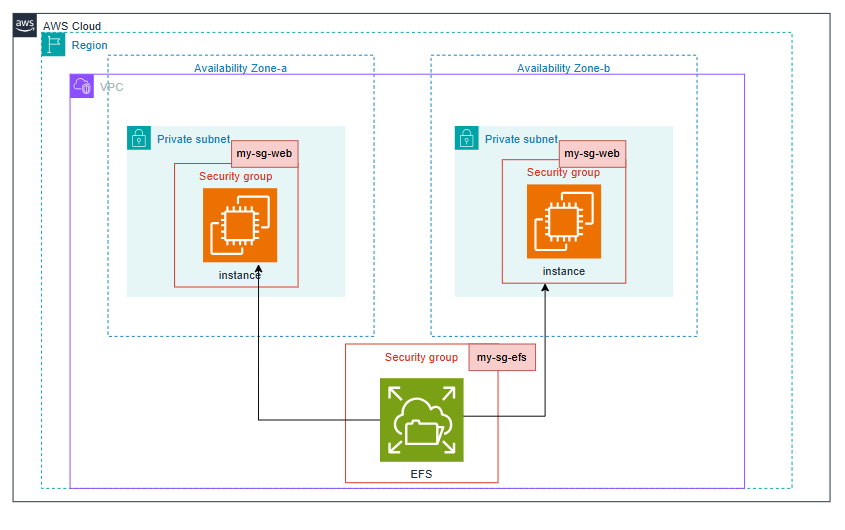
EFS #
ℹ️ For more information about Elastic File System, refer to EFS section from the AWS Cloud Practitioner series.
» Sources « #
- Amazon EBS volume types
- Attach an EBS volume to multiple EC2 instances using Multi-Attach
- Amazon EBS encryption
» References « #
- Cloud Practitioner: Storage
- Cloud Practitioner: EBS
- Cloud Practitioner: EC2 Instance Store
- Cloud Practitioner: EFS
- Cloud Practitioner: FSx
- Cloud Practitioner: AMI
- EC2
- Cloud Practitioner: EC2 (CLF-C02)
- Solutions Architect: EC2 (SAA-C03)
» Disclaimer « #
This series draws heavily from Stephane Maarek’s Ultimate AWS Certified Solutions Architect Associate 2026 course on Udemy.
His content was instrumental in helping me pass the certification.
| About the instructor | |
|---|---|
| 🌐 Website | 📺 YouTube |
| 𝕏 x.com |