- Welcome my DevOps blog./
- 🔰Posts/
- 🗂️My Trainings/
- AWS Trainings and Certifications/
- 🏅AWS Certified Solutions Architect - Associate/
- Solutions Architect: Advanced Identity/
Solutions Architect: Advanced Identity
Table of Contents
ℹ️ Associate‑level extension of the Identity and Access management section from the AWS Cloud Practitioner series.
| AWS Certifications Series » | |
|---|---|
| AWS Cloud Practitioner | AWS Solution Architect |
AWS Organizations #
- A global service for centrally managing multiple AWS accounts
- The primary account is the management account; all others are member accounts
- Member accounts can belong to only one organization
- Supports consolidated billing with a single payment method and shared usage‑based discounts (EC2, S3, etc.)
- Reserved Instances and Savings Plans discounts are shared across accounts
- Provides APIs to automate account creation and management
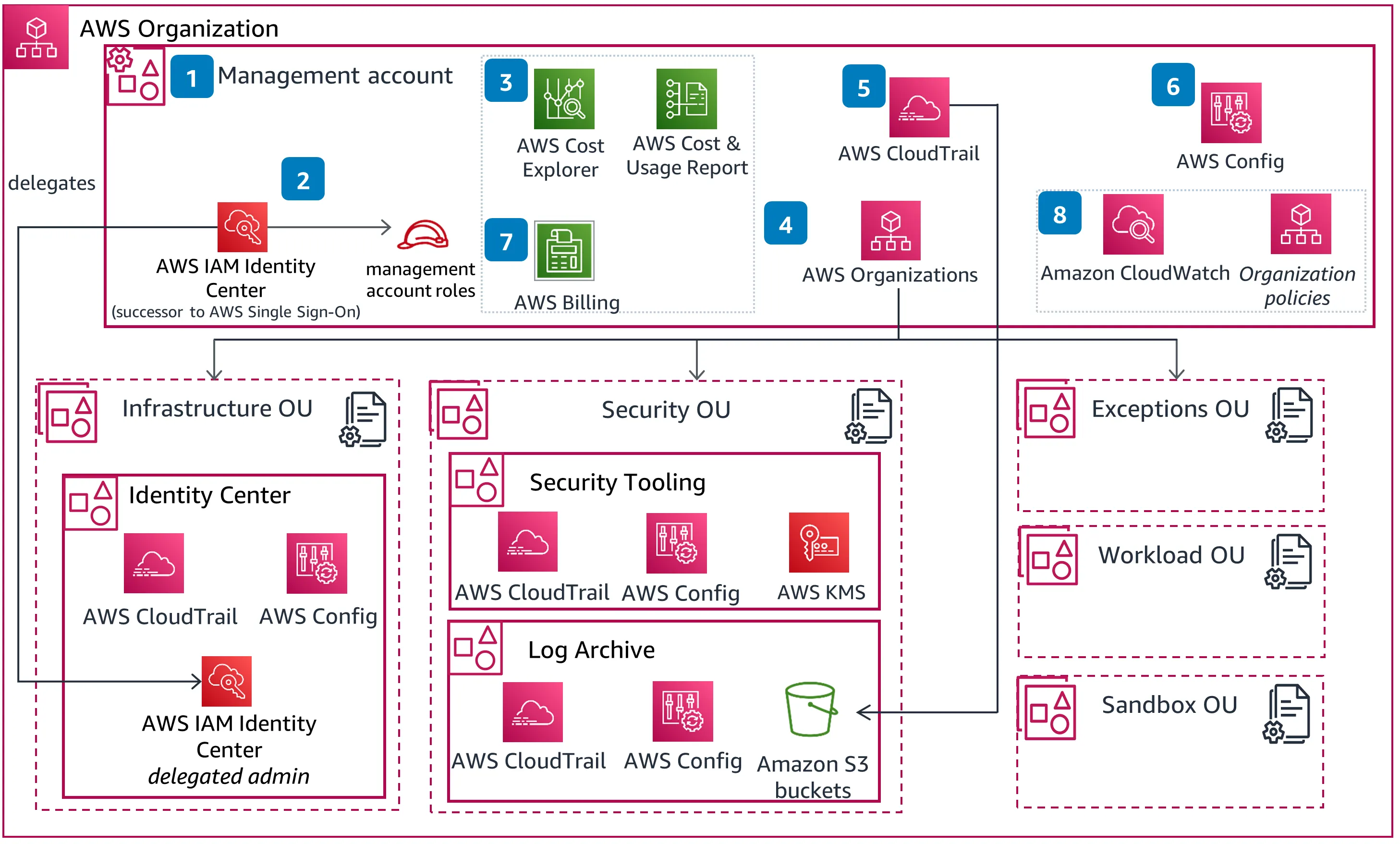
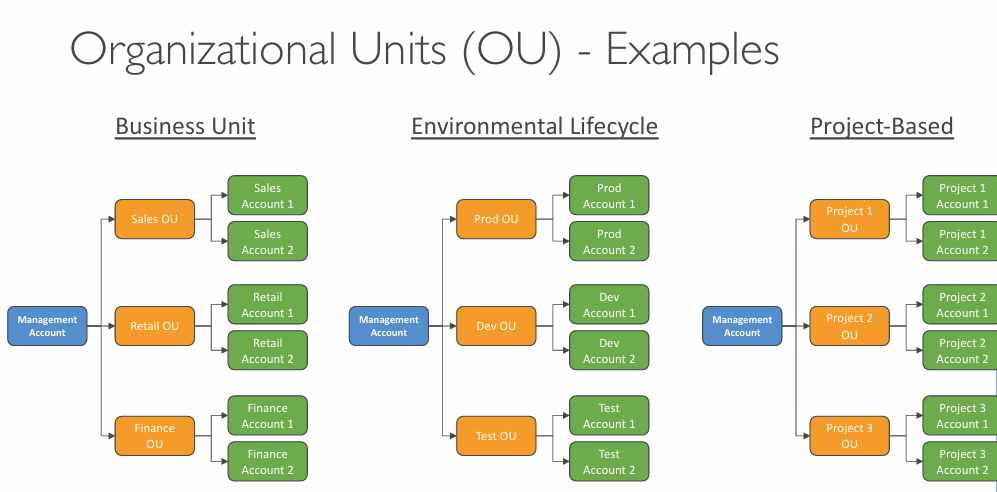
- Encourages a multi‑account strategy instead of packing everything into one account with many VPCs
- Lets you apply tagging standards for clear, centralised cost allocation
- Enable CloudTrail across all accounts and centralise logs in a dedicated S3 logging account
- Send CloudWatch Logs to a central logging account as well
- Use cross‑account roles for centralised administration
SCP #
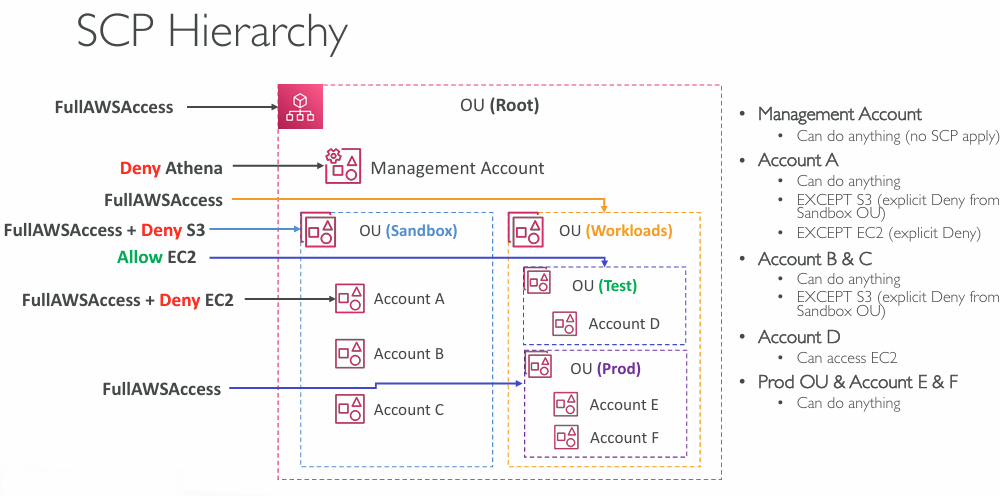
- Strengthen security with Service Control Policies (SCPs) applied to OUs or individual accounts to restrict what IAM users and roles can do
- SCPs don’t apply to the management account, which always retains full admin rights
- Like IAM, SCPs require explicit allows from the root OU down to the target account - nothing is permitted by default
Important nuance
SCPs do not grant permissions. They only define the maximum allowed permissions.
Meaning:
- If an SCP denies an action → no one in the account can do it, including root.
- If an SCP allows an action → a user/role still needs IAM permissions to perform it.
SCP Least Privilege #
{
  "Version": "2012-10-17",
  "Statement": [
    {
      "Sid": "DenyAllUnnecessaryServices",
      "Effect": "Deny",
      "NotjsoAction": [
        "s3:*",
        "lambda:*",
          ...
      ],
      "Resource": "*"
    }
  ]
}
Use the Service control policy examples page as a reference - it includes a GitHub repository with ready‑made SCP samples you can adapt.
More info: 🔥Service control policy examples
AWS Organizations - Tag Policies #
- Enforces consistent tagging across all accounts in your AWS Organization
- Defines allowed tag keys and values to maintain proper categorisation and support cost allocation and Attribute-based Access Control (ABAC)
- Blocks non‑compliant tagging operations on specified services and resources (but doesn’t affect untagged resources)
- Produces reports showing compliant and non‑compliant resources
- Can integrate with EventBridge to detect and react to tagging violations
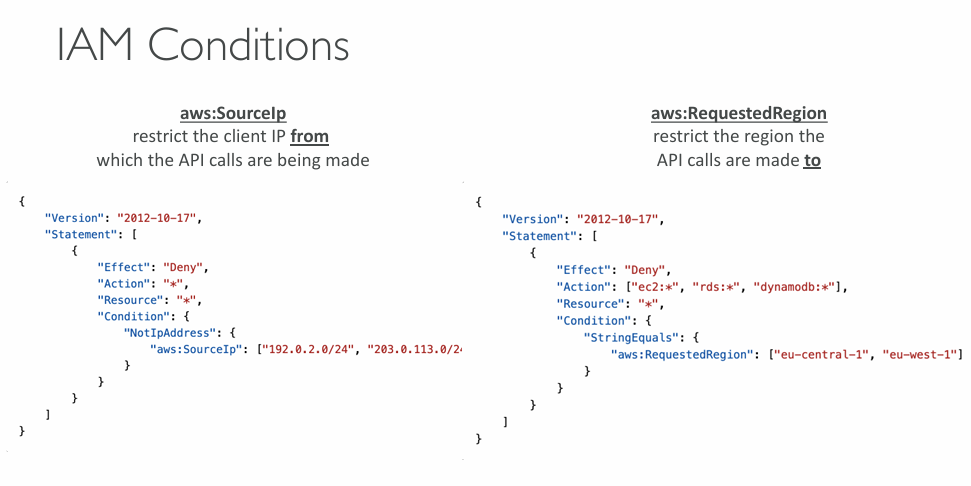
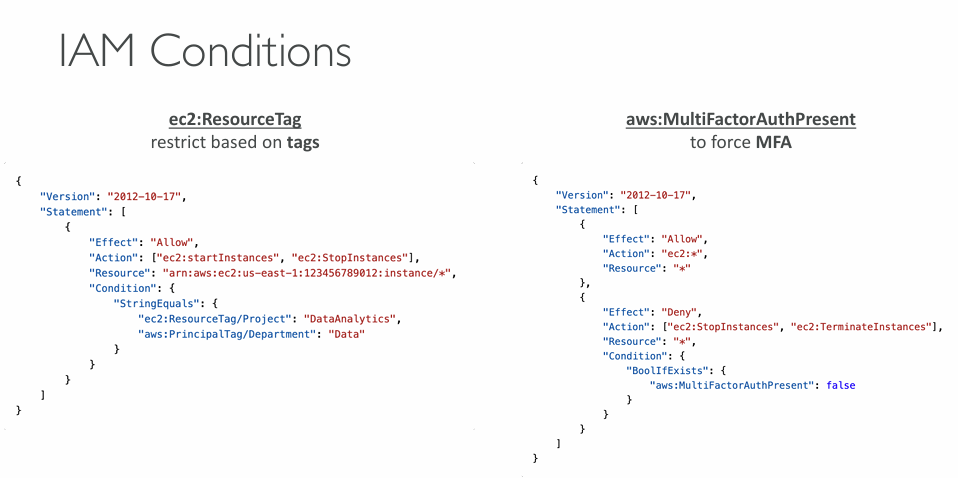
IAM Conditions #
IAM for S3 #
  policy = jsonencode({
    Version = "2012-10-17"
    Statement = [
      {
        Effect = "Allow"
        Action = [
          "s3:ListBucket"
        ]
        Resource = [
          "arn:aws:s3:::test"
        ]
      },
      {
        Effect = "Allow"
        Action = [
          "s3:GetObject",
          "s3:PutObject",
          "s3:DeleteObject"
        ]
        Resource = [
          "arn:aws:s3:::test/*"
        ]
      },
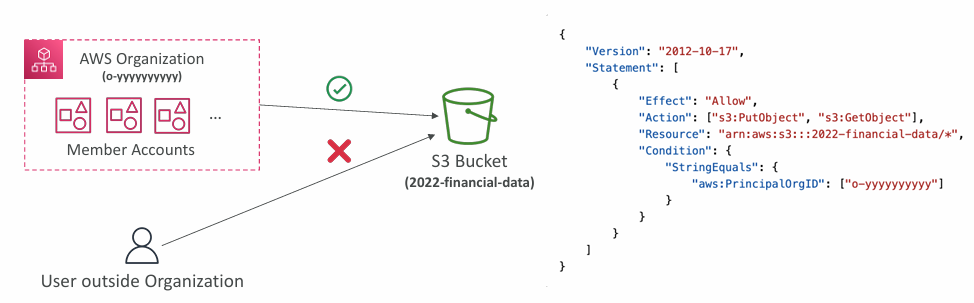
Resource Policies & aws:PrincipalOrgID #
aws:PrincipalOrgID can be used in any resource policies to restrict access to accounts that are member of an AWS Organization
IAM Roles vs Resource Based Policies #
- Cross account:
- attaching a resource-based policy to a resource (example: S3 bucket policy)
- OR using a role as a proxy
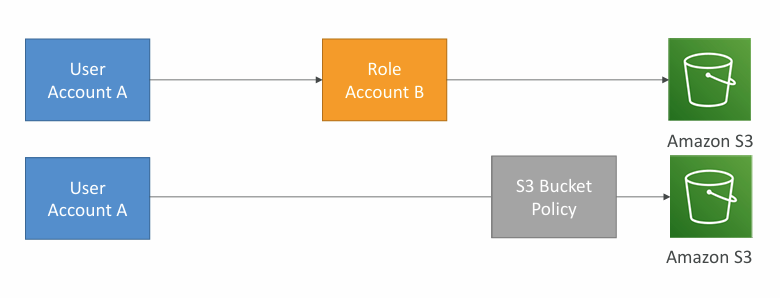
When you assume a role (user, application or service), you give up your original permissions and take the permissions assigned to the role.
- When using a resource-based policy, the principal doesn’t have to give up his permissions
- Example: User in account A needs to scan a DynamoDB table in Account A and dump it in an S3 bucket in Account B.
More info: Identity-based policies and resource-based policies
IAM Permission Boundaries #
IAM Permission Boundaries are supported for users and roles (not groups). This is an advanced feature to use a managed policy to set the maximum permissions an IAM entity can get.
- Let non‑admins perform delegated tasks (e.g., creating IAM users) within strict limits
- Allow developers to self‑manage permissions without being able to escalate to admin
- Useful for restricting a single user when full‑account controls like SCPs are too broad
More info: 🔥Permissions boundaries for IAM entities
IAM Policy evaluation logic #
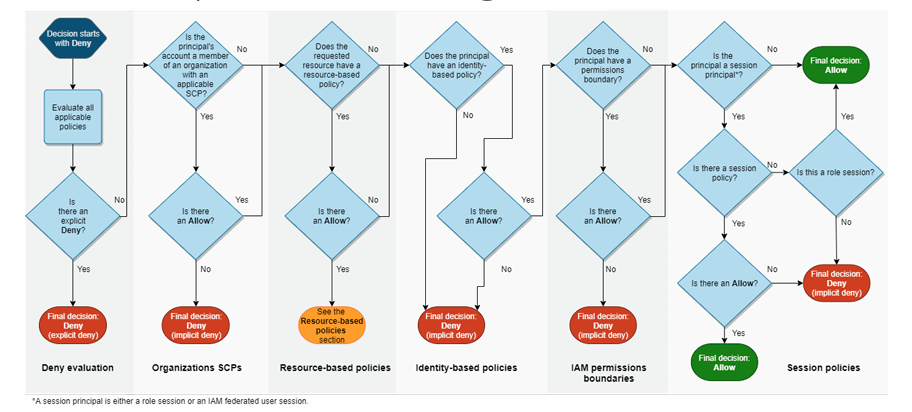
More info: Policy evaluation logic
IAM Identity Center #
- One login (single sign-on) for all your:
- AWS accounts in AWS Organizations
- Business cloud applications (e.g., Salesforce, Box, Microsoft 365, …)
- SAML2.0-enabled applications
- EC2 Windows Instances
- Identity providers:
- Built-in identity store in IAM Identity Center
- 3rd party: Active Directory (AD), OneLogin, Okta…
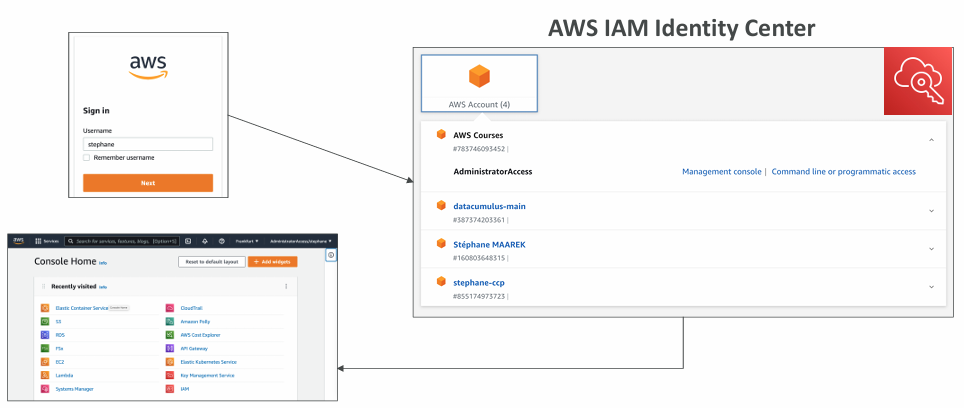
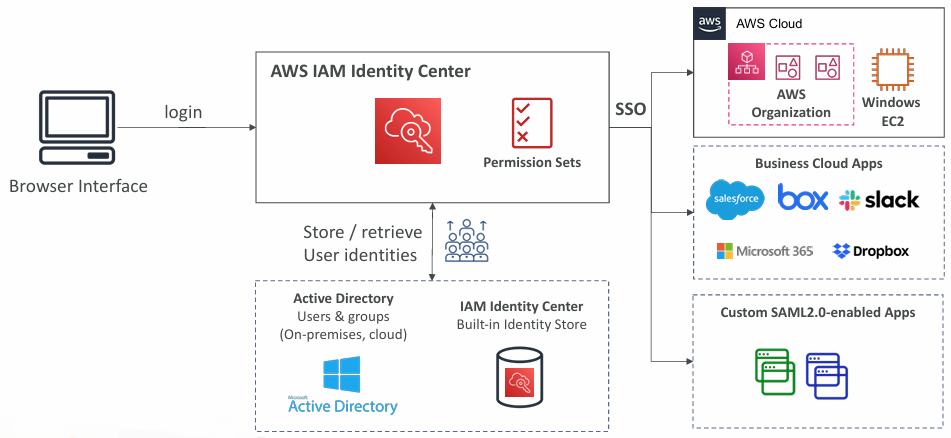
AWS IAM Identity Center provides centralised, fine‑grained access control across your AWS Organization. You define permission sets to manage multi‑account access, assign users/groups to SAML 2.0 business apps, and use ABAC to grant AWS permissions dynamically based on user attributes (e.g., cost center, title, locale).
Define access once, then adjust permissions simply by updating user attributes.
More info: AWS IAM Identity Center
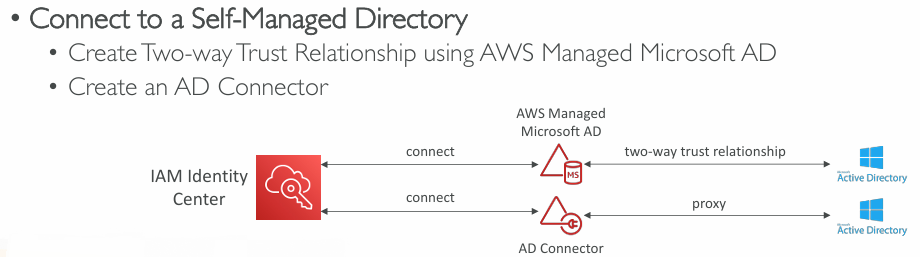
AWS Directory Services #
- AWS Managed Microsoft AD
- Create your own AD in AWS, manage users locally, supports MFA
- Establish “trust” connections with your on premises AD

- AD Connector
- Directory Gateway (proxy) to redirect to on premises AD, supports MFA
- Users are managed on the on-premises AD
- Simple AD
- AD-compatible managed directory on AWS
- Cannot be joined with on-premises AD
AWS Control Tower #
- Easy way to set up and govern a secure and compliant multi-account AWS environment based on best practices
- AWS Control Tower uses AWS Organizations to create accounts
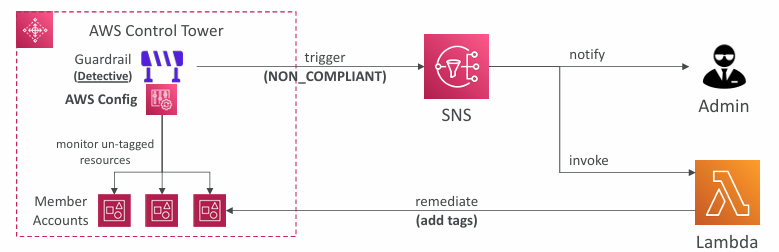
Guardrails #
- Provides ongoing governance for your Control Tower environment (AWS Accounts)
- Preventive Guardrail - using SCPs (e.g., Restrict Regions across all your accounts)
- Detective Guardrail - using AWS Config (e.g., identify untagged resources)
Summary #
AWS Organizations #
The foundation for multi‑account AWS environments. It lets you centrally create, group, and manage accounts, apply SCPs, enforce tagging standards, and use consolidated billing with shared discounts. It provides the governance layer that everything else builds on.
AWS IAM Identity Center #
The central place for managing user identities and access across all accounts in your AWS Organization. It provides:
- SSO into AWS accounts and business applications
- Permission sets for consistent, multi‑account access
- ABAC1 using user attributes for fine‑grained, dynamic permissions
Identity Center sits on top of Organizations and uses its account structure to assign access cleanly.
AWS Control Tower #
A higher‑level orchestration service that automates the setup and governance of a secure multi‑account environment. It provides:
- Automated landing zone creation
- Prebuilt guardrails (SCPs + Config rules)
- Continuous compliance monitoring
- Centralised logging and baseline security controls
Control Tower uses Organizations under the hood and integrates with IAM Identity Center for access management.
How they work together #
- AWS Organizations provides the multi‑account structure, OUs, and policy boundaries.
- IAM Identity Center provides unified identity and access across those accounts.
- AWS Control Tower automates the creation, governance, and compliance of that entire setup using both Organizations and Identity Center as core building blocks.
» Sources « #
- AWS Organizations
- AWS Organizations and AWS Account Management Documentation
- AWS Organizations: An overview of concepts and best practices
- 🔥Service control policy examples
- 🔥Permissions boundaries for IAM entities
- Policy evaluation logic
- AWS IAM Identity Center
- Identity-based policies and resource-based policies
» References « #
Cloud Practitioner: Identity and Access management
» Disclaimer « #
This series draws heavily from Stephane Maarek’s Ultimate AWS Certified Solutions Architect Associate 2026 course on Udemy.
His content was instrumental in helping me pass the certification.
| About the instructor | |
|---|---|
| 🌐 Website | 📺 YouTube |
| 𝕏 x.com |
ABAC - Attribute Based Access Control. ↩︎