- Welcome my DevOps blog./
- 🔰Posts/
- 🗂️My Trainings/
- AWS Trainings and Certifications/
- 🏅AWS Certified Solutions Architect - Associate/
- Solutions Architect: AWS Security & Encryption/
Solutions Architect: AWS Security & Encryption
Table of Contents
ℹ️ Associate‑level extension of the Security and Compliance section from the AWS Cloud Practitioner series.
| AWS Certifications Series » | |
|---|---|
| AWS Cloud Practitioner | AWS Solution Architect |
Encryption #
Encryption in flight (TLS / SSL) #
Encryption in flight (TLS/SSL) means data is encrypted before it’s sent, decrypted after it’s received, and protected end‑to‑end using TLS certificates (HTTPS). This prevents man‑in‑the‑middle attacks by ensuring the connection can’t be intercepted or altered.
Encryption at rest (server-side) #
Server‑side encryption at rest means the server encrypts data after receiving it, stores it in encrypted form using a data key, and decrypts it before sending it back. The keys must be managed somewhere secure, and the server needs access to them to perform encryption and decryption.
Client-side encryption #
Client‑side encryption means the data is encrypted before it ever reaches the server, stays encrypted while stored, and is only decrypted by the receiving client. The server cannot decrypt it, and the approach often uses envelope encryption.
AWS KMS #
More info: AWS Key Management Service
- Anytime you hear “encryption” for an AWS service, it’s most likely KMS
- AWS manages encryption keys for us
- Fully integrated with IAM for authorization
- Easy way to control access to your data
- Able to audit KMS Key usage using CloudTrail
- Seamlessly integrated into most AWS services (EBS, S3, RDS, SSM…)
Encrypted secrets can be stored in the code / environment variables.
KMS Keys Types #
ℹ️ Note: KMS Keys is the new name of KMS Customer Master Key.
Symmetric (AES-256 keys)
- Single encryption key that is used to Encrypt and Decrypt
- AWS services that are integrated with KMS use Symmetric CMKs
- You never get access to the KMS Key unencrypted (must call KMS API to use)
Asymmetric (RSA & ECC key pairs)
- Public (Encrypt) and Private Key (Decrypt) pair
- Used for Encrypt/Decrypt, or Sign/Verify operations
- The public key is downloadable, but you can’t access the Private Key unencrypted
- Use case: encryption outside of AWS by users who can’t call the KMS API
AWS KMS (Key Management Service) #
Types of KMS Keys #
- AWS Owned Keys (free): SSE-S3, SSE-SQS, SSE-DDB (default key)
- AWS Managed Key: free (aws/service-name, example: aws/rds or aws/ebs)
- Customer managed keys created in KMS: $1 / month
- Customer managed keys imported: $1 / month
- + pay for API call to KMS ($0.03 / 10000 calls)
Key Rotation #
- AWS-managed KMS Key: automatic every 1 year
- Customer-managed KMS Key: (must be enabled) automatic & on-demand
- Imported KMS Key: only manual rotation possible using alias
KMS Key Policies #
KMS key policies define who can use or manage a KMS key, similar to how S3 bucket policies control access - but with one crucial difference: a KMS key cannot be accessed at all unless a key policy explicitly allows it.
For most AWS services (like S3, SNS, SQS), IAM policies alone can grant access. KMS is different.
With KMS:
- The key policy is the ultimate authority.
- If the key policy does not grant permission (directly or via delegation to IAM), no IAM policy can override that.
- Even an admin with
AdministratorAccesscannot use or manage a KMS key unless the key policy allows it.
In other words:
IAM policies can add permissions, but only if the key policy first allows IAM to participate. Without a key policy entry, the key is effectively locked.
- Default KMS Key Policy:
- Created if you don’t provide a specific KMS Key Policy
- Complete access to the key to the root user = entire AWS account
{
  "Sid": "Enable IAM User Permissions",
  "Effect": "Allow",
  "Principal": {
    "AWS": "arn:aws:iam::111122223333:root"
   },
  "Action": "kms:*",
  "Resource": "*"
}
- Custom KMS Key Policy:
- Define users, roles that can access the KMS key
- Define who can administer the key
- Useful for cross-account access of your KMS key
{
  "Sid": "Allow access for Key Administrators",
  "Effect": "Allow",
  "Principal": {"AWS":"arn:aws:iam::111122223333:role/ExampleAdminRole"},
  "Action": [
    "kms:Create*",
    "kms:Describe*",
    "kms:Enable*",
    "kms:List*",
    "kms:Put*",
    "kms:Update*",
    "kms:Revoke*",
    "kms:Disable*",
    "kms:Get*",
    "kms:Delete*",
    "kms:TagResource",
    "kms:UntagResource",
    "kms:ScheduleKeyDeletion",
    "kms:CancelKeyDeletion",
    "kms:RotateKeyOnDemand"
  ],
  "Resource": "*"
}
More info: Key policies in AWS KMS
Copying encrypted EBS Snapshots across accounts #
- Create a Snapshot, encrypted with your own KMS Key (Customer Managed Key)
- Attach a KMS Key Policy to authorize cross-account access
{
  "Sid": "Allow use of the key with destination account",
  "Effect": "Allow",
  "Principal": {
    "AWS": "arn:aws:iam::TARGET-ACCOUNT-ID:role/ROLENAME"
  },
  "Action": [
    "kms:Decrypt",
    "kms:CreateGrant"
  ],
  "Resource": "*",
  "Condition": {
    "StringEquals": {
      "kms:ViaService": "ec2.REGION.amazonaws.com",
      "kms:CallerAccount": "TARGET-ACCOUNT-ID"
    }
  }
}
- Share the encrypted snapshot (the target account cannot read it unless the KMS key policy allows it)
- (in target) Create a copy of the Snapshot, decrypt and re-encrypt it with a CMK in your target account (a target account cannot create volumes from a snapshot encrypted with a key it does not own.)
- Create a volume from the snapshot
- Snapshot now is in the target account
- encrypted with a target‑account KMS key
- the target account can finally create an EBS volume from it
KMS Multi-Region Keys #
- Identical KMS keys replicated across Regions that can be used interchangeably
- Same key ID, key material, and rotation state across all Regions
- Encrypt in one Region and decrypt in another without re‑encrypting
- No cross‑Region KMS API calls needed during encryption or decryption
- Not global keys - each Region hosts a primary or replica, managed independently
- Each key is still a separate KMS resource, with its own policy and lifecycle
- Use cases: global client‑side encryption, Global DynamoDB tables, and Global Aurora
Global Databases #
DynamoDB Global Tables and KMS Multi Region Keys Client-Side encryption #
You can encrypt specific DynamoDB item attributes client‑side using the DynamoDB Encryption Client
When used with Global Tables, the encrypted attributes replicate automatically to all replica Regions
If each Region has a replica of the same Multi‑Region KMS key, clients in those Regions can decrypt locally using low‑latency, in‑Region KMS calls
This avoids cross‑Region KMS traffic and keeps decryption fast and resilient
The workflow:
- Client encrypts an attribute using the primary Multi‑Region Key
- Writes the encrypted attribute to DynamoDB
- DynamoDB Global Tables replicate the encrypted value to other Regions
In each Region, clients can decrypt the replicated data only if they have access to the key
Client‑side encryption ensures that sensitive fields (e.g., SSNs) remain protected end‑to‑end, and only authorized clients with the right API key can decrypt them
Global Aurora and KMS Multi-Region Keys Client-Side encryption #
- You can encrypt selected fields in your Aurora records client‑side using the AWS Encryption SDK
- When used with Aurora Global Database, those encrypted fields replicate automatically to all secondary Regions
- If each Region has a replica of the same Multi‑Region KMS key, clients in those Regions can decrypt locally using fast, in‑Region KMS calls
- This avoids cross‑Region KMS latency and keeps decryption efficient and resilient
- Client‑side encryption ensures that only applications holding the correct API key can decrypt the protected fields
- Because encryption happens before data reaches Aurora, even DB administrators cannot read those sensitive attributes
S3 Replication Encryption Considerations #
Unencrypted objects and SSE‑S3–encrypted objects replicate automatically with S3 Replication
SSE‑C–encrypted objects can be replicated, but only if the client provides the encryption key during replication
SSE‑KMS objects require an explicit setting to enable replication
You must choose the KMS key that will encrypt replicated objects in the destination bucket
The destination KMS key policy must allow the replication role to use it
The replication IAM role needs kms:Decrypt on the source KMS key and kms:Encrypt on the destination KMS key
High‑volume replication may trigger KMS throttling, so you may need a Service Quotas increase
AMI Sharing Process Encrypted via KMS #
- The AMI in the source account is encrypted using a KMS key from the source account
- You must update the AMI’s launch permissions to allow the target AWS account to use it
- You also need to share the KMS key(s) used to encrypt the AMI’s underlying snapshots with the target account or its IAM role
- The target account’s IAM role or user must have permissions such as DescribeKey, ReEncrypt*, CreateGrant, and Decrypt to work with the shared encrypted snapshots
- When launching an EC2 instance from the shared AMI, the target account may optionally choose a different KMS key in its own account to re‑encrypt the resulting EBS volumes
SSM Parameter Store #
More info: AWS Systems Manager Parameter Store
- Secure, managed storage for configuration values and sensitive secrets (encrypted!)
- Optional KMS‑backed encryption for seamless at‑rest protection
- Fully serverless, scalable, and easy to use through AWS SDKs
- Built‑in versioning for parameters and secrets
- Access controlled entirely through IAM policies
- Supports EventBridge notifications for parameter changes
Standard and advanced parameter tiers #
| Standard | Advanced | |
|---|---|---|
| Total number of parameters allowed (per AWS account and Region) | 10,000 | 100,000 |
| Maximum size of a parameter value | 4 KB | 8 KB |
| Parameter policies available | No | Yes |
| Cost | No additional charge | Charges apply |
| Storage Pricing | Free | $0.05 per advanced parameter per month |
Parameters Policies (for advanced parameters) #
- Allow to assign a TTL to a parameter (expiration date) to force updating or deleting sensitive data such as passwords
- Can assign multiple policies at a time
Expiration #
{
  "Type": "Expiration",
  "Version": "1.0",
  "Attributes": {
    "Timestamp": "2020-12-02T21:34:33.000Z"
  }
}
ExpirationNotification (EventBridge) #
{
  "Type": "ExpirationNotification",
  "Version": "1.0",
  "Attributes": {
    "Before": "15",
    "Unit": "Days"
  }
}
NoChangeNotification (EventBridge notification if unchanged for X time) #
{
  "Type": "NoChangeNotification",
  "Version": "1.0",
  "Attributes": {
    "After": "20",
    "Unit": "Days"
  }
}
Retrieving parameters via CLI - examples #
get-parameters
aws ssm get-parameters --names /my-app/dev/db-url /my-app/dev/db-password
aws ssm get-parameters --names /my-app/dev/db-url /my-app/dev/db-password --decryption # KMS permissions are required to decrypt
get-parameters-by-path
aws ssm get-parameters-by-path --path /my-app/dev

aws ssm get-parameters-by-path --path /my-app --recursive

aws ssm get-parameters-by-path --path /my-app --recursive --with-decryption
AWS Secrets Manager #
Secrets Manager can replicate secrets across multiple AWS Regions, keeping regional read‑replica copies automatically in sync with the primary secret, and allowing you to promote any replica into an independent secret - a pattern useful for multi‑region applications, disaster‑recovery setups, and cross‑region database architectures.
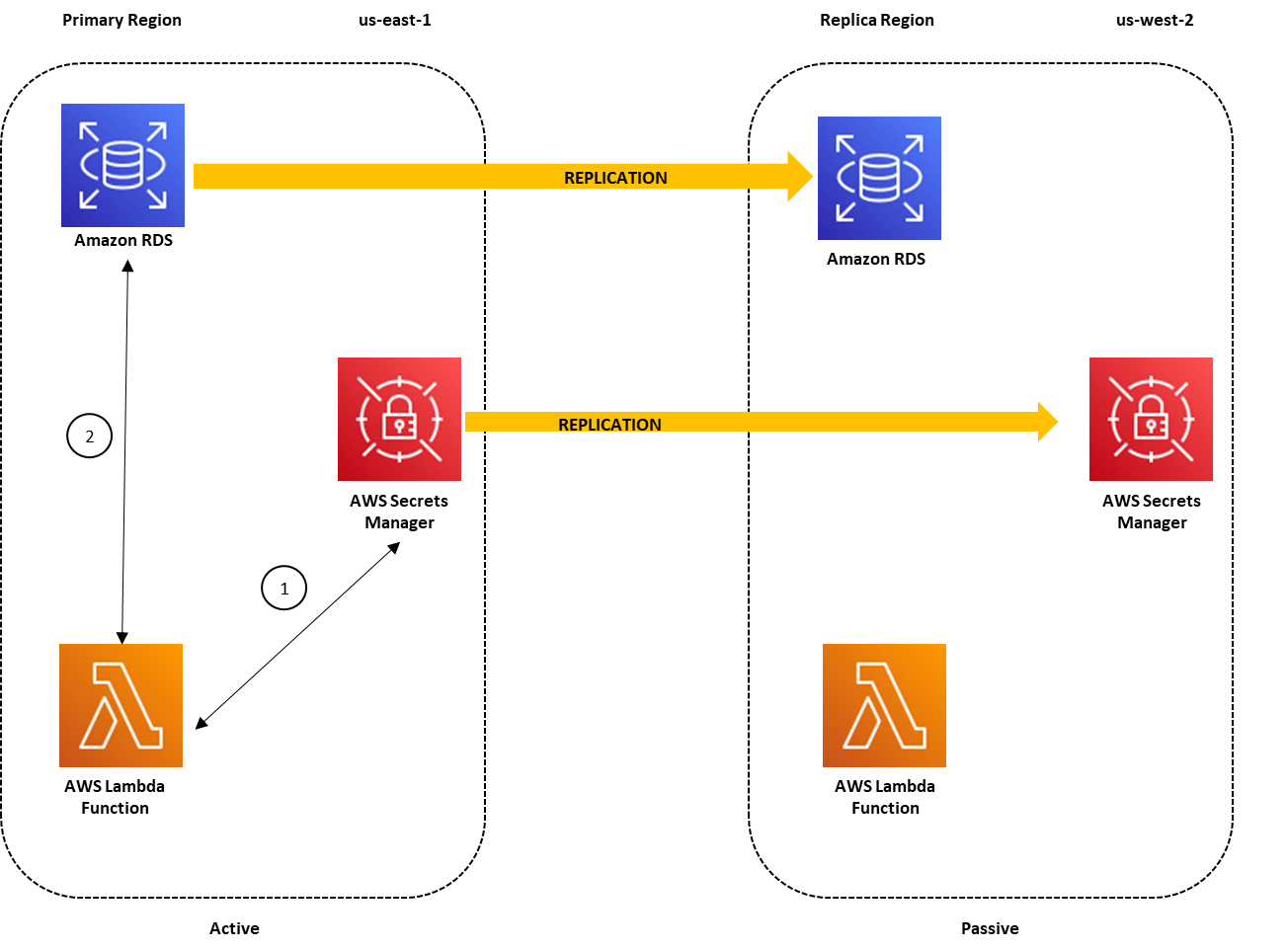
Use cases: multi-region apps, disaster recovery strategies, multi-region DB…
More info:
- Replicate AWS Secrets Manager secrets across Regions
- How to replicate secrets in AWS Secrets Manager to multiple Regions
AWS Certificate Manager (ACM) #
More info: AWS Certificate Manager Documentation
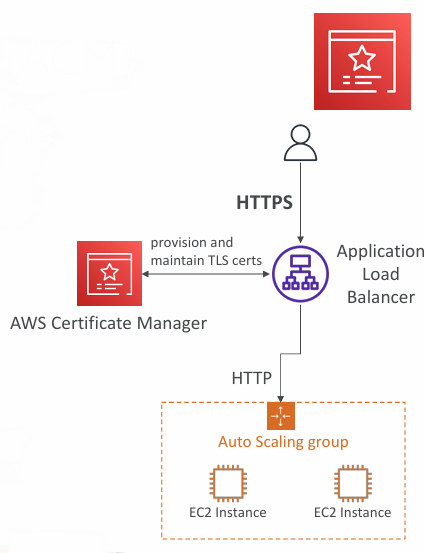
Simplifies the provisioning, management, and deployment of TLS certificates
Enables HTTPS by providing in‑flight encryption for websites and APIs
Supports both public and private TLS certificates
Public certificates issued by ACM are free of charge
Handles automatic certificate renewal with no manual intervention
Integrates directly with:
- Elastic Load Balancers (CLB, ALB, NLB)
- CloudFront distributions
- API Gateway
Cannot be used directly on EC2 instances, as ACM certificates cannot be exported
ACM - Requesting Public Certificates #
- Start by listing all domain names you want on the certificate, including FQDNs (e.g.,
corp.example.com) and wildcards (e.g.,*.example.com) - Choose a validation method: DNS validation (preferred for automation) or email validation (uses WHOIS contact emails)
- DNS validation requires adding a CNAME record to your DNS provider (such as Route 53)
- Verification typically completes within a few hours
- Once issued, the public certificate is automatically enrolled for renewal, and ACM renews it about 60 days before expiration
ACM - Importing Public Certificates #
- You can generate a certificate outside ACM and import it instead of letting ACM create one
- Imported certificates do not auto‑renew - you must upload a new one before it expires
- ACM begins sending daily expiration notifications starting 45 days before expiry
- The notification window is configurable
- These expiration events appear in EventBridge
- AWS Config provides a managed rule, acm-certificate-expiration-check, which monitors certificates approaching expiration (with a configurable threshold)
CloudHSM #
More info: AWS CloudHSM Documentation
- With KMS, AWS manages all the encryption software for you
- With CloudHSM, AWS provides dedicated hardware security modules (HSMs) instead
- You get exclusive, single‑tenant hardware for cryptographic operations
- You fully control and manage your own encryption keys - AWS cannot access them
- The HSMs are tamper‑resistant and meet FIPS 140‑2 Level 3 compliance
- Supports both symmetric and asymmetric encryption, including SSL/TLS key storage
- There is no free tier for CloudHSM
- Requires installing and using the CloudHSM client software
- Amazon Redshift can integrate with CloudHSM for database encryption and key management
CloudHSM - High Availability #
- CloudHSM clusters are spread across Multi AZ (HA)
- Great for availability and durability
CloudHSM - Integration with AWS Services #
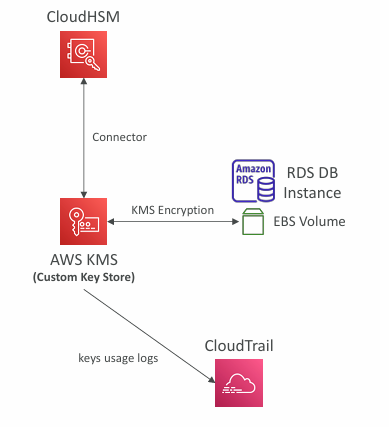
- CloudHSM can integrate with AWS services through AWS KMS
- You can configure a KMS Custom Key Store backed by CloudHSM
- Once configured, KMS‑integrated services (such as EBS, S3, RDS, and others) can use keys stored in your CloudHSM cluster
CloudHSM vs. KMS #
| Feature | AWS KMS | AWS CloudHSM |
|---|---|---|
| Tenancy | Multi-Tenant | |
| Encryption Standard | FIPS 140-2 Level 3 | FIPS 140-2 Level 3 |
| Master Keys | - AWS Owned CMK - AWS Managed CMK - Customer Managed CMK | - Customer Managed CMK |
| Key Types | - Symmetric - Asymmetric - Digital Signing | - Symmetric - Asymmetric - Digital Signing & Hashing |
| Key Accessibility | Accessible in multiple AWS regions (can’t access keys outside the region it’s created in) | - Deployed and managed in a VPC - Can be shared across VPCs (VPC Peering) |
| Access & Authentication | AWS IAM | You create users and manage their permissions |
| High Availability | AWS Managed Service | Add multiple HSMs over different AZs |
| Audit Capability | - CloudTrail - CloudWatch | - CloudTrail - CloudWatch - MFA support |
| Free Tier | Yes | No |
AWS WAF #
More info: AWS WAF Documentation
- Can be deployed on:
- Application Load Balancer
- API Gateway
- CloudFront
- AppSync GraphQL APIs
- Cognito User Pools
📝 Note: WAF doesn’t work with NLB.
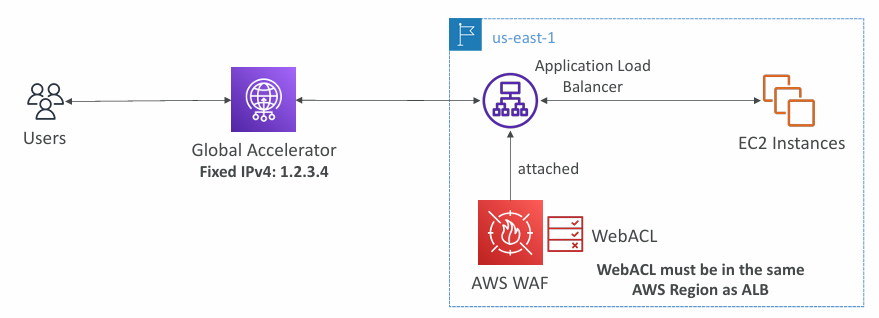
- Web ACLs let you define rules that inspect and filter web requests
- IP sets can include up to 10,000 IP addresses; use multiple rules if you need more
- You can filter based on HTTP headers, body, or URI strings, and block common attacks like SQL injection and XSS
- Additional match options include size constraints and geo‑matching (e.g., blocking specific countries)
- Rate‑based rules track request volume and help mitigate DDoS‑style bursts
- Web ACLs are regional, except when used with CloudFront, where they become global
- Rule groups provide reusable collections of rules that can be shared across multiple Web ACLs
AWS Shield #
More info: AWS Shield Documentation
- A DDoS attack is a Distributed Denial of Service, where an attacker overwhelms a system with massive traffic
- AWS Shield Standard is automatically enabled for all AWS customers at no cost
- Protects against common Layer 3 and Layer 4 attacks such as SYN floods, UDP floods, and reflection attacks
- AWS Shield Advanced is an optional, paid DDoS protection service ($3,000/month per organization)
- Defends against more sophisticated attacks targeting EC2, Elastic Load Balancing, CloudFront, Global Accelerator, and Route 53
- Provides 24/7 access to the AWS DDoS Response Team (DRT)
- Includes cost protection to avoid unexpected spikes in usage charges caused by DDoS events
- Offers automatic application‑layer mitigation, dynamically creating and deploying AWS WAF rules to counter Layer 7 attacks
AWS Firewall Manager #
More info: AWS Firewall Manager Documentation
- Centralizes management of security rules across all accounts in an AWS Organization
- Uses security policies to define a consistent set of rules applied org‑wide
- Supports managing:
- WAF rules for ALB, API Gateway, and CloudFront
- AWS Shield Advanced protections for ALB, CLB, NLB, Elastic IPs, and CloudFront
- Security Groups for EC2, ALB, and ENIs within VPCs
- AWS Network Firewall at the VPC level
- Route 53 Resolver DNS Firewall
- Policies are created per Region
- Automatically applies rules to newly created resources, ensuring continuous compliance across current and future accounts in the Organization
WAF vs. Firewall Manager vs. Shield #
- AWS WAF, Firewall Manager, and Shield work together to provide end‑to‑end protection for web applications
- Use AWS WAF to define and manage Web ACL rules for fine‑grained, application‑layer protection
- If you only need resource‑level filtering and rule control, WAF alone is sufficient
- To manage WAF rules across multiple accounts, automate protection for new resources, and simplify organization‑wide enforcement, use Firewall Manager with WAF
- Shield Advanced adds enhanced DDoS protection, including specialized support from the Shield Response Team (SRT) and advanced visibility/reporting
- Organizations that experience frequent or high‑risk DDoS activity should consider Shield Advanced
DDoS protection - best practices #
More info: AWS Best Practices for DDoS Resiliency
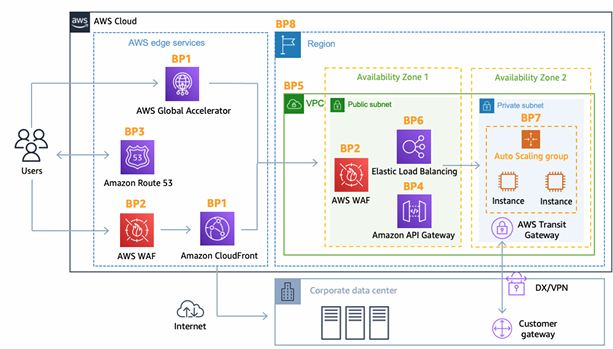
AWS Best Practices for DDoS Resiliency Edge Location Mitigation (BP1, BP3) #
BP1 – CloudFront
- Delivers your web content at the edge
- Absorbs and mitigates common DDoS attacks such as SYN floods and UDP reflection
BP1 – Global Accelerator
- Provides edge‑based entry points to your application
- Integrates with AWS Shield for DDoS protection
- Useful when your backend cannot be fronted by CloudFront
BP3 – Route 53
- Performs DNS resolution at AWS edge locations
AWS Best Practices for DDoS Resiliency Best pratices for DDoS mitigation #
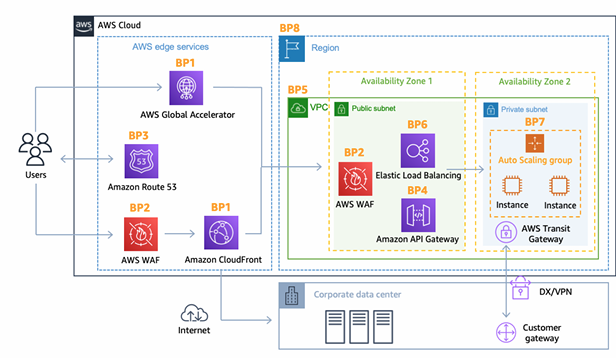
- Infrastructure‑layer defense (BP1, BP3, BP6) focuses on protecting Amazon EC2 and other backend systems from large traffic volumes
- This includes using Global Accelerator, Route 53, CloudFront, and Elastic Load Balancing to absorb and distribute traffic before it reaches your instances
- Amazon EC2 with Auto Scaling (BP7) helps your application scale out rapidly during sudden traffic spikes, whether caused by legitimate flash crowds or DDoS attacks
- Elastic Load Balancing (BP6) automatically scales with incoming traffic and spreads requests across multiple EC2 instances, improving resilience under heavy load
AWS Best Practices for DDoS Resiliency Application Layer Defense #
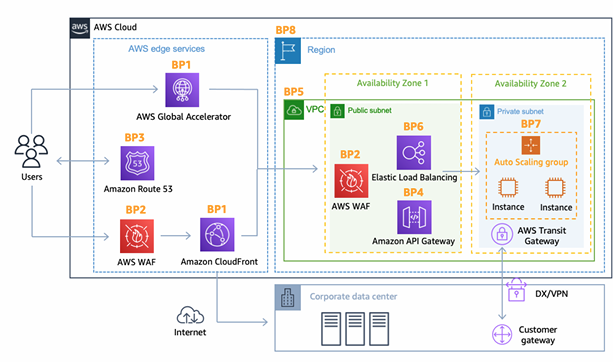
- Detect and filter malicious web requests using CloudFront and AWS WAF (BP1, BP2)
- CloudFront caches static content and serves it from edge locations, reducing load on your backend and absorbing unwanted traffic
- AWS WAF, applied on CloudFront or an Application Load Balancer, blocks requests based on signatures and patterns
- Rate‑based rules in WAF can automatically block IPs that exceed request thresholds
- Managed WAF rule sets help block threats using IP reputation, bot detection, or by filtering anonymous IP sources
- CloudFront can restrict access by geographic location
- Shield Advanced (BP1, BP2, BP6) provides automated application‑layer DDoS mitigation by dynamically creating and deploying WAF rules to counter attacks
AWS Best Practices for DDoS Resiliency Attack surface reduction #
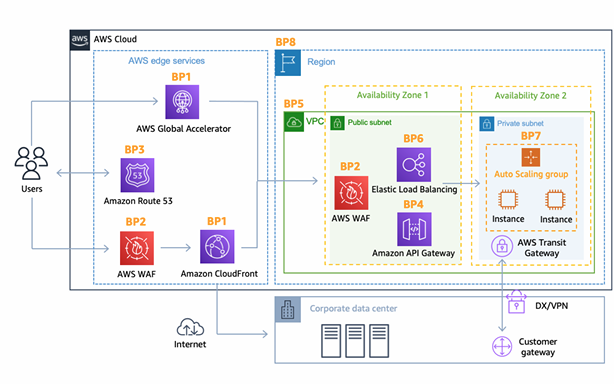
- Obfuscate backend resources (BP1, BP4, BP6) by placing CloudFront, API Gateway, or Elastic Load Balancing in front of services like EC2 or Lambda
- Use Security Groups and Network ACLs (BP5) to restrict traffic by IP at the subnet or ENI level
- Elastic IPs receive DDoS protection when covered by AWS Shield Advanced
- Protect API endpoints (BP4) by avoiding direct exposure of EC2 or Lambda
- Use API Gateway in edge‑optimized or regional mode for stronger DDoS control
- Combine WAF + API Gateway for rate limiting, header filtering, and API key enforcement
Amazon GuardDuty #
More info: Amazon GuardDuty
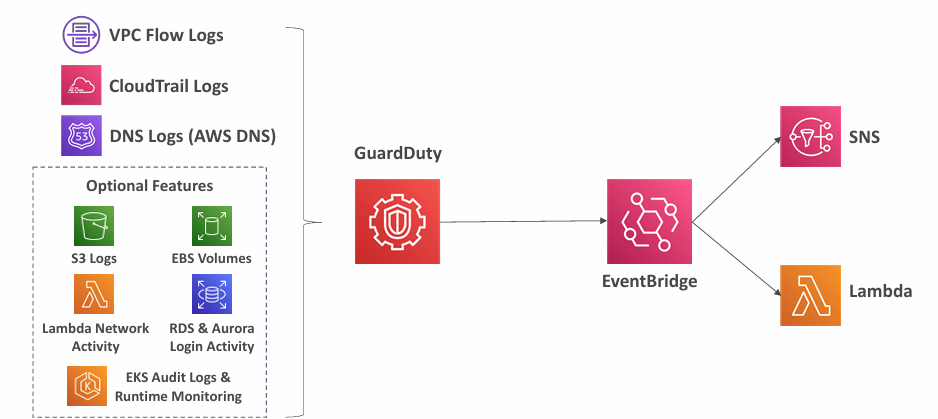
- Provides intelligent threat detection to help secure your AWS accounts
- Uses machine learning, anomaly detection, and third‑party threat intelligence
- Can be enabled with a single click (includes a 30‑day trial) and requires no agents or software installation
- Analyzes multiple data sources, including:
- CloudTrail event logs for unusual API activity or unauthorized changes
- CloudTrail management events such as creating subnets or trails
- CloudTrail S3 data events like object reads, listings, or deletions
- VPC Flow Logs to spot suspicious internal traffic or unexpected IPs
- DNS logs to detect compromised EC2 instances exfiltrating data via DNS
- Optional coverage includes EKS audit logs, RDS/Aurora, EBS, Lambda, and S3 data events
- Findings can trigger EventBridge rules for automated notifications
- EventBridge can route alerts to Lambda, SNS, or other targets
- Includes dedicated detections for cryptocurrency mining activity
Amazon Inspector #
More info: Amazon Inspector Documentation
Provides automated security assessments across multiple AWS workloads
EC2 instances:
- Uses the SSM Agent to perform assessments
- Checks for unintended network exposure
- Evaluates the operating system for known vulnerabilities
Container images in Amazon ECR:
- Scans images automatically as they are pushed
- Identifies vulnerabilities in packages and dependencies
Lambda functions:
- Detects software vulnerabilities in function code and bundled libraries
- Performs assessments automatically when functions are deployed
Integrates with AWS Security Hub for centralized reporting
Can send findings to Amazon EventBridge for automated workflows and alerting
Amazon Inspector evaluation #
- Applies only to EC2 instances, container images in ECR, and Lambda functions
- Performs continuous, on‑demand scanning of your environment
- Detects package vulnerabilities across EC2, ECR, and Lambda using a CVE database
- Assesses network reachability for EC2 instances
- Assigns a risk score to each finding to help prioritize remediation
AWS Macie #
More info: Amazon Macie Documentation
- Amazon Macie is a fully managed data security and privacy service that uses machine learning and pattern matching to locate and protect sensitive data stored in AWS
- It helps detect and alert you to sensitive information, including personally identifiable information (PII)
» Sources « #
- AWS Key Management Service
- AWS Systems Manager Parameter Store
- AWS Secrets Replication
- AWS Certificate Manager Documentation
- AWS CloudHSM Documentation
- DDoS
- AWS Firewall Manager Documentation
- Amazon GuardDuty
- Amazon Inspector Documentation
- Amazon Macie Documentation
» References « #
Cloud Practitioner: Security and Compliance
» Disclaimer « #
This series draws heavily from Stephane Maarek’s Ultimate AWS Certified Solutions Architect Associate 2026 course on Udemy.
His content was instrumental in helping me pass the certification.
| About the instructor | |
|---|---|
| 🌐 Website | 📺 YouTube |
| 𝕏 x.com |