- Welcome my DevOps blog./
- 🔰Posts/
- 🗂️My Trainings/
- AWS Trainings and Certifications/
- 🏅AWS Certified Solutions Architect - Associate/
- Solutions Architect: VPC/
Solutions Architect: VPC
Table of Contents
ℹ️ Associate‑level extension of the VPC section from the AWS Cloud Practitioner series.
| AWS Certifications Series » | |
|---|---|
| AWS Cloud Practitioner | AWS Solution Architect |
CIDR #
A CIDR consists of two components:
Base IP
- Represents an IP contained in the range (XX.XX.XX.XX)
- Example: 10.0.0.0, 192.168.0.0, …
Subnet Mask
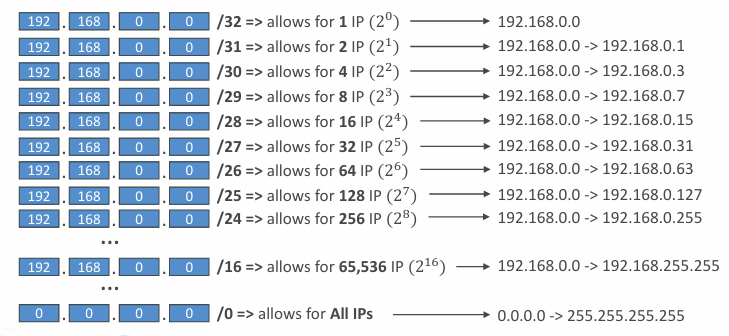
- Defines how many bits can change in the IP
- Example: /0, /24, /32
- Can take two forms:
- /8 => 255.0.0.0
- /16 => 255.255.0.0
- /24 => 255.255.255.0
- /32 => 255.255.255.255
More info: IPAddressGuide
Public vs. Private IP (IPv4) #
Private IP addresses must fall within one of these ranges:
- 10.0.0.0 - 10.255.255.255 (10.0.0.0/8) - typically used in large networks
- 172.16.0.0 - 172.31.255.255 is the full private IP range defined by RFC1918 (CIDR 172.16.0.0/12)
- AWS default VPCs use a single /16 block inside that range, specifically 172.31.0.0/16
- 192.168.0.0 - 192.168.255.255 (192.168.0.0/16) - common in home and small office networks
All the rest of the IP addresses on the Internet are Public.
- Every new AWS account comes with a default VPC already created
- If you launch an EC2 instance without choosing a subnet, it is placed in this default VPC
- The default VPC is internet‑enabled, and EC2 instances launched inside it receive public IPv4 addresses by default
- Instances also get both a public DNS name and a private DNS name
VPC in AWS (IPv4) #
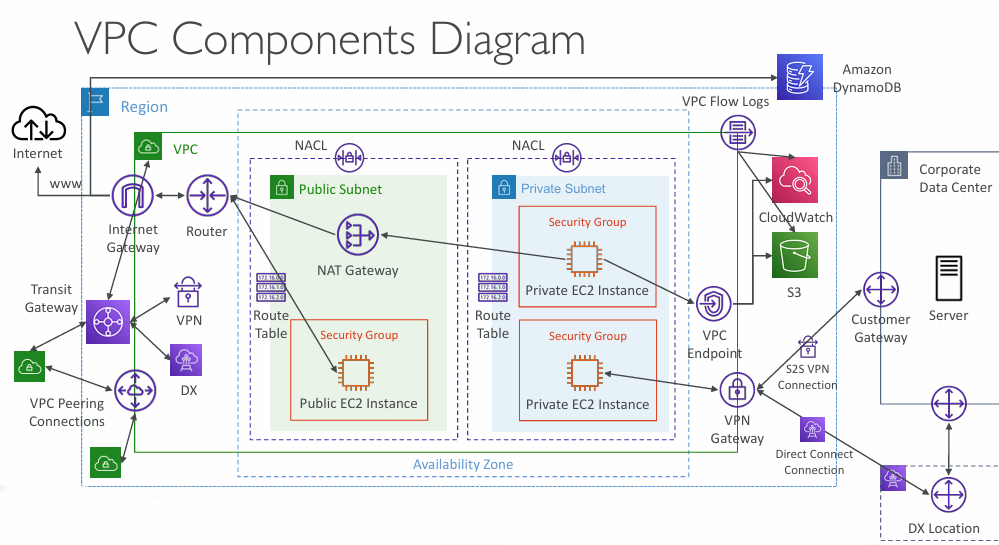
A VPC (Virtual Private Cloud) is your isolated network environment in AWS
You can create multiple VPCs per region (default soft limit: 5)
Each VPC can have up to 5 CIDR blocks, and each CIDR must be between:
- /28 (16 IP addresses)
- /16 (65,536 IP addresses)
VPCs must use private IPv4 ranges only:
- 10.0.0.0/8
- 172.16.0.0/12
- 192.168.0.0/16
Your VPC CIDR should not overlap with any existing networks (e.g., corporate on‑prem) to avoid routing conflicts.
VPC - Subnet (IPv4) #
- AWS reserves 5 IP addresses in every subnet (the first four and the last one)
- These addresses cannot be assigned to EC2 instances
- For a subnet like 10.0.0.0/24, the reserved IPs are:
- 10.0.0.0 - network address
- 10.0.0.1 - AWS VPC router
- 10.0.0.2 - AWS‑provided DNS mapping
- 10.0.0.3 - reserved for future AWS use
- 10.0.0.255 - broadcast address (broadcasting isn’t supported in VPCs, so it’s reserved)
Exam Tip, if you need 29 IP addresses for EC2 instances:
- You can’t choose a subnet of size /27 (32 IP addresses, 32 – 5 = 27 < 29)
- You need to choose a subnet of size /26 (64 IP addresses, 64 – 5 = 59 > 29)
Internet Gateway (IGW) #
More info:
- Building AWS VPC
- Add internet access to a subnet
- Enable internet access for a VPC using an internet gateway
An Internet Gateway (IGW) in AWS is a horizontally scaled, redundant VPC component that allows communication between your Virtual Private Cloud (VPC) and the internet, enabling resources within the VPC to connect to the internet and vice versa.
It is essential for instances with public IPs to access the internet and for external services to initiate connections to those instances.
- An Internet Gateway enables resources in a VPC (such as EC2 instances) to reach the public Internet
- It is fully managed, horizontally scalable, and highly available
- It must be created separately and then attached to a VPC
- A VPC can have only one Internet Gateway attached, and an Internet Gateway can attach to only one VPC
- The IGW alone does not provide Internet access - you must also update the route tables to send traffic to it
NAT Gateway #
More info: NAT gateways
- Fully managed AWS NAT service with high bandwidth, high availability, and no admin overhead
- Billed by the hour plus data processing charges
- Deployed in a specific Availability Zone and associated with an Elastic IP
- Cannot be used by instances in the same subnet - only by instances in other subnets
- Requires an Internet Gateway for outbound traffic (Private Subnet → NAT Gateway → IGW)
- Provides 5 Gbps baseline throughput and automatically scales up to 100 Gbps
- No Security Groups are needed or supported for NAT Gateways
ℹ️ Note: NAT Gateway is resilient within a single Availability Zone. Must create multiple NAT Gateways in multiple AZs for fault tolerance.
Regional NAT Gateway (RNAT) #
- Provides a highly available, VPC‑wide NAT service
- RNAT uses its own dedicated route tables
- Removes the need to deploy NAT Gateways in every Availability Zone - it is shared across all AZs
- You don’t need public subnets in your VPC to host RNAT
- Automatically detects when new AZs become available and extends coverage to them
Security Groups & NACLs #
More info:
Security Groups are stateful, meaning return traffic is automatically allowed, and they act as virtual firewalls at the instance level.
Network ACLs are stateless, so both inbound and outbound rules must be explicitly defined, and they filter traffic at the subnet boundary.
Network Access Control List (NACL) #
- A Network ACL acts as a subnet‑level firewall that controls inbound and outbound traffic.
- Each subnet is associated with a single NACL, and new subnets inherit the default NACL unless changed.
- NACL rules are numbered 1–32766, and the rule with the lowest number that matches the traffic determines the outcome.
- Example: rule #100 ALLOW and rule #200 DENY for the same IP means the traffic is allowed because rule 100 takes precedence.
- Any traffic that doesn’t match a rule hits the final “” deny* entry.
- AWS recommends spacing rule numbers in increments of 100 for easier management.
- Newly created NACLs start with deny‑all rules.
- NACLs are useful for blocking specific IP addresses at the subnet boundary.
Default NACL #
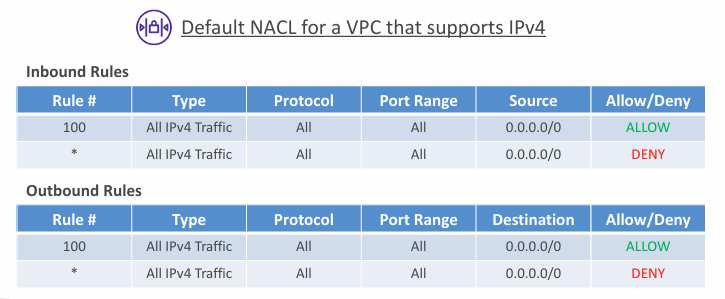
- Accepts everything inbound/outbound with the subnets it’s associated with
- Do NOT modify the Default NACL, instead create custom NACLs
🙋🏻 Question: Why do NACLs have both ALLOW and DENY rules?
Because NACLs are stateless, they must explicitly decide what to do with every packet. That means they need ALLOW rules to permit traffic and DENY rules to block traffic - nothing is remembered, and nothing is implied.
🙋🏻 Question: What is “Rule #”?
Rule # is the priority number.
- Lower number = higher priority
- NACL evaluates rules in order, starting from the lowest number
- The first matching rule wins, and evaluation stops immediately
🙋🏻 Question: Why does the default NACL show both ALLOW and DENY?
The default NACL includes:
- Rule 100 ALLOW all → permits all traffic
- Rule * DENY all → catch‑all fallback if nothing else matches
This ensures the NACL always has a final decision path.
Ephemeral Ports #
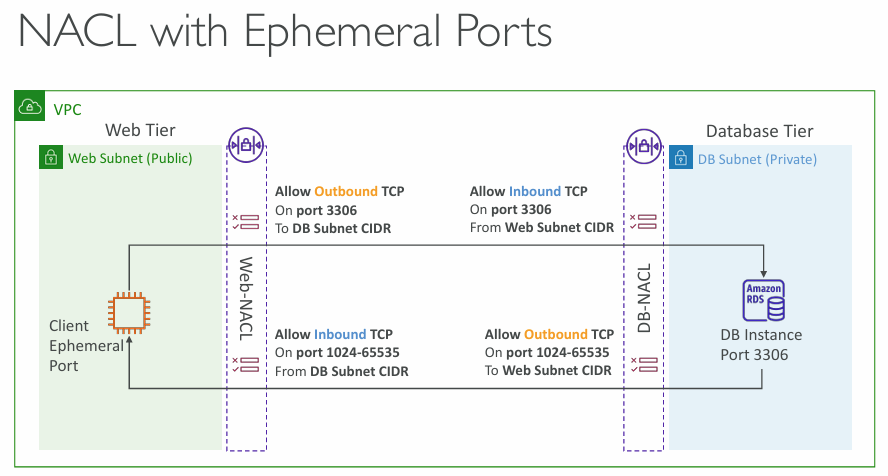
- Every connection between two endpoints requires ports, and while clients connect to a server’s well‑known port, the server replies back using an ephemeral (temporary) port.
- Different operating systems allocate ephemeral ports from different ranges - for example, 49152-65535 on IANA and Windows 10, and 32768-60999 on many Linux kernels.
Security Group vs. NACLs #
| Security Group | NACL |
|---|---|
| Operates at the instance level | Operates at the subnet level |
| Supports allow rules only | Supports allow rules and deny rules |
| Stateful: return traffic is automatically allowed, regardless of any rules | Stateless: return traffic must be explicitly allowed by rules (think of ephemeral ports) |
| All rules are evaluated before deciding whether to allow traffic | Rules are evaluated in order (lowest to highest) when deciding whether to allow traffic, first match wins |
| Applies to an EC2 instance when specified by someone | Automatically applies to all EC2 instances in the subnet that it’s associated with |
More info: Control subnet traffic with network access control lists
VPC Peering #
- VPC Peering lets you privately connect two VPCs over the AWS internal network so they can communicate as if they were part of the same environment.
- The VPCs must have non‑overlapping CIDR ranges.
- Peering is not transitive - every pair of VPCs that needs to talk must have its own peering connection.
- You must update the route tables in each VPC’s subnets so that EC2 instances can reach each other through the peering link.
- You can create VPC Peering connection between VPCs in different AWS accounts/regions
- You can reference a security group in a peered VPC (works cross accounts – same region)
More info: What is VPC peering?
VPC Endpoints #
Interface Endpoints (most common) #
- Powered by ENIs (Elastic Network Interfaces) in your subnets
- Provide private IPs to reach AWS services like SSM, Secrets Manager, API Gateway, STS, CloudWatch, etc.
- Support Security Groups
- You pay per hour + data processed
Think of them as: “Private ENIs that act as a doorway to an AWS service.”
More info: Access an AWS service using an interface VPC endpoint
Gateway Endpoints #
- Only for S3 and DynamoDB
- Added to your route tables
- Free to use
- No ENIs, no Security Groups
Think of them as: “Route‑table entries that send traffic to S3/DynamoDB privately.”
More info: Gateway endpoints
Why VPC Endpoints matter #
- No Internet exposure
- No NAT Gateway cost for S3/DynamoDB traffic
- Lower latency (stays on AWS backbone)
- Better security posture (private connectivity, IAM policies, endpoint policies)
Lambda in VPC accessing DynamoDB #
DynamoDB is a public AWS service, so a Lambda function inside a VPC must either reach it through the public Internet (which requires a NAT Gateway in a public subnet plus an Internet Gateway), or
Use the better, private and free option: create a DynamoDB Gateway VPC Endpoint and update your route tables so the Lambda function can access DynamoDB entirely through the AWS private network.
🙋🏻 Question: Isn’t Lambda outside of VPC by default and has to be created inside of VPC if required?
Lambda is outside your VPC by default, and you only place it inside a VPC when your function needs to reach private resources.
- Lambda outside VPC → can reach DynamoDB directly
- Lambda inside VPC → cannot reach DynamoDB unless you fix routing
Lambda only needs a NAT or VPC Endpoint when you put it inside a VPC.
- Default Lambda = outside VPC = Internet access = DynamoDB works automatically
- Lambda in VPC = no Internet = must use NAT or DynamoDB VPC Endpoint
- Best practice: use VPC Endpoints for AWS services instead of NAT
VPC Flow Logs #
- VPC Flow Logs record IP traffic flowing into and out of your VPC, subnets, or individual ENIs.
- They’re useful for monitoring and diagnosing network connectivity issues.
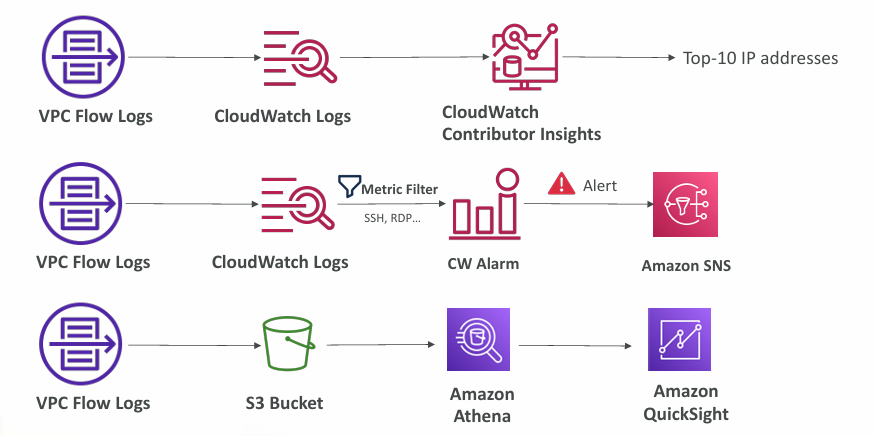
- Flow log data can be sent to S3, CloudWatch Logs, or Kinesis Data Firehose.
- They also capture traffic from AWS‑managed network interfaces such as ELB, RDS, ElastiCache, Redshift, WorkSpaces, NAT Gateways, and Transit Gateways.
VPC Flow Logs Syntax #
- srcaddr & dstaddr - help identify problematic IP protocol
- srcport & dstport - help identity problematic ports bytes end
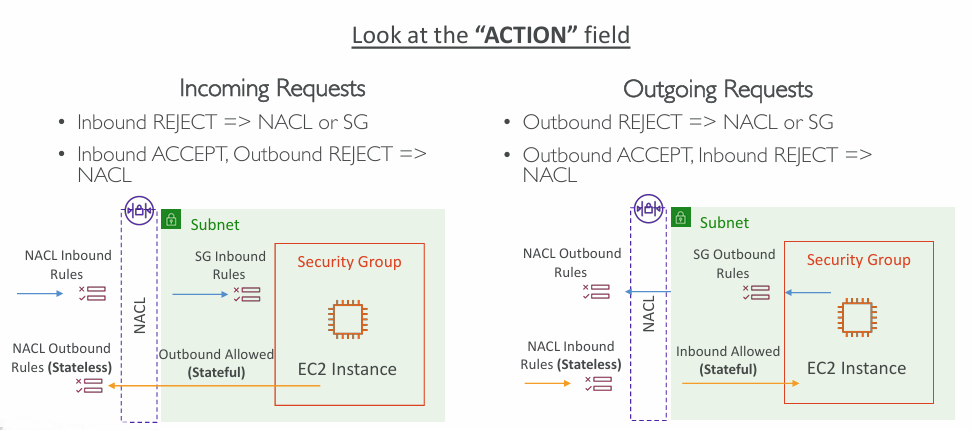
- Action - success or failure of the request due to Security Group / NACL
- Can be used for analytics on usage patterns, or malicious behavior
- Query VPC flow logs using Athena on S3 or CloudWatch Logs Insights

More info: Flow log record examples
VPC Flow Logs - Troubleshoot SG & NACL issues #
VPC Flow Logs - Architectures #
Site-to-Site VPN #
More info:
- A Customer Gateway (CGW) represents your on‑premises side and can be either a physical device or a software‑based VPN appliance.
- A Virtual Private Gateway (VGW) is the AWS‑side VPN concentrator; you create it and attach it to the VPC that will use the Site‑to‑Site VPN, and you can optionally set a custom ASN for routing.
On‑premises side
Your Customer Gateway device may have:
- A private IP behind a NAT device (using NAT‑T), OR
- A public IP directly exposed
Either way, AWS must see a public, routable IP for the VPN tunnel.
AWS side
- A Virtual Private Gateway (VGW) terminates the VPN tunnel.
- The route table must have route propagation enabled so on‑prem routes automatically appear.
- If you want to ping EC2 instances, the Security Group must allow ICMP inbound.
AWS VPN CloudHub #
- AWS VPN CloudHub lets you securely connect multiple remote sites using a hub‑and‑spoke VPN model, ideal for low‑cost primary or backup connectivity between locations.
- Because it’s still a VPN over the public Internet, you set it up by attaching multiple VPN connections to the same Virtual Private Gateway, enabling dynamic routing, and updating your route tables so all sites can communicate.
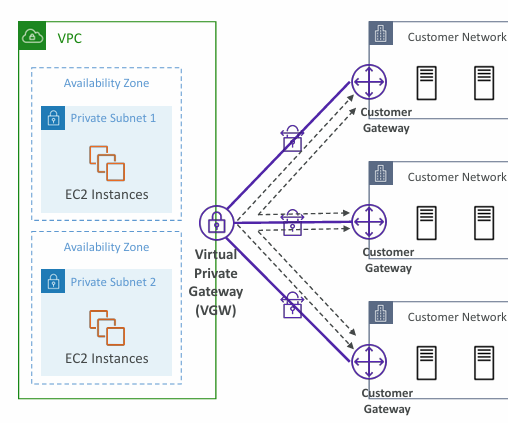
AWS side
- A single Virtual Private Gateway (VGW) acts as the hub.
- Multiple Availability Zones and private subnets host EC2 instances.
- The VGW is attached to the VPC and handles all VPN tunnels.
Customer side
- Each customer site has its own Customer Gateway (CGW).
- Each CGW establishes a separate VPN tunnel to the VGW.
CloudHub behaviour
- Because all tunnels terminate on the same VGW, AWS can route traffic between customer sites, not just between each site and the VPC.
- This creates a hub‑and‑spoke topology:
- VGW = hub
- Customer Gateways = spokes
- With BGP dynamic routing, all sites learn each other’s routes.
Benefits
- Simple, low‑cost multi‑site connectivity
- No need for complex on‑prem mesh VPNs
- Works as primary or backup WAN connectivity
- Uses the public Internet but encrypted end‑to‑end
Direct Connect (DX) #
More info: What is Direct Connect?
- AWS Direct Connect gives you a dedicated, private network link from your on‑premises environment to your VPC.
- You establish a physical connection between your data centre and an AWS Direct Connect location.
- Your VPC still needs a Virtual Private Gateway to receive the connection.
- The same Direct Connect link can reach both public AWS services (like S3) and private VPC resources (like EC2).
- Common use cases include:
- Higher, more predictable bandwidth for large data transfers at lower cost
- Consistent, low‑latency connectivity for real‑time applications
- Hybrid architectures spanning on‑prem and cloud
- Direct Connect supports both IPv4 and IPv6 traffic.
Direct Connect Gateway #
If you want to setup a Direct Connect to one or more VPC in many different regions (same account), you must use a Direct Connect Gateway.
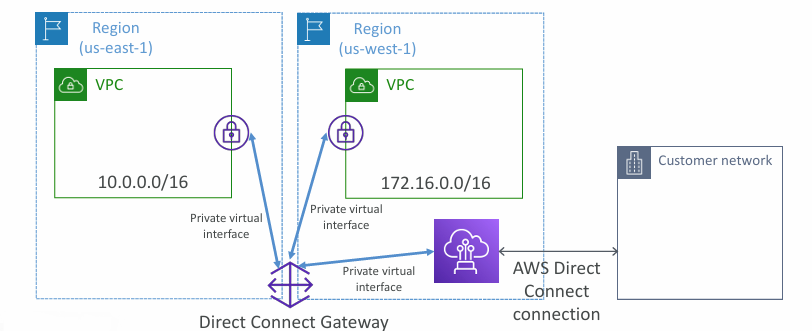
Direct Connect - Connection Types #
- Dedicated Connections provide a physical, customer‑specific Ethernet port at speeds from 1 Gbps up to 400 Gbps. You request these through AWS, and an AWS Direct Connect Partner completes the provisioning.
- Hosted Connections are provisioned entirely through AWS Direct Connect Partners and range from 50 Mbps to 25 Gbps. They offer flexible, on‑demand capacity adjustments, though new connections often take over a month to be fully established.
Direct Connect - Encryption #
- Traffic sent over AWS Direct Connect is not encrypted by default, even though it travels over a private link.
- If you need encryption, you can layer a VPN (IPsec) tunnel on top of Direct Connect to create an encrypted private connection.
- This adds an extra layer of security, but also introduces a bit more setup complexity.
Direct Connect - Resiliency #
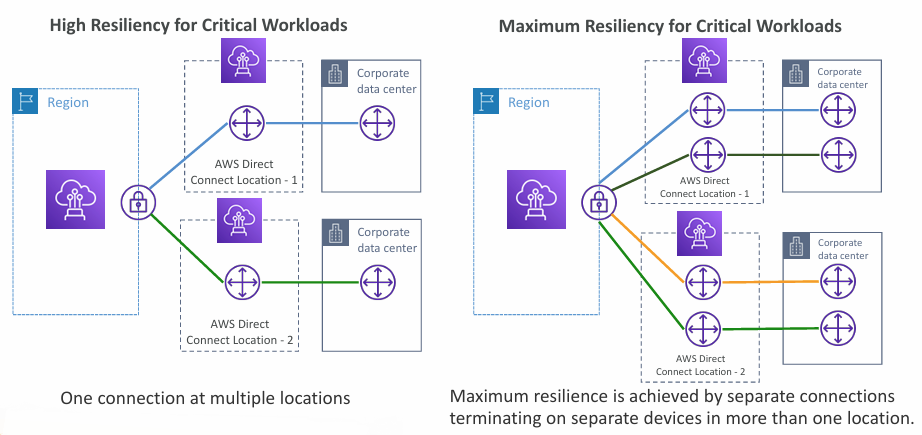
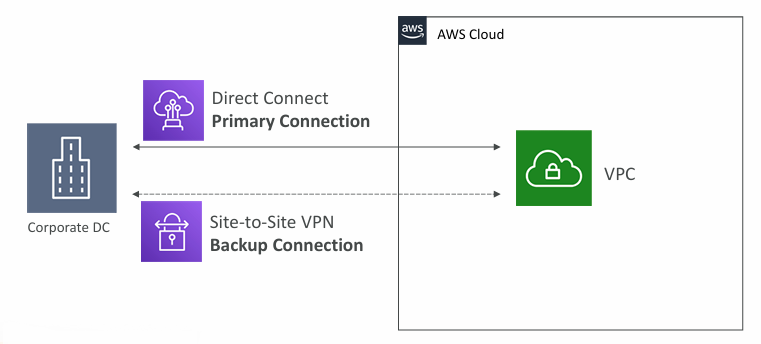
Site-to-Site VPN connection as a backup #
In case Direct Connect fails, you can set up a backup Direct Connect connection (expensive), or a Site-to-Site VPN connection.
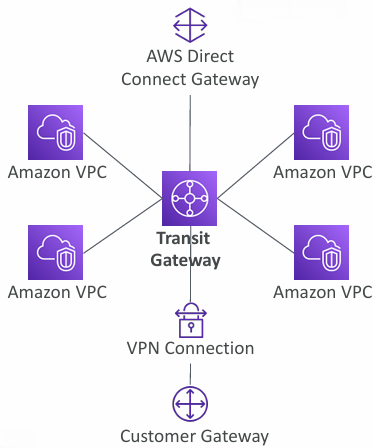
Transit Gateway #
More info: What is AWS Transit Gateway for Amazon VPC?
- Transit Gateway enables large‑scale, transitive connectivity across thousands of VPCs and on‑prem networks using a hub‑and‑spoke architecture.
- It’s a regional resource but can also be used across regions through inter‑region peering.
- You can share a Transit Gateway with other AWS accounts using Resource Access Manager (RAM).
- Transit Gateways themselves can be peered across regions for global architectures.
- Route tables on the TGW control which VPCs and networks are allowed to communicate.
- It integrates with Direct Connect Gateway and Site‑to‑Site VPN.
- It uniquely supports IP multicast, which no other AWS networking service provides.
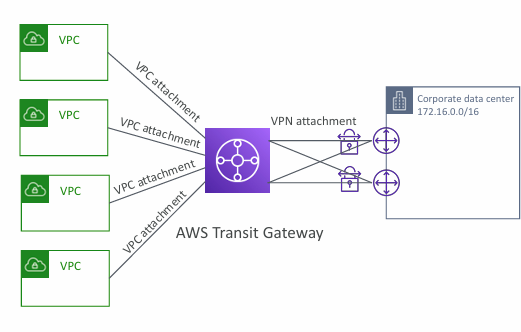
Transit Gateway - Site-to-Site VPN ECMP #
- Equal‑Cost Multi‑Path (ECMP) allows a Transit Gateway to send traffic across multiple routes that all have the same cost.
- This lets AWS load‑balance traffic across several VPN tunnels simultaneously.
- A common use case is creating multiple Site‑to‑Site VPN connections to AWS so you can increase total available bandwidth beyond what a single VPN tunnel can provide.
VPC - Traffic Mirroring #
- VPC Traffic Mirroring lets you capture and analyze network traffic inside your VPC.
- You can forward mirrored packets to your own security or monitoring appliances.
- Traffic can be mirrored from ENIs (sources) and sent to an ENI or a Network Load Balancer (targets).
- You can mirror all packets or only specific traffic, and optionally truncate packets to reduce volume.
- Sources and targets may be in the same VPC or in different VPCs connected through VPC Peering.
- Common use cases include deep packet inspection, threat detection, and network troubleshooting.
IPv6 #
- IPv4 was built to support about 4.3 billion addresses, and that pool is nearly exhausted.
- IPv6 is the next‑generation protocol designed to provide an almost limitless supply of addresses — roughly 3.4 × 10³⁸ unique IPs.
- In AWS, every IPv6 address is public and Internet‑routable; there is no private IPv6 range.
IPv6 in VPC #
- You can’t turn off IPv4 for a VPC or its subnets.
- You can enable IPv6 to run in dual‑stack mode, where IPv4 and IPv6 operate together.
- EC2 instances will receive a private IPv4 address and a public IPv6 address.
- They can reach the Internet over either protocol through an Internet Gateway.
Egress-only Internet Gateway #
- An egress‑only Internet Gateway is for IPv6 traffic only and works like a NAT Gateway but specifically for outbound IPv6.
- It lets instances make outbound IPv6 connections while blocking inbound IPv6 traffic from the Internet.
- You must update your route tables to use it.
AWS Network Firewall #
More info: What is AWS Network Firewall?
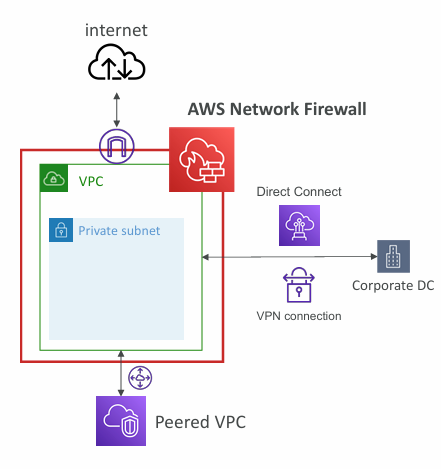
- AWS Network Firewall provides full VPC‑level protection, covering traffic from Layer 3 through Layer 7.
- It can inspect traffic in any direction: VPC‑to‑VPC, outbound to the Internet, inbound from the Internet, and traffic to or from Direct Connect or Site‑to‑Site VPN.
- Internally, it relies on the AWS Gateway Load Balancer for scaling and availability.
- Rules can be centrally managed across accounts using AWS Firewall Manager, making it easy to enforce consistent policies across many VPCs.
- Supports thousands of rules, including large IP and port lists.
- Can filter by protocol, such as blocking SMB for outbound traffic.
- Offers stateful domain list rules to restrict outbound access (e.g., only
*.mycorp.comor approved software repositories). - Allows regex‑based pattern matching for advanced inspection.
- Traffic actions include allow, drop, or alert.
- Performs active flow inspection with intrusion‑prevention capabilities, fully managed by AWS.
- Can send detailed logs to S3, CloudWatch Logs, or Kinesis Data Firehose.
» Sources « #
IP Address Guide (CIDR): IPAddressGuide
VPC:
IGW:
- Building AWS VPC
- Add internet access to a subnet
- Enable internet access for a VPC using an internet gateway
NATGW:
SG & NACL:
VPC Peering:
VPC Endpoints:
VPN & Direct Connect:
- AWS Virtual Private Network Documentation
- Get started with AWS Site-to-Site VPN
- What is Direct Connect?
Transit Gateway:
AWS Network Firewall:
» References « #
Cloud Practitioner: VPC
» Disclaimer « #
This series draws heavily from Stephane Maarek’s Ultimate AWS Certified Solutions Architect Associate 2026 course on Udemy.
His content was instrumental in helping me pass the certification.
| About the instructor | |
|---|---|
| 🌐 Website | 📺 YouTube |
| 𝕏 x.com |