- Welcome my DevOps blog./
- 🔰Posts/
- 🗂️My Trainings/
- AWS Trainings and Certifications/
- 🏅AWS Certified Solutions Architect - Associate/
- Solutions Architect: Disaster Recovery & Migrations/
Solutions Architect: Disaster Recovery & Migrations
Table of Contents
ℹ️ Associate‑level extension of the Disaster Recovery Strategies section from the AWS Cloud Practitioner series.
| AWS Certifications Series » | |
|---|---|
| AWS Cloud Practitioner | AWS Solution Architect |
Disaster Recovery Overview #
A disaster is any event that disrupts business operations or causes financial loss.
Disaster Recovery (DR) focuses on preparing for such events and restoring systems afterward.
DR can take several forms:
- On‑prem to on‑prem: traditional and typically very costly
- On‑prem to AWS: hybrid recovery
- AWS Region A to Region B: cloud‑native cross‑region recovery
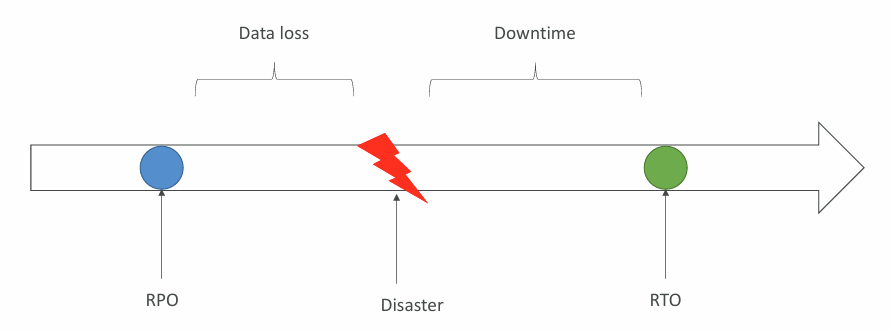
Two key metrics define your DR strategy:
- RPO (Recovery Point Objective) - how much data you can afford to lose
- RTO (Recovery Time Objective) - how quickly systems must be restored
Disaster Recovery Strategies #
- Backup and Restore - cheapest method (high RPO)
- Pilot Light - core functions are there (e.g. database) but it’s not scaled up
- Warm Standby - full version of the app but at minimum size (databases, webs, api, …)
- Multi-Site / Hot-Site - full version, full size active-active DR
Backup and Restore #
A Backup and Restore DR strategy stores your data in services like Amazon S3 or AWS Backup and recreates your infrastructure only when a disaster occurs.
Recovery involves restoring the latest backups and redeploying resources, giving you low cost but higher RTO and RPO compared to other DR models.
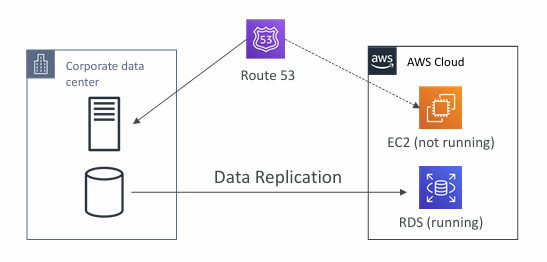
Pilot Light #
- A minimal, always‑on version of your application runs in AWS, keeping the critical components active.
- It’s similar to Backup & Restore but recovers faster because the essential services are already running in the cloud.
Warm Standby #
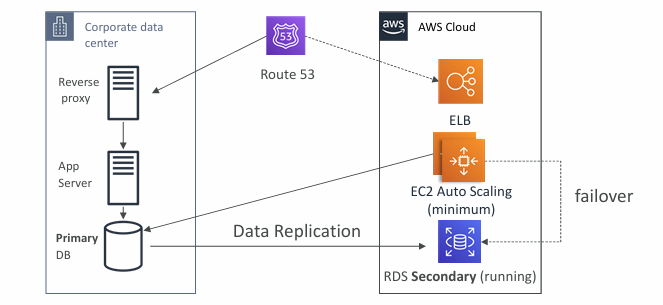
- The full application stack runs in AWS but at reduced capacity.
- If a disaster occurs, you scale it up to handle normal production traffic.
Multi Site / Hot Site #
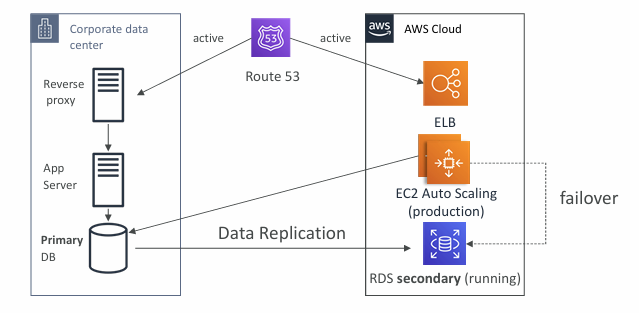
- Provides an extremely low RTO (seconds to minutes) but is also the most expensive option.
- The full production environment runs simultaneously on‑premises and in AWS at full scale.
🔥Disaster Recovery Best Practices #
Backup
- Use EBS snapshots, RDS automated backups/snapshots, and regularly push data to S3, S3 IA, or Glacier with lifecycle policies and cross‑region replication.
- For on‑premises backups, use Snowball or Storage Gateway.
High Availability
- Use Route 53 to shift DNS between regions.
- Leverage Multi‑AZ features for RDS, ElastiCache, EFS, and S3.
- Keep a Site‑to‑Site VPN as a fallback if Direct Connect fails.
Replication
- Use cross‑region RDS replication, Aurora Global Databases, or on‑prem to RDS database replication.
- Storage Gateway can also support replication workflows.
Automation
- Rebuild environments with CloudFormation or Elastic Beanstalk.
- Auto‑recover EC2 instances via CloudWatch alarms.
- Use Lambda for custom automation tasks.
Chaos Testing
- Inject controlled failures (e.g., Netflix‑style “simian army” or “chaos monkey”) to validate resilience.
AWS Elastic Disaster Recovery (DRS) #
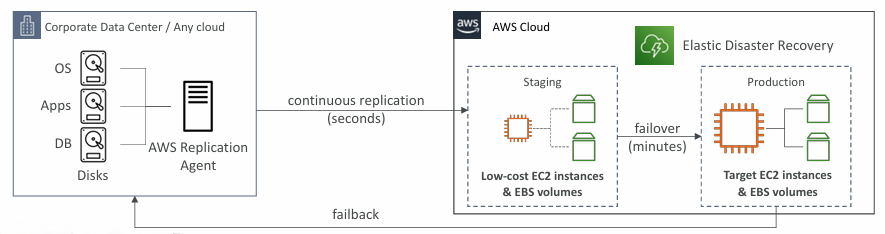
- AWS Elastic Disaster Recovery lets you rapidly restore physical, virtual, or cloud‑based servers into AWS.
- It protects critical workloads - databases like Oracle, MySQL, SQL Server, enterprise apps like SAP, and even against ransomware - using continuous block‑level replication.
DMS - Database Migration Service #
More info: What is AWS Database Migration Service?
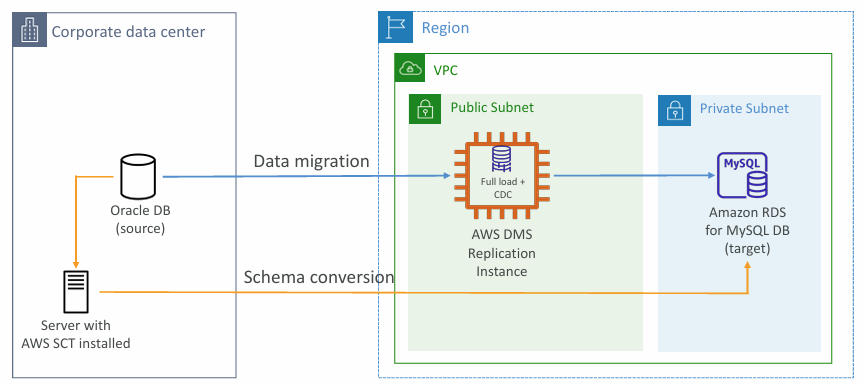
- AWS Database Migration Service lets you migrate databases to AWS quickly and securely, with built‑in resilience and self‑healing.
- The source database stays online throughout the migration.
- Supports both homogeneous migrations (e.g., Oracle → Oracle) and heterogeneous migrations (e.g., SQL Server → Aurora).
- Provides continuous data replication using CDC.
- Replication tasks run on a DMS replication instance, which you deploy on EC2.
DMS Sources and Targets #
| Sources | Targets |
|---|---|
| On-Premises and EC2 instances databases: Oracle, MS SQL Server, MySQL, MariaDB, PostgreSQL, MongoDB, SAP, DB2 | On-Premises and EC2 instances databases: Oracle, MS SQL Server, MySQL, MariaDB, PostgreSQL, SAP |
| Azure: Azure SQL Database | Amazon RDS |
| Amazon RDS: all including Aurora | Redshift, DynamoDB, S3 |
| Amazon S3 | OpenSearch Service |
| DocumentDB | Kinesis Data Streams |
| Apache Kafka | |
| DocumentDB & Amazon Neptune | |
| Redis & Babelfish | |
| More info: Sources for AWS DMS |
AWS Schema Conversion Tool (SCT) #
- AWS SCT converts a database schema from one engine to another.
- For OLTP, it can migrate schemas from SQL Server or Oracle to MySQL, PostgreSQL, or Aurora; for OLAP, it can convert Teradata or Oracle schemas to Amazon Redshift.
- Use compute‑heavy instances to speed up large or complex schema conversions.
ℹ️ Note: You do not need to use SCT if you are migrating the same DB engine.
DMS - Continuous Replication #
AWS DMS - Multi-AZ Deployment #
- When Multi‑AZ is enabled, DMS creates and maintains a synchronously replicated standby in another Availability Zone.
- This setup provides data redundancy, avoids I/O freezes, and reduces latency spikes during failover.
🔥On-Premise strategy with AWS #
- You can download the Amazon Linux 2 AMI as a VM image for platforms like VMware, KVM, VirtualBox, and Hyper‑V.
- VM Import/Export lets you migrate on‑premises applications into EC2 and build a DR strategy for your existing VMs, with the option to export them back on‑prem.
- AWS Application Discovery Service collects server utilization and dependency data to support migration planning, tracked centrally in AWS Migration Hub.
- AWS DMS supports replication from on‑prem to AWS, between AWS environments, and back to on‑prem across many database engines.
- AWS Application Migration Service (MGN) performs ongoing, incremental replication of live on‑prem servers into AWS.
AWS Backup #
- AWS Backup is a fully managed service that centralises and automates backups across AWS services without custom scripts.
- It supports backups for EC2/EBS, S3, RDS/Aurora/DynamoDB, DocumentDB, Neptune, EFS, FSx (Lustre & Windows), and Storage Gateway volumes.
- It also enables cross‑region and cross‑account backup capabilities for stronger resilience and compliance.
- AWS Backup supports point‑in‑time recovery for compatible services, along with both on‑demand and scheduled backups.
- You define Backup Plans that use tag‑based policies, specify backup frequency (12‑hourly, daily, weekly, monthly, or cron), and set a backup window.
- Plans can automatically transition backups to cold storage and define retention periods ranging from days to years or indefinitely.
More info: What is AWS Backup?
AWS Backup Vault Lock #
- Backup Vault Lock enforces a WORM (Write Once, Read Many) state on all backups stored in a vault.
- It adds strong protection against accidental or malicious deletions and prevents changes that reduce retention periods.
- Once enabled, even the root user cannot delete the protected backups.
Cloud Migration Strategies - the 7Rs #
More info: 7 Strategies for Migrating Applications to the Cloud
AWS Application Discovery Service #
- Helps you plan migrations by collecting detailed information about your on‑premises data centre.
- Captures server utilisation and dependency mappings, which are essential for migration planning.
- Agentless discovery (via the Discovery Connector) gathers VM inventory, configuration details, and performance history such as CPU, memory, and disk usage.
- Agent‑based discovery collects deeper insights, including system configuration, performance metrics, running processes, and network connection details.
- All collected data is viewable and trackable in AWS Migration Hub.
AWS Application Migration Service (MGN) #
- AWS MGN is the modern successor to CloudEndure Migration and replaces the old Server Migration Service, offering a streamlined lift‑and‑shift path to AWS.
- It converts physical, virtual, and cloud‑hosted servers to run natively on AWS, supports a wide range of platforms and databases, and delivers migrations with minimal downtime and lower overall cost.
VMware Cloud on AWS #
- Some organisations run their on‑premises data centres using VMware Cloud and want to extend that environment into AWS while keeping the same VMware tooling.
- VMware Cloud on AWS enables this by letting you migrate vSphere workloads to AWS, run them across private, public, and hybrid VMware environments, and implement a robust disaster recovery strategy.
Transferring large amount of data into AWS #
Suppose you need to move 200 TB of data to AWS over a 100 Mbps internet link.
Internet / Site‑to‑Site VPN:
- Easiest to set up, but extremely slow.
- Transfer time: ~185 days.
1 Gbps Direct Connect:
- Takes over a month to provision, but much faster once active.
- Transfer time: ~18.5 days.
Snowball:
- End‑to‑end process typically completes in about one week.
- Can be paired with DMS for database migrations.
For ongoing replication, use Site‑to‑Site VPN or Direct Connect together with DMS or DataSync.
It is recommended to use AWS Snowball devices if it would take more than a week to transfer over the network.
More info: AWS Snowball
» Sources « #
» References « #
Cloud Practitioner: Disaster Recovery Strategies
» Disclaimer « #
This series draws heavily from Stephane Maarek’s Ultimate AWS Certified Solutions Architect Associate 2026 course on Udemy.
His content was instrumental in helping me pass the certification.
| About the instructor | |
|---|---|
| 🌐 Website | 📺 YouTube |
| 𝕏 x.com |