- Welcome my DevOps blog./
- 🔰Posts/
- 🗂️My Trainings/
- AWS Trainings and Certifications/
- 🏅AWS Certified Solutions Architect - Associate/
- Solutions Architect: Scalability & High Availability/
Solutions Architect: Scalability & High Availability
Table of Contents
ℹ️ Scalability & High Availability is already covered at a high level in the Scalability & High Availability section of the AWS Cloud Practitioner series.
ℹ️ Elastic Load Balancing is already covered at a high level in the Elastic Load Balancing section of the AWS Cloud Practitioner series.
This section focuses only on the Associate‑level additions.
| AWS Certification Series » | |
|---|---|
| AWS Cloud Practitioner | AWS Solution Architect |
Scalability & High Availability #
Scalability means an application or system can handle increased load by adapting.
- Two kinds of scalability:
- Vertical scalability
- Horizontal scalability (elasticity)
- Scalability is related to, but distinct from, [High Availability]Scalability
📡 Sources:
- Cloud Practitioner: Scalability & High Availability
- High availability and scalability on AWS
- Scalability » handling increasing load.
- High Availability » staying operational when parts of the system fail. It means running your application / system in at least 2 Availability Zones.
Elastic Load Balancing #
ℹ️ Types of Load Balancers: 3 kinds of Load Balancers offered by AWS
ELB is integrated with many AWS offerings / services:
- EC2
- EC2 Auto Scaling Groups
- Amazon ECS
- AWS Certificate Manager (ACM)
- CloudWatch
- Route 53
- AWS WAF
- AWS Global Accelerator
X-Forwarded-For. We can also get Port (X-Forwarded-Port) and proto (X-Forwarded-Proto).Health Checks #
Health Checks are crucial for Load Balancers
They enable the load balancer to know if instances it forwards traffic to are available to reply to requests
The health check is done on a port and a route (/health is common)
If the response is not 200 (OK), then the instance is unhealthy
ALB can route to multiple target groups
Health checks are at the target group level
More info:
Sticky Sessions #
- Stickiness ensures a client is consistently routed to the same backend instance behind the load balancer
- Supported by CLB, ALB, and NLB
- For CLB and ALB, stickiness relies on a cookie with a configurable expiration
- Useful when you need to preserve session state on a specific instance
- Enabling stickiness can lead to uneven load distribution across instances
🙋🏻 Question: ALB Sticky sessions (cookie based) vs Database support for session state (Session Store)?
Both are two different approaches to the same problem: session persistence.
| Approach | How it works | Pros | Cons |
|---|---|---|---|
| Sticky sessions | Keep user on same instance | Simple, no app changes | Breaks scaling, uneven load, fragile |
| Session store | Store session centrally | Scales well, resilient | Requires app changes |
- Sticky sessions = “Always send the user to the same server because the server is holding their session.”
- Session store = “Any server can handle the user because the session lives in a shared database.”
Modern, scalable apps use a Session Store, not sticky sessions.
More info: Elasticache
ALB Sticky Sessions vs Session Store Diagram #
(Sticky Sessions Enabled)"] A1["App Server A
(Session in Memory)"] A2["App Server B
(Session in Memory)"] U1 --> ALB1 ALB1 -->|Cookie routes user to same server| A1 ALB1 -.->|Other users| A2 end %% RIGHT SIDE — ALB + Session Store subgraph Stateless["ALB + Shared Session Store (Stateless App)"] direction TB U2["User"] ALB2["ALB
(No Stickiness)"] B1["App Server A
(Stateless)"] B2["App Server B
(Stateless)"] Store["Session Store
(Redis / DynamoDB)"] U2 --> ALB2 ALB2 --> B1 ALB2 --> B2 B1 --> Store B2 --> Store end Sticky --- Stateless
Sticky Sessions - Cookie Names #
- Application‑based cookies
- Custom cookie - generated by the target; can include any app‑specific attributes
- Cookie name must be set per target group
- Avoid using AWSALB, AWSALBAPP, or AWSALBTG (reserved by ELB)
- Application cookie
- Generated by the load balancer
- Cookie name: AWSALBAPP
- Duration‑based cookies
- Generated by the load balancer
- Cookie names: AWSALB (ALB) and AWSELB (CLB)
Cross-Zone Load Balancing #
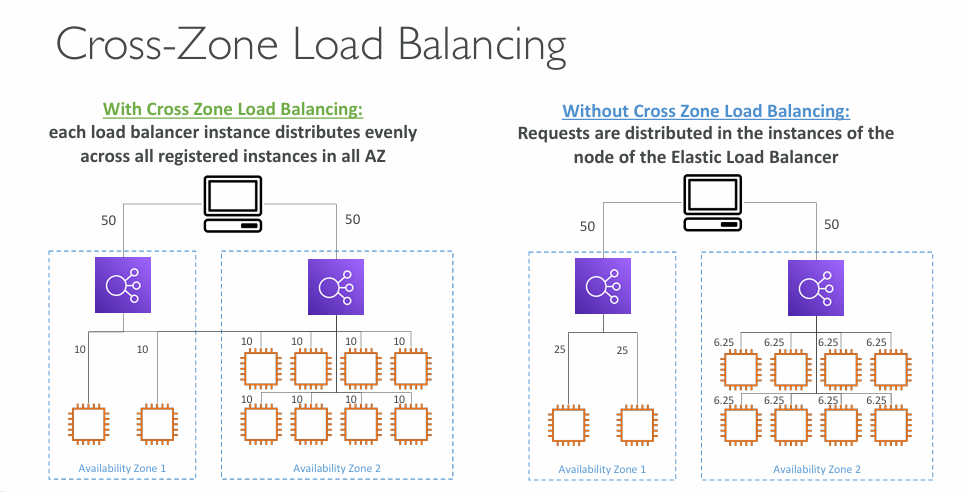
- Application Load Balancer
- Enabled by default (can be disabled at the Target Group level)
- No charges for inter AZ data
- Network Load Balancer & Gateway Load Balancer
- Disabled by default
- You pay charges ($) for inter AZ data if enabled
Cross‑Zone Load Balancing lets a load balancer distribute traffic evenly across all registered targets in all Availability Zones, rather than only the targets in the AZ where the request was received.
This helps smooth out uneven workloads and prevents situations where one AZ becomes overloaded simply because it has fewer instances. It improves overall load distribution and resilience, especially in multi‑AZ architectures.
SSL/TLS #
- Load balancers use X.509 SSL/TLS certificates
- Certificates can be managed through ACM or uploaded manually
- For an HTTPS listener, you must define a default certificate, with optional additional certificates for multi‑domain support
- Clients can use SNI (Server Name Indication) to indicate the hostname they’re connecting to
- You can choose a security policy to support (or restrict) older SSL/TLS versions for legacy clients
Server Name Indication (SNI) #
SNI lets a client tell the server which hostname it wants during the TLS handshake so the load balancer can present the correct certificate.
It enables hosting multiple HTTPS sites on the same IP and is essential for multi‑domain or multi‑tenant architectures.
🙋🏻 Question: What is the difference between SNI and SAN
SNI and SAN solve different problems:
SNI is a TLS handshake feature: the client tells the server which hostname it wants, so the server can choose the correct certificate when multiple certificates are hosted on the same IP.
SAN is a certificate feature: a single certificate can list multiple valid hostnames (Subject Alternative Names), allowing one certificate to cover several domains.
In short:
SNI = client tells the server which certificate to use
SAN = one certificate that is valid for multiple hostnames
ℹ️ For more high-level information about Load Balancing, refer to Elastic Load Balancing section from the AWS Cloud Practitioner series.
Auto Scaling Groups #
ASG Metrics #
- CPUUtilization - average CPU usage across all instances
- RequestCountPerTarget - ensures each instance receives a stable number of requests
- NetworkIn / NetworkOut - useful when the application is network‑bound
- Custom CloudWatch metrics - any application‑specific metric you publish for scaling decisions
ASG Scaling Cooldown #
- After a scaling activity happens, you are in the cooldown period (default 300 seconds)
- During the cooldown period, the ASG will not launch or terminate additional instances (to allow for metrics to stabilize)
ℹ️ For more high-level information about Auto Scaling Groups, refer to Auto Scaling Groups section from the AWS Cloud Practitioner series.
Scale in termination policies #
More info: Control which Auto Scaling instances terminate during scale in
Amazon EC2 Auto Scaling uses termination policies to decide the order for terminating instances.
You can use a predefined policy or create a custom policy to meet your specific requirements. By using a custom policy or instance scale in protection, you can also prevent your Auto Scaling group from terminating instances that aren’t yet ready to terminate.
A scale in event occurs when there is a new value for the desired capacity of an Auto Scaling group that is lower than the current capacity of the group.
Scale in events occur in the following scenarios:
- When using dynamic scaling policies and the size of the group decreases as a result of changes in a metric’s value
- When using scheduled scaling and the size of the group decreases as a result of a scheduled action
- When you manually decrease the size of the group
Default EC2 Auto Scaling Termination Policy #
When no custom termination policy is assigned, EC2 Auto Scaling terminates instances using the following order:
Select the Availability Zone with the most instances
- Auto Scaling first chooses the AZ that has more instances than others, to maintain AZ balance.
Within that AZ, identify the instance launched from the “least-preferred” configuration Auto Scaling prefers to terminate an instance that was launched from:
- a launch configuration (older mechanism), or
- a different launch template, or
- the oldest version of the current launch template
If all instances use the same launch template and version, choose based on billing hour
- Auto Scaling terminates the instance closest to the next billing hour to minimise cost.
- AZ balancing first
- Oldest or mismatched configuration second
- Billing-hour optimisation last
Availability Zone rebalancing #
Amazon EC2 Auto Scaling balances your capacity evenly across the Availability Zones enabled for your Auto Scaling group. This helps reduce the impact of an Availability Zone outage.
If the distribution of capacity across Availability Zones becomes out of balance, Amazon EC2 Auto Scaling rebalances the Auto Scaling group by launching instances in the enabled Availability Zones with the fewest instances and terminating instances elsewhere.
The termination policy controls which instances are prioritized for termination first.
There are a number of reasons why the distribution of instances across Availability Zones can become out of balance.
Removing instances
If you detach instances from your Auto Scaling group, you put instances on standby, or you explicitly terminate instances and decrement the desired capacity, which prevents replacement instances from launching, the group can become unbalanced. If this occurs, Amazon EC2 Auto Scaling compensates by rebalancing the Availability Zones.
Using different Availability Zones than originally specified
If you expand your Auto Scaling group to include additional Availability Zones, or you change which Availability Zones are used, Amazon EC2 Auto Scaling launches instances in the new Availability Zones and terminates instances in other zones to help ensure that your Auto Scaling group spans Availability Zones evenly.
Availability outage
Availability outages are rare. However, if one Availability Zone becomes unavailable and recovers later, your Auto Scaling group can become unbalanced between Availability Zones. Amazon EC2 Auto Scaling tries to gradually rebalance the group, and rebalancing might terminate instances in other zones.
» Sources « #
High Availability and Scalability:
- High availability and scalability on AWS
- Control which Auto Scaling instances terminate during scale in
Load Balancing:
» References « #
- Cloud Practitioner: Scalability & High Availability
- Cloud Practitioner: Elastic Load Balancing
- Cloud Practitioner: Auto Scaling Groups
- Solutions Architect: Elasticache
- ACM
- HTTP Status Codes
» Disclaimer « #
This series draws heavily from Stephane Maarek’s Ultimate AWS Certified Solutions Architect Associate 2026 course on Udemy.
His content was instrumental in helping me pass the certification.
| About the instructor | |
|---|---|
| 🌐 Website | 📺 YouTube |
| 𝕏 x.com |